acalcutt/grav-plugin-subpages
Composer 安装命令:
composer require acalcutt/grav-plugin-subpages
包简介
A Grav plugin to display subpages.
关键字:
README 文档
README
This Grav plugin displays a list of direct, visible sub-pages for the current page. It's designed to be a simple and straightforward way to provide navigation to child pages.
Features
- Direct Subpages: Displays only the immediate children of the current page.
- Visibility Check: Only shows pages that are explicitly visible (not hidden).
- Routable Check: Only shows pages that are routable.
- Configurable List Style: Allows you to choose between
ul(unordered list) andol(ordered list) in the plugin's configuration. - Easy Integration: Uses a simple Twig include to display the list on your pages.
- "Back to Parent" Link: Adds a navigation link to the parent page (if not a root page), using
[..]notation, for a concise and clean way to go back one level.
How It Works
The plugin works by:
- Hooking into the Grav Events: The plugin listens for Grav's
onPluginsInitializedandonTwigSiteVariablesevents. It also usesonTwigTemplatePathsfor loading template paths. - Adding Template Path: When the
onPluginsInitializedevent fires, the plugin adds its/templatesdirectory to Grav's Twig template paths so it can find the correct template file. - Fetching Subpages: When
onTwigSiteVariablesfires, the plugin retrieves the current page object, then it uses the functiongetVisibleSubpagesto get the subpages that are both visible and routable. - Fetching Parent: When
onTwigSiteVariablesfires, the plugin retrieves the current page object, then it uses the functiongetParentPageto get the current page's parent (or null if it doesn't have one). - Passing Data to Twig: The plugin makes this data available to your Twig templates through the
subpages,parentandsubpages_configvariables. - Rendering the Subpage List: In your Twig template, you include
subpages.html.twig, which loops through thesubpagesvariable and renders the list of links. The style of list will depend on thesubpages_config.style.
Installation
With Grav Package Manager (GPM)
- Navigate to the
/admin/pluginspage in your browser. - Search for "Subpages" and click the install button.
Manually
- Download: Download the plugin from the GitHub Releases page or clone this repository to the
user/plugins/subpagesdirectory of your Grav site:cd user/plugins git clone https://github.com/acalcutt/grav-plugin-subpages subpages - Enable the Plugin:
- Log in to your Grav Admin panel.
- Navigate to "Plugins."
- Find the "Subpages" plugin and enable it by toggling the switch.
- Configure the list
style. You can choose betweenulfor an unordered list orolfor an ordered list.
- Clear the Cache: Clear the Grav cache, just in case.
Usage
-
Add the Twig Include: In the Twig template where you want to display the subpage list, add the following include:
{% if config.plugins.subpages.enabled %} {% include 'subpages.html.twig' %} {% endif %}- This could be in your theme's
base.html.twigfile (ordefault.html.twigif you don't have abase.html.twig), or in a specific page's Twig template. - Important: The plugin adds the
subpages,parent, andsubpages_configvariables to your Twig environment so that thesubpages.html.twigtemplate can access it.
- This could be in your theme's
Example
Let's say you have a page structure like this:
/parent-page/
  /01.subpage-1/
  /02.subpage-2/
  /03.subpage-3/  (hidden)
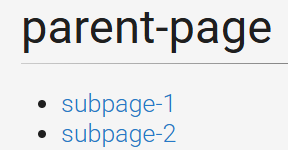
If you navigate to /parent-page/ and have the plugin enabled with a unordered list style, the output will be something like this:

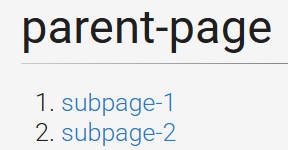
If you are using the ordered list style, the output will look like this:

- Note that
subpage-3is not listed as it is hidden (not visible)
Configuration
The plugin has the following configuration options under the "Subpages" section in the Grav admin panel:
- Plugin Status (enabled): Enable or disable the plugin.
- Style: Allows you to chose between
ulfor an unordered list orolfor an ordered list. - Show Previous Page Link (enabled): Enable or disable the [..] Previous Page Link at the top of the list. Disabling this option makes the list of pages look like this.


Customization
- CSS: Customize the appearance of the list by adding styles to the
.subpages-listclass in your theme's CSS file. - Template: You can modify the
subpages.html.twigtemplate to change the HTML structure of the list to fit your needs.
Admin Preview Limitation
- The subpages list may not be fully visible in the admin preview. This is expected behavior, as the admin preview is not designed to render all aspects of plugins or themes. It is meant for previewing content, not elements. The most important testing should always be done on the front-end of the website.
License
This plugin is released under the MIT License.
acalcutt/grav-plugin-subpages 适用场景与选型建议
acalcutt/grav-plugin-subpages 是一款 基于 PHP 开发的 Composer 扩展包,目前已累计 3 次下载、GitHub Stars 达 0, 最近一次更新时间为 2025 年 01 月 27 日, 在 PHP 生态内属于活跃度较高的组件。
它主要适用于以下技术方向: 「plugin」 「navigation」 「grav」 「subpages」 等业务场景。在实际项目中,围绕这些方向常见需要落地的问题包括:接口对接、性能调优、并发安全、与既有框架(Laravel / ThinkPHP / Yii / Webman 等)的兼容适配,以及生产环境的日志埋点与稳定性保障。
我们在过去多个企业项目中使用过 acalcutt/grav-plugin-subpages 或与其功能相近的方案,如果你在选型或落地过程中遇到问题,例如 版本兼容、二次改造、私有化封装、与内部系统对接、生产 BUG 排查,欢迎联系我们协助评估。
基于 acalcutt/grav-plugin-subpages 在你已有业务上做功能扩展、字段裁剪、UI 适配、与内部账号 / 权限 / 日志系统的深度对接。
线上偶发问题、内存泄漏、慢查询、并发异常等排查修复;针对高流量场景做缓存、队列、索引层面的调优。
承接完整的项目从需求 → 设计 → 开发 → 上线 → 长期运维;也可按月提供技术保姆服务。
与 acalcutt/grav-plugin-subpages 相关的其它包
同方向 / 同关键字的高下载量 PHP Composer 包推荐,方便对比选型:
CakePHP 4.x AdminLTE Theme.
A block to display a list of links to child pages, or pages in current level
Add MailChimp subscribe form action support
A multi-framework Composer library installer
Laravel Menu management
A multi-framework Composer library installer
统计信息
- 总下载量: 3
- 月度下载量: 0
- 日度下载量: 0
- 收藏数: 0
- 点击次数: 13
- 依赖项目数: 0
- 推荐数: 0
其他信息
- 授权协议: MIT
- 更新时间: 2025-01-27