ahuggins/laravel-opensearch
Composer 安装命令:
composer require ahuggins/laravel-opensearch
包简介
Quickly add the ability for people to search your site in Chrome address bar using OpenSearch. Like when you type an address and press 'space' Chrome searches the site, this package adds that.
README 文档
README
You know when you go to Amazon.com or Google.com, you type in the domain, hit space, and the whole address bar becomes a "search field"? If you have wanted to add that to your site, then this package will make it super easy.
Note: The "name" of your site, should be set in the
config/app.phpfile BEFORE you load this package on your site. Google (and other search engines) cache the opensearch.xml file on your site (one of the things provided by this package) pretty aggressively, so it can be a while before it updates.
Without OpenSearch

WITH OpenSearch
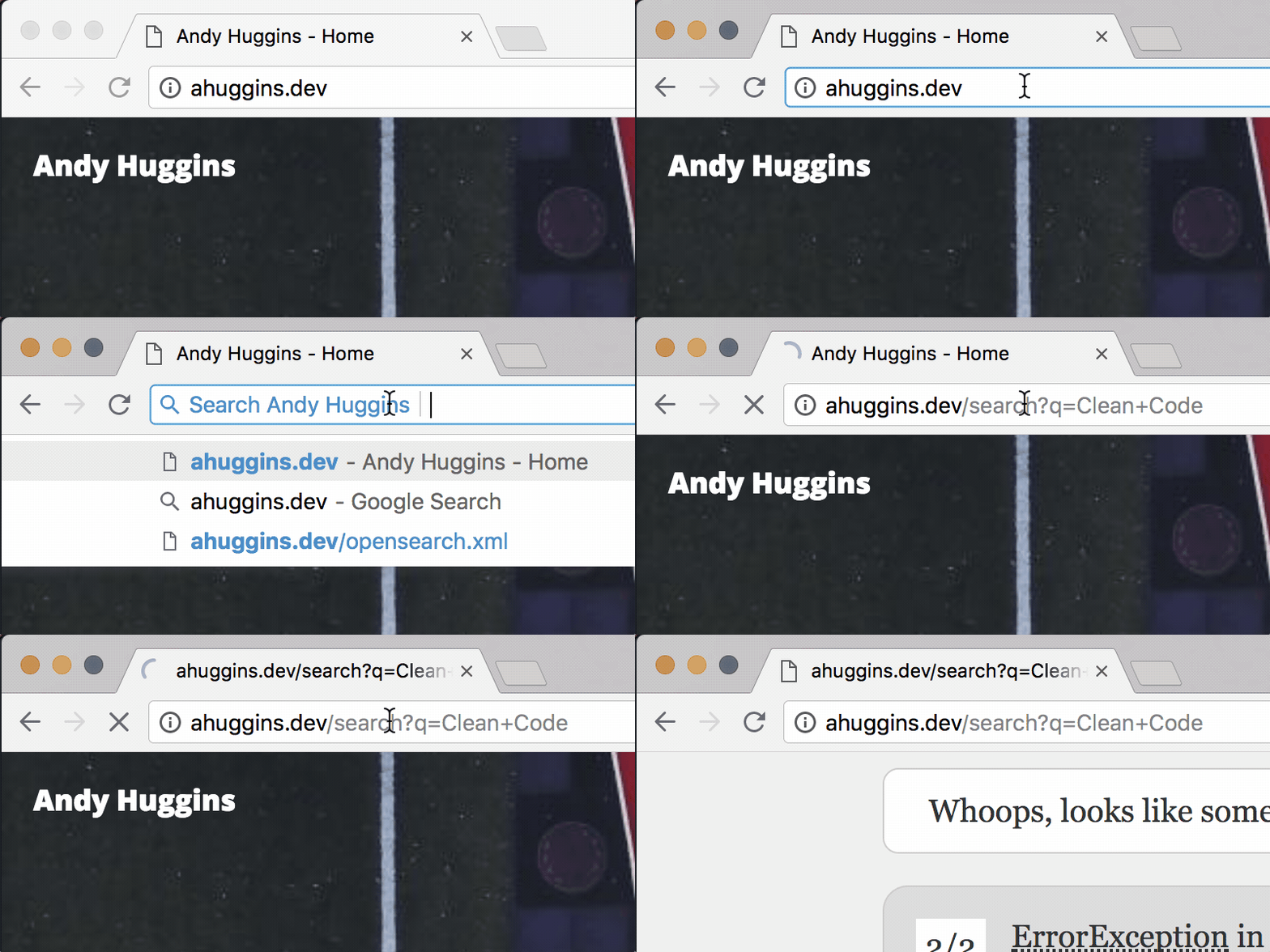
Note: While the "WITH" OpenSearch Gif shows a "Whoops" That is only because my test/example site, does not have a 'search' route. Notice too, that the url does route to the "customizable" search route.
Installation
This was made after release of 5.5, which is what it was built with, so I'll say it supports Laravel 5.5+, but really it probably is good on Laravel 5+.
composer require ahuggins/laravel-opensearch
Note, since this was made with Laravel 5.5, it supports Package Auto-Discovery, so you should not need to manually add the ServiceProvider or Alias to
config/app.php. But just in case for the sake of copy/pasta:
ServiceProvider
AHuggins\OpenSearch\Providers\OpenSearchServiceProvider::class,
Alias
'OpenSearch' => AHuggins\OpenSearch\Facades\OpenSearchFacade::class,
Remaining Setup
There is a config file you might want to customize, to publish it, you need to do:
php artisan vendor:publish
This puts a opensearch.php file in your apps config folder.
Final Piece
In order for this to work, you need to add the following to the <head> section of your app layout or your base blade file:
{!! OpenSearch::load() !!}
Notes
This package does not provide a "search" functionality to your site. It just makes adding the Chrome ability to search from the address bar. You will have to connect the route to your search route/view.
You can customize this using the provided config (provided you publish it, see above).
// The config options

'search_route' => 'search',
'query_param' => 'q',
'description' => [
    'before_name' => 'Search',
    'after_name' => '',
],
'title' => 'Search Site',
'xml_route' => 'opensearch.xml',
'favicon' => [
    'type' => 'image/x-icon',
    'path' => 'favicon.ico',
]
search_route
This is whatever your actual app's search route would be yoururl.com/{yoursearchroute}.
query_param
If you use something other than q as your query param, designate it here.
description
This is used to "decorate" the "name" of your site in the search box.
before_name
the Before Name, will be placed before the "name" of your site.
Note: The "name" of your site, should be set in the
config/app.phpfile BEFORE you load this package on your site. Google (and other search engines) cache the opensearch.xml file on your site (one of the things provided by this package) pretty aggressively, so it can be a while before it updates.
after_name
Like Before Name, but this comes "after" the name of your site.
title
Title is only really used in the output of the link to the opensearch.xml file. You can see it in the head section (or wherever you output the ::load() call). Search Site should be a good default for most sites...but if you want to override it. Do so with this option in the config/opensearch.xml file.
xml_route
If for some reason you have a need to change from the default opensearch.xml do so here. It's basically what search engines look for for this definition.
favicon
Specify the path to the favicon and the type below. type is usually going to be image/x-icon or image/png. Just be sure you have the right type for the right type of favicon.
Currently this package only supports a single favicon, but this package also accepts Pull Requests! (hint hint)
ahuggins/laravel-opensearch 适用场景与选型建议
ahuggins/laravel-opensearch 是一款 基于 PHP 开发的 Composer 扩展包,目前已累计 115 次下载、GitHub Stars 达 1, 最近一次更新时间为 2017 年 09 月 01 日, 在 PHP 生态内属于活跃度较高的组件。
我们在过去多个企业项目中使用过 ahuggins/laravel-opensearch 或与其功能相近的方案,如果你在选型或落地过程中遇到问题,例如 版本兼容、二次改造、私有化封装、与内部系统对接、生产 BUG 排查,欢迎联系我们协助评估。
基于 ahuggins/laravel-opensearch 在你已有业务上做功能扩展、字段裁剪、UI 适配、与内部账号 / 权限 / 日志系统的深度对接。
线上偶发问题、内存泄漏、慢查询、并发异常等排查修复;针对高流量场景做缓存、队列、索引层面的调优。
承接完整的项目从需求 → 设计 → 开发 → 上线 → 长期运维;也可按月提供技术保姆服务。
统计信息
- 总下载量: 115
- 月度下载量: 0
- 日度下载量: 0
- 收藏数: 1
- 点击次数: 1
- 依赖项目数: 0
- 推荐数: 0
其他信息
- 授权协议: MIT
- 更新时间: 2017-09-01