andchir/twig-visual
Composer 安装命令:
composer require andchir/twig-visual
包简介
README 文档
README
Bundle for Symfony 5+.
Menu, breadcrumbs, list of pages, shopping cart ... - all this can be done dynamically in the visual mode, without having to dive into code and study the documentation. The application can be adapted for other template engines and CMS, the main settings are in one YAML file.
composer require andchir/twig-visual
Video: https://www.youtube.com/watch?v=kcR5Ip6dQHA
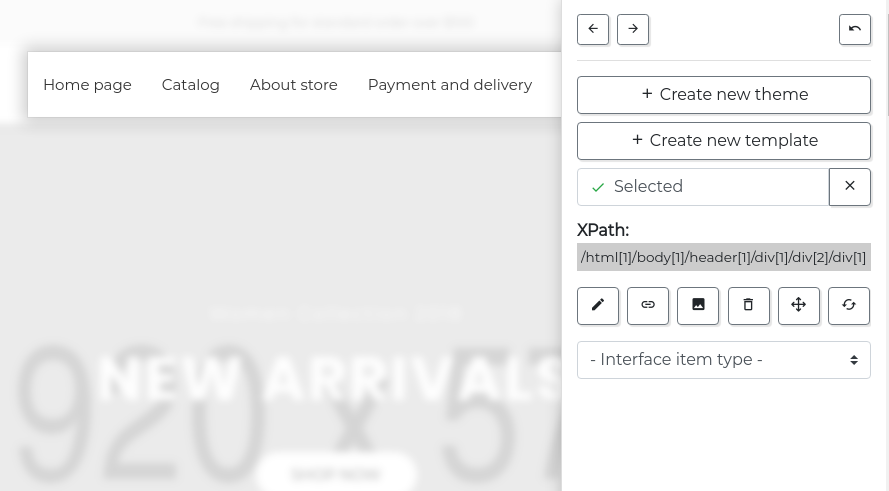
Configuration example:
twig_visual:
    default_copy: []
    templates:
        - homepage
    cache_location: []
    templates_extension: html.twig
    file_upload_dir_path: '%kernel.project_dir%/public/uploads'
    editor_user_role: 'ROLE_ADMIN_WRITE'
    ui:
        field:
            title: Content field
            configuration:
                saveBackupCopy: true
            components:
                root:
                    title: Root element
                    type: elementSelect
                    required: true
                    template: '<root>{%% if {{ fieldName }} is defined %%}{{ {{ fieldName }} }}{%% endif %%}</root>'

                fieldName:
                    title: Content field
                    type: pageField
                    join: key
                    separator: '.'

                key:
                    title: Value key
                    type: text

        includeCreate:
            title: Make included
            configuration:
                saveBackupCopy: true
            components:
                root:
                    title: Root element
                    type: elementSelect
                    required: true

                includeName:
                    title: Item name
                    type: text
                    required: true

        include:
            title: Replace with included
            configuration:
                updateIncludeSource: false
                saveBackupCopy: true
            components:
                root:
                    title: Root element
                    type: elementSelect
                    required: true

                includeName:
                    title: Include name
                    type: include
                    required: true

        menu:
            title: Main menu
            configuration:
                saveBackupCopy: true
            components:
                root:
                    title: Root element
                    type: elementSelect
                    required: true
                    output: "{{ categoriesTree(0, 'menu_dropdown{{ nameSuffix }}', null, activeCategoriesIds, false) }}"
                    template: '<root/>'
                    templatePath: nav/menu_dropdown
                    saveBackupCopy: true

                itemFirst:
                    title: First level menu item
                    type: elementSelect
                    isChildItem: true
                    required: true
                    output: '<itemFirst/>'
                    template: |
                        {%% for category in children %%}
                        <itemFirst class="{%% if category.id in activeCategoriesIds %%}{{ activeClassName }}{%% endif %%}">
                            <a href="{{ catalogPath(category.uri, '', category) }}">{{ category.title }}</a>
                        </itemFirst>
                        {%%  endfor %%}

                containerSecond:
                    title: Second level container
                    type: elementSelect
                    output: "{{ categoriesTree(category.id, 'menu_dropdown_child{{ nameSuffix }}', category, activeCategoriesIds, false) }}"
                    template: '<containerSecond/>'
                    templatePath: nav/menu_dropdown_child

                itemSecond:
                    title: Second level menu item
                    type: elementSelect
                    isChildItem: true
                    output: '<itemSecond/>'
                    template: |
                        {%% for category in children %%}
                        <itemSecond class="{%% if category.id in activeCategoriesIds %%}{{ activeClassName }}{%% endif %%}">
                            <a href="{{ catalogPath(category.uri, '', category) }}">{{ category.title }}</a>
                        </itemSecond>
                        {%%  endfor %%}

                containerThird:
                    title: Third level container
                    type: elementSelect
                    output: "{{ categoriesTree(category.id, 'menu_dropdown_child', category, activeCategoriesIds, false) }}"
                    template: '<containerThird/>'
                    templatePath: nav/menu_dropdown_child_child

                itemThird:
                    title: Third level menu item
                    type: elementSelect
                    isChildItem: true
                    output: '<itemThird/>'
                    template: |
                        {%% for category in children %%}
                        <itemThird class="{%% if category.id in activeCategoriesIds %%}{{ activeClassName }}{%% endif %%}">
                            <a href="{{ catalogPath(category.uri, '', category) }}">{{ category.title }}</a>
                        </itemThird>
                        {%%  endfor %%}

                activeClassName: {title: CSS activity class, type: text, value: active}

                nameSuffix: {title: Name suffix, type: text}

                deleteLeftSiblings: {title: Delete previous child, type: checkbox}

                deleteRightSiblings: {title: Delete next child, type: checkbox}

        editMargin:
            title: Edit margin
            configuration:
                saveBackupCopy: true
            components:
                root:
                    title: Root element
                    type: elementSelect
                    required: true
                marginTop:
                    title: Indent on the top
                    type: text
                    styleName: 'margin-top'
                marginRight:
                    title: Indent on the right
                    type: text
                    styleName: 'margin-right'
                marginBottom:
                    title: Indent from the bottom
                    type: text
                    styleName: 'margin-bottom'
                marginLeft:
                    title: Indent on the left
                    type: text
                    styleName: 'margin-left'

        editPadding:
            title: Edit padding
            configuration:
                saveBackupCopy: true
            components:
                root:
                    title: Root element
                    type: elementSelect
                    required: true
                paddingTop:
                    title: Indent on the top
                    type: text
                    styleName: 'padding-top'
                paddingRight:
                    title: Indent on the right
                    type: text
                    styleName: 'padding-right'
                paddingBottom:
                    title: Indent from the bottom
                    type: text
                    styleName: 'padding-bottom'
                paddingLeft:
                    title: Indent on the left
                    type: text
                    styleName: 'padding-left'

        wrapTag:
            title: Create block
            configuration:
                saveBackupCopy: true
            components:
                root:
                    title: Root element
                    type: elementSelect
                    required: true
                    output: '<root/>'
                    template: '<div><root/></div>'
Add to base template before </head> tag:
<!-- twv-script -->
{% if is_granted('ROLE_ADMIN') %}
    <link href="{{ asset('bundles/twigvisual/css/twv-icomoon/style.css') }}" rel="stylesheet">
    <link href="{{ asset('bundles/twigvisual/dist/twigvisual_styles.min.css') }}" rel="stylesheet">
    <script src="{{ asset('bundles/twigvisual/dist/twigvisual.min.js') }}"></script>
    <script>
        const twigVisual = new TwigVisual( {{ twigVisualOptions(_self, _context) }} );
    </script>
{% endif %}
<!-- /twv-script -->
Development:
npm run build:dev
Production:
npm run build
andchir/twig-visual 适用场景与选型建议
andchir/twig-visual 是一款 基于 PHP 开发的 Composer 扩展包,目前已累计 100 次下载、GitHub Stars 达 1, 最近一次更新时间为 2020 年 05 月 31 日, 在 PHP 生态内属于活跃度较高的组件。
它主要适用于以下技术方向: 「twig」 「visual editor」 「edit template」 等业务场景。在实际项目中,围绕这些方向常见需要落地的问题包括:接口对接、性能调优、并发安全、与既有框架(Laravel / ThinkPHP / Yii / Webman 等)的兼容适配,以及生产环境的日志埋点与稳定性保障。
我们在过去多个企业项目中使用过 andchir/twig-visual 或与其功能相近的方案,如果你在选型或落地过程中遇到问题,例如 版本兼容、二次改造、私有化封装、与内部系统对接、生产 BUG 排查,欢迎联系我们协助评估。
基于 andchir/twig-visual 在你已有业务上做功能扩展、字段裁剪、UI 适配、与内部账号 / 权限 / 日志系统的深度对接。
线上偶发问题、内存泄漏、慢查询、并发异常等排查修复;针对高流量场景做缓存、队列、索引层面的调优。
承接完整的项目从需求 → 设计 → 开发 → 上线 → 长期运维;也可按月提供技术保姆服务。
与 andchir/twig-visual 相关的其它包
同方向 / 同关键字的高下载量 PHP Composer 包推荐,方便对比选型:
Shoot aims to make providing data to your templates more manageable
This Symfony bundle integrates PhpSpreadsheet into Symfony using Twig.
A Twig extension to insert css as inline styles with a tag
Caching and compression for Twig assets (JavaScript and CSS).
Two Factor Auth for filament
Adds more BBCode
统计信息
- 总下载量: 100
- 月度下载量: 0
- 日度下载量: 0
- 收藏数: 1
- 点击次数: 2
- 依赖项目数: 0
- 推荐数: 0
其他信息
- 授权协议: MIT
- 更新时间: 2020-05-31