apphp/laravel-datagrid
Composer 安装命令:
composer require apphp/laravel-datagrid
包简介
DataGrid helpers for easy creating CRUD in Laravel Framework Applications
关键字:
README 文档
README
DataGrid helpers for Laravel Framework Applications
This package helps to create DataGrid (CRUD) pages for Laravel 6+ framework applications.
Requirements
- PHP >=7.1
- Laravel 6+
- Bootstrap 3+
License
This project is released under the MIT License.
Copyright © 2020 ApPHP.
Installation
Begin by pulling in the package through Composer.
composer require apphp/laravel-datagrid
Next, make sure you connected Bootstrap. You may either pull in the Bootstrap's CSS within your HTML or layout file, or write your own CSS classes based on them.
<link rel="stylesheet" href="//getbootstrap.com/docs/4.0/dist/css/bootstrap.min.css">
If you need to modify the datagrid files, you can run:
php artisan vendor:publish --provider="Apphp\DataGrid\DataGridServiceProvider"
Usage in Controllers
1. Import classes
use Apphp\DataGrid\Pagination;
use Apphp\DataGrid\Filter;
2. Define filters and filter field types
$filters      = [
    'act' => ['type' => 'equals', 'value' => 'search'],
    'email'    => ['title' => 'Email', 'type' => 'string', 'compareType' => '%like%', 'validation' => ['maxLength' => 150]],
    'name'     => ['title' => 'Name', 'type' => 'string', 'compareType' => '%like%'],
    'username' => ['title' => 'Username', 'type' => 'string', 'compareType' => '%like%'],
    'user_id'  => ['title' => 'ID', 'type' => 'integer', 'compareType' => '=', 'validation' => ['max' => 10000000]],
];
Following filter field types are available
| Type | Description |
|---|---|
string |
Any type of strings |
integer or int |
Numeric integer field (HTML type="number" attribute is used) |
set |
Set of values (array) |
date |
The datetime fields |
Each filter field can include following attributes:
| Attribute | Type | Description |
|---|---|---|
title |
String | Specifies a title, that will be shown in the label of filter field |
type |
String | Specifies a type of the filter field (see above) |
compareType |
String | Specifies which type of comparison will be used: ex.: '=', '%like%', '!=' etc. |
source |
Array | Specifies the source (array) to 'set' fields |
validation |
Array | Specifies validation rules (array). Possible options: ['minLength'=>2, 'maxLength'=>10, 'min'=>2, 'max'=>100] |
relation |
String | Specifies the relation between 2 models (One-to-One, One-to-Many), ex.: search in posts for users - relation="posts" |
relationXref |
String | Specifies the relation between 2 models (Many-to-Many), ex.: search in roles for users - relation="roles" |
htmlOptions |
Array | Specifies any possible HTML attribute for the field |
disabled |
Boolean | Specifies whether the field is disabled or not (default - not) |
3. Handle filters and prepare SQL builder
// $query = User::sortable()->orderByDesc('id');
$query = User::orderByDesc('id');
$request = request(); // or get it via function param, like foo(Request $request){...}
$url = route('backend.users.submitRote');
$cancelUrl = $url;
$filters = [];

$filter       = Filter::init($query, $request, $filters, $url, $cancelUrl, 'collapsed');
$filter       = $filter::filter();
$filterFields = $filter::getFilterFields();
$query        = $filter::getQuery();
4. Sorting
$sort      = $request->get('sort');
$direction = $request->get('direction');
5. Pagination
$pagination       = Pagination::init($query, 20, $sort, $direction, $filterFields)::paginate();
$paginationFields = $pagination::getPaginationFields();
$users            = $pagination::getRecords();
6. Rendering view
return view('backend.users.mainView', compact('users', 'filterFields', 'paginationFields'));
Usage in View files
<script>
    {!! \Apphp\DataGrid\Filter::renderJs() !!}
</script>

@if(count($records))
    {!! \Apphp\DataGrid\Filter::renderFields() !!}

        <!-- YOUR TABLE WITH RECORDS DATA -->
        @foreach ($records as $record)
        <!-- ... -->
        @endforeach
        <!-- YOUR TABLE WITH RECORDS DATA -->

    {!! \Apphp\DataGrid\Pagination::renderLinks() !!}
@else
    {!! \Apphp\DataGrid\Message::warning('Sorry, no records were found. Please adjust your search criteria and try again.') !!}
@endif
Configuration
To change default settings and enable some extra features you can export the config file:
php artisan vendor:publish --tag=laravel-datagrid:config
Localization
To change or add new translation files you can export the language files:
php artisan vendor:publish --tag=laravel-datagrid:lang
Customize Views
To change HTML template of the datagrid or use your own, publish view file and customize it to suit your needs.
$ php artisan vendor:publish --tag=laravel-datagrid:views
Now you should have a datagrid.php file in the config folder of your application. If you need to force to re-publish the config file to use --force.
Testing
To rum unit testing simply do following:
./vendor/bin/phpunit vendor\\apphp\\laravel-datagrid\\tests\\TestDataGridMessage.php
or your may add additional section to your composer.json file:
"scripts": {
    "tests": "phpunit --colors=always",
    "test": "phpunit --colors=always --filter",
}
and then rum unit following command:
composer tests vendor\\apphp\\laravel-datagrid\\tests\\TestDataGridMessage.php
composer tests vendor\\apphp\\laravel-datagrid\\tests\\TestDataGridPagination.php
composer tests vendor\\apphp\\laravel-datagrid\\tests\\TestDataGridFilter.php
and so on...
Examples
Controller code (full example)
public function index(Request $request)
{
    // Additional data
    $roles    = Role::rolesList();
    $statuses = User::statusesList();
    $actives  = [0 => 'Not Active', 1 => 'Active'];

    // Define filters and filter field types
    $filters      = [
        'act' => ['type' => 'equals', 'value' => 'search'],

        'email'    => ['title' => 'Email', 'type' => 'string', 'compareType' => '%like%', 'validation' => ['maxLength' => 150]],
        'name'     => ['title' => 'Name', 'type' => 'string', 'compareType' => '%like%'],
        'username' => ['title' => 'Username', 'type' => 'string', 'compareType' => '%like%'],
        'user_id'  => ['title' => 'ID', 'type' => 'integer', 'compareType' => '=', 'validation' => ['max' => 10000000]],

        'role'       => ['title' => 'Role', 'type' => 'user_role', 'compareType' => '', 'source' => $roles],
        'status'     => ['title' => 'Status', 'type' => 'user_status', 'compareType' => '', 'source' => $statuses],
        'active'     => ['title' => 'Active', 'type' => 'user_active', 'compareType' => '', 'source' => $actives],

        'created_at'    => ['title' => 'Created At', 'type' => 'date', 'compareType' => 'like%'],
        'last_logged_at' => ['title' => 'Last Login', 'type' => 'date', 'compareType' => 'like%'],
    ];

    $query = User::orderByDesc('id');

    // Handle filters and prepare SQL query
    $filter       = Filter::init($query, $request, $filters, route('users.list'), route('users.list'), 'collapsed');
    $filter       = $filter::filter();
    $filterFields = $filter::getFilterFields();
    $query        = $filter::getQuery();

    // Sorting
    $sort      = $request->get('sort');
    $direction = $request->get('direction');

    // Pagination
    $pagination       = Pagination::init($query, 20, $sort, $direction, $filterFields)::paginate();
    $paginationFields = $pagination::getPaginationFields();
    $users            = $pagination::getRecords();

    return view('users.list', compact('users', 'filterFields', 'paginationFields'));
}
Sorting
If you use some kind of packages for column sorting, like kyslik/column-sortable, you have to change usage of Model to following:
Without sorting
$query = User::orderByDesc('id');
With column sorting
$query = User::sortable()->orderByDesc('id');
Table content rendering
You have 2 way to render table content. The first is to write creating table manually in view file. Look on example below:
<div class="table-responsive">
    <table class="table table-bordered table-striped">
    <thead>
    <tr>
        <th class="text-right" width="60px">@sortablelink('user_id', 'ID')</th>
        ...
    </tr>
    </thead>
    <tbody>
        @foreach ($users as $user)
            <tr>
                <td class="text-right">{{ $user->user_id }}</td>
                ...
            </tr>
        @endforeach
    </tbody>
    </table>
</div>
The second way is to use GridView helper. Look on example below:
// GridView - initialized in Controller
$gridView = GridView::init($records);

return view('backend.users', compact(..., 'gridView'));
{{-- Render table content --}}
{!!
    $gridView::renderTable([
        'user_id'           => ['title' => 'ID', 'width'=>'60px', 'headClass'=>'text-right', 'class'=>'text-right', 'sortable'=>true, 'callback'=>null],
        'username'          => ['title' => 'Username', 'width'=>'', 'headClass'=>'text-left', 'class'=>'', 'sortable'=>true],
        'name'              => ['title' => 'Name', 'width'=>'', 'headClass'=>'text-left', 'class'=>'', 'sortable'=>true],
        'email'             => ['title' => 'Email', 'width'=>'', 'headClass'=>'text-left', 'class'=>'text-truncate px-2', 'sortable'=>true],
        'created_at'        => ['title' => 'Created At', 'width'=>'160px', 'headClass'=>'text-center', 'class'=>'text-center px-1', 'sortable'=>true],
        'last_login_at'     => ['title' => 'Last Login', 'width'=>'160px', 'headClass'=>'text-center', 'class'=>'text-center px-1', 'sortable'=>false],
    ])
!!}
You may also use a callback attribute to customize values of the specific field. This attribute accepts a function, link to function or a closure.
Below you may find few examples to get a feel:
Show specific badge if user has verified
'callback'=>function($user){ return $user->isVerified() ? '<span class="badge badge-primary">Verified</span>' : '<span class="badge badge-secondary">Waiting</span>'; }
Show a list of user roles, get array of roles via $roles parameter
'callback'=>function($user) use ($roles){ $output = ''; if(!count($user->roles)) $output .= '<span class="badge badge-light">User</span>'; foreach($user->roles as $role) { $output .= '<span class="badge badge-info">'.$roles[$role->name].'</span> '; } return $output; }
Show user's avatar with a link to edit
'callback'=>function($user){ return '<img src="'.$user->avatar.'" alt="avatar" /> <a href="'.route('users.show', $user).'" title="Click to edit">'.$user->username.'</a>'; }
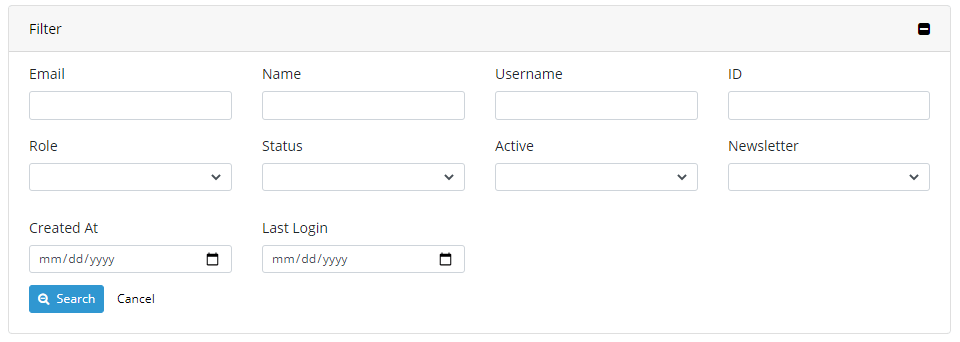
Collapsed filter

Expanded filter
Pagination

apphp/laravel-datagrid 适用场景与选型建议
apphp/laravel-datagrid 是一款 基于 PHP 开发的 Composer 扩展包,目前已累计 133 次下载、GitHub Stars 达 9, 最近一次更新时间为 2020 年 12 月 21 日, 在 PHP 生态内属于活跃度较高的组件。
它主要适用于以下技术方向: 「laravel」 「laravel-package」 「laravel6」 「laravel6-package」 「apphp」 「datagrid helpers」 等业务场景。在实际项目中,围绕这些方向常见需要落地的问题包括:接口对接、性能调优、并发安全、与既有框架(Laravel / ThinkPHP / Yii / Webman 等)的兼容适配,以及生产环境的日志埋点与稳定性保障。
我们在过去多个企业项目中使用过 apphp/laravel-datagrid 或与其功能相近的方案,如果你在选型或落地过程中遇到问题,例如 版本兼容、二次改造、私有化封装、与内部系统对接、生产 BUG 排查,欢迎联系我们协助评估。
基于 apphp/laravel-datagrid 在你已有业务上做功能扩展、字段裁剪、UI 适配、与内部账号 / 权限 / 日志系统的深度对接。
线上偶发问题、内存泄漏、慢查询、并发异常等排查修复;针对高流量场景做缓存、队列、索引层面的调优。
承接完整的项目从需求 → 设计 → 开发 → 上线 → 长期运维;也可按月提供技术保姆服务。
与 apphp/laravel-datagrid 相关的其它包
同方向 / 同关键字的高下载量 PHP Composer 包推荐,方便对比选型:
An enhanced drop-in replacement for Laravel's maintenance mode
A Laravel package for converting English numbers into Bangla digits, Bangla words, Bangla month names, and Bangla money format with an easy-to-use API.
A package for automatically encrypting and decrypting Eloquent attributes in Laravel 5.5+, based on configuration settings.
Laravel table comments loader (part of Diplodocker project)
A simple Laravel Library to connect/publish/subscribe to MQTT broker
jitone-ai is a powerful FilamentPHP plugin that integrates AI-powered features directly into your Filament forms.
统计信息
- 总下载量: 133
- 月度下载量: 0
- 日度下载量: 0
- 收藏数: 9
- 点击次数: 6
- 依赖项目数: 0
- 推荐数: 0
其他信息
- 授权协议: MIT
- 更新时间: 2020-12-21