apphp/laravel-flash
Composer 安装命令:
composer require apphp/laravel-flash
包简介
Simple Flash messages for Laravel Framework Applications
README 文档
README
Simple Flash Messages for Laravel Framework Applications
This package allows to use Bootstrap 3/4/5 flash messaging for Laravel 6+ framework applications.
Requirements
- PHP >=7.1
- Laravel 6+
- Bootstrap 3+
License
This project is released under the MIT License.
Copyright © 2020 ApPHP.
Installation
Begin by pulling in the package through Composer.
composer require apphp/laravel-flash
Next, make sure the default CSS classes for your flash message are optimized for Bootstrap. You may either pull in the Bootstrap's CSS within your HTML or layout file, or write your own CSS classes based on them. If you use Bootstrap 3, part of classes, like "primary" and "secondary" will not have styling.
<link rel="stylesheet" href="//getbootstrap.com/docs/4.0/dist/css/bootstrap.min.css">
Usage
In your controllers, before you perform a redirect or render a view, make a call to the flash() function.
public function store()
{
    flash('Welcome Message!');

    return redirect()->route('home');
}
The general way to define a flash message is a following:
flash()->danger('The error message')->important();
flash()->info('The info message');

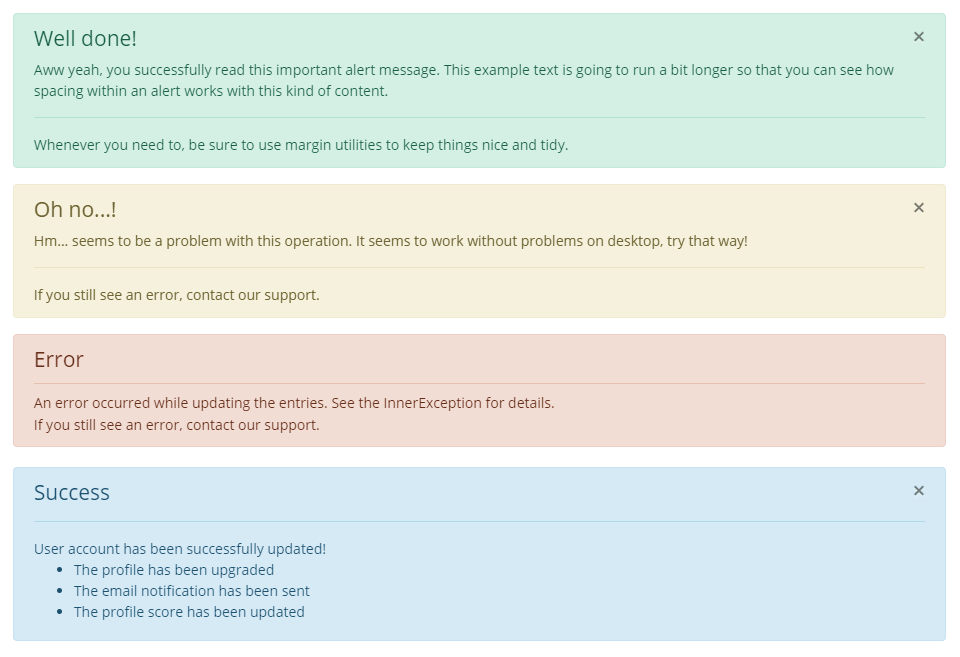
If you want to specify a title for alert, pass 2 arguments in the following way:
flash()->success(['Success', 'Operation has been successfully completed']);

But you may use a shorter syntax:
flash(['Error', 'The error message'], 'error', true);
flash('The info message', true);
flash('The info message');
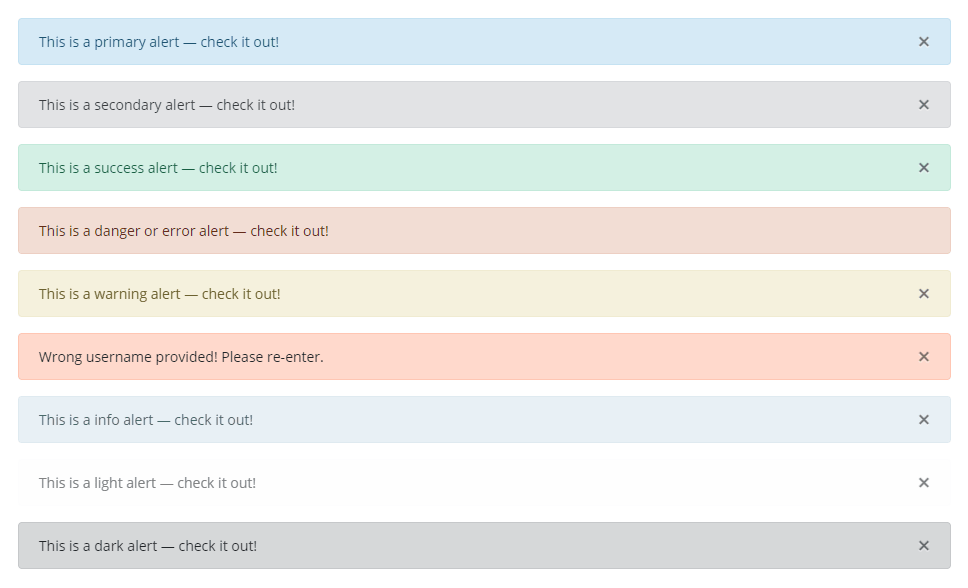
You may also define the following flash messages:
| Method | Description |
|---|---|
flash('your-message', 'primary') |
Set the flash type to "primary". |
flash('your-message', 'secondary') |
Set the flash type to "secondary". |
flash('your-message', 'success') |
Set the flash type to "success". |
flash('your-message', 'warning') |
Set the flash type to "warning". |
flash('your-message', 'validation') |
Set the flash type to "validation". |
flash('your-message', 'info') |
Set the flash type to "info". |
flash('your-message', 'danger') |
Set the flash type to "danger". |
flash('your-message', 'error') |
Set the flash type to "error" (alias to "danger") w/o a close button. |
flash('your-message', 'error', true) |
Set the flash type to "error" with a close button to the message. |
flash('your-message', 'light') |
Set the flash type to "light". |
flash('your-message', 'dark') |
Set the flash type to "dark". |
You may also define messages, by using Flash facade:
use Apphp\Flash\Flash;
| Method | Description |
|---|---|
Flash::success('your-message') |
Set the success flash message. |
Flash::error('your-message') |
Set the flash type to "error" w/o a close button to the message. |
Flash::error('your-message', true) |
Set the flash type to "error" with a close button to the message. |
| etc. |
To show messages on view files, use the following:
@include('flash::message')
If you need to modify the flash message, you can run:
php artisan vendor:publish --provider="Apphp\Flash\FlashServiceProvider"
Show Multiple Messages
If you need to flash multiple flash messages, you may simply define them one after another.
flash('First Message', 'success');
flash('Second Message', 'warning', true);

return redirect('somewhere');
Take in account, that you'll not see flash messages if you don't perform redirect.
Clear Messages
If you need to clear flash messages, you may do it in the following way:
// All previously defined messages will be removed
flash('First Message', 'error');
flash('Second Message', 'danger')->clear();

// All previously defined messages will be removed
flash('First Message', 'error');
flash('Second Message', 'danger');
Flash::success('Third Message');
flash()->clear();

Flash::success('First Message');
// Only current message will be removed
Flash::error('Second Message')->clear();

return redirect('somewhere');
Hide Messages
Generally you're expecting from the flash messages to be shown for a few seconds, and then they will be closed (if this message is not important).
To handle such behaviour, you may write a simple JavaScript code. For example, using jQuery, you might add the following snippet just before
the closing </body> tag.
<script>
    $('div.alert').not('.alert-important').delay(5000).fadeOut(250);
</script>
or with pure CSS
<style>
div.alert:not(.alert-important) {
    -webkit-animation: cssAnimation 5s forwards;
    animation: cssAnimation 5s forwards;
}
@keyframes cssAnimation {
    0%   {opacity: 1; height:auto; padding: 0.75rem 1.25rem; margin-bottom: 1rem;}
    90%  {opacity: 1; height:auto; padding: 0.75rem 1.25rem; margin-bottom: 1rem;}
    100% {opacity: 0; height:0; padding:0; margin:0;}
}
@-webkit-keyframes cssAnimation {
    0%   {opacity: 1; height:auto; padding: 0.75rem 1.25rem; margin-bottom: 1rem;}
    90%  {opacity: 1; height:auto; padding: 0.75rem 1.25rem; margin-bottom: 1rem;}
    100% {opacity: 0; height:0; padding:0; margin:0;}
}
</style>
Configuration
To change default messages and enable some extra features you can export the config file:
php artisan vendor:publish --tag=laravel-flash:config
Customize Views
To change HTML template of the message or use your own, publish view file and customize it to suit your needs.
$ php artisan vendor:publish --tag=laravel-flash:views
Now you should have a flash.php file in the config folder of your application. If you need to force to re-publish the config file to use --force.
Testing
To rum unit testing simply do following:
./vendor/bin/phpunit vendor\\apphp\\laravel-flash\\tests\\TestFlashMessage.php
or your may add additional section to your composer.json file:
"scripts": {
    "tests": "phpunit --colors=always",
    "test": "phpunit --colors=always --filter",
}
and then rum unit following command:
composer tests vendor\\apphp\\laravel-flash\\tests\\TestFlashMessage.php
Example
This package doesn't includes Bootstrap or any other styling or frontend assets frameworks, so you need to import all the necessary stylesheets.
<!DOCTYPE html>
<html lang="en">
<head>
    <meta charset="UTF-8">
    <title>Document Title</title>
    <link rel="stylesheet" href="https://getbootstrap.com/docs/4.0/dist/css/bootstrap.min.css">
</head>
<body>

<div class="container">
    @include('flash::message')

    <p>Welcome to my website...</p>
</div>

<script src="https://code.jquery.com/jquery-3.3.1.slim.min.js"></script>
<script src="https://cdnjs.cloudflare.com/ajax/libs/popper.js/1.14.7/umd/popper.min.js"></script>

</body>
</html>
All Types of Messages
Messages with Titles
apphp/laravel-flash 适用场景与选型建议
apphp/laravel-flash 是一款 基于 PHP 开发的 Composer 扩展包,目前已累计 24 次下载、GitHub Stars 达 3, 最近一次更新时间为 2020 年 12 月 21 日, 在 PHP 生态内属于活跃度较高的组件。
它主要适用于以下技术方向: 「laravel」 「flash messages」 「laravel-package」 「laravel6」 「laravel6-package」 「apphp」 等业务场景。在实际项目中,围绕这些方向常见需要落地的问题包括:接口对接、性能调优、并发安全、与既有框架(Laravel / ThinkPHP / Yii / Webman 等)的兼容适配,以及生产环境的日志埋点与稳定性保障。
我们在过去多个企业项目中使用过 apphp/laravel-flash 或与其功能相近的方案,如果你在选型或落地过程中遇到问题,例如 版本兼容、二次改造、私有化封装、与内部系统对接、生产 BUG 排查,欢迎联系我们协助评估。
基于 apphp/laravel-flash 在你已有业务上做功能扩展、字段裁剪、UI 适配、与内部账号 / 权限 / 日志系统的深度对接。
线上偶发问题、内存泄漏、慢查询、并发异常等排查修复;针对高流量场景做缓存、队列、索引层面的调优。
承接完整的项目从需求 → 设计 → 开发 → 上线 → 长期运维;也可按月提供技术保姆服务。
与 apphp/laravel-flash 相关的其它包
同方向 / 同关键字的高下载量 PHP Composer 包推荐,方便对比选型:
Class Log libraries
Notification component for storing and retrieving flash data.
Shim repository for WebcamJS
Element Messages for CraftCMS
A modern take on PHP session-based flash messages
A Laravel package made for displaying flashes messages in a conveniant way
统计信息
- 总下载量: 24
- 月度下载量: 0
- 日度下载量: 0
- 收藏数: 3
- 点击次数: 2
- 依赖项目数: 0
- 推荐数: 0
其他信息
- 授权协议: MIT
- 更新时间: 2020-12-21