asgalex/yii2-multiple-input-bs4
Composer 安装命令:
composer require asgalex/yii2-multiple-input-bs4
包简介
Widget for handle multiple inputs for an attribute of Yii2 framework model
关键字:
README 文档
README
Yii2 widget for handle multiple inputs for an attribute of model and tabular input for batch of models.
Latest release
The latest stable version of the extension is v2.21.5 Follow the instruction for upgrading from previous versions
Installation
The preferred way to install this extension is through composer.
Either run
php composer.phar require unclead/yii2-multiple-input "~2.0"
or add
"unclead/yii2-multiple-input": "~2.0"
to the require section of your composer.json file.
Basic usage

For example you want to have an ability of entering several emails of user on profile page. In this case you can use yii2-multiple-input widget like in the following code
use unclead\multipleinput\MultipleInput;

...

<?php
    echo $form->field($model, 'emails')->widget(MultipleInput::className(), [
        'max'               => 6,
        'min'               => 2, // should be at least 2 rows
        'allowEmptyList'    => false,
        'enableGuessTitle'  => true,
        'addButtonPosition' => MultipleInput::POS_HEADER, // show add button in the header
    ])
    ->label(false);
?>
See more in single column
Advanced usage
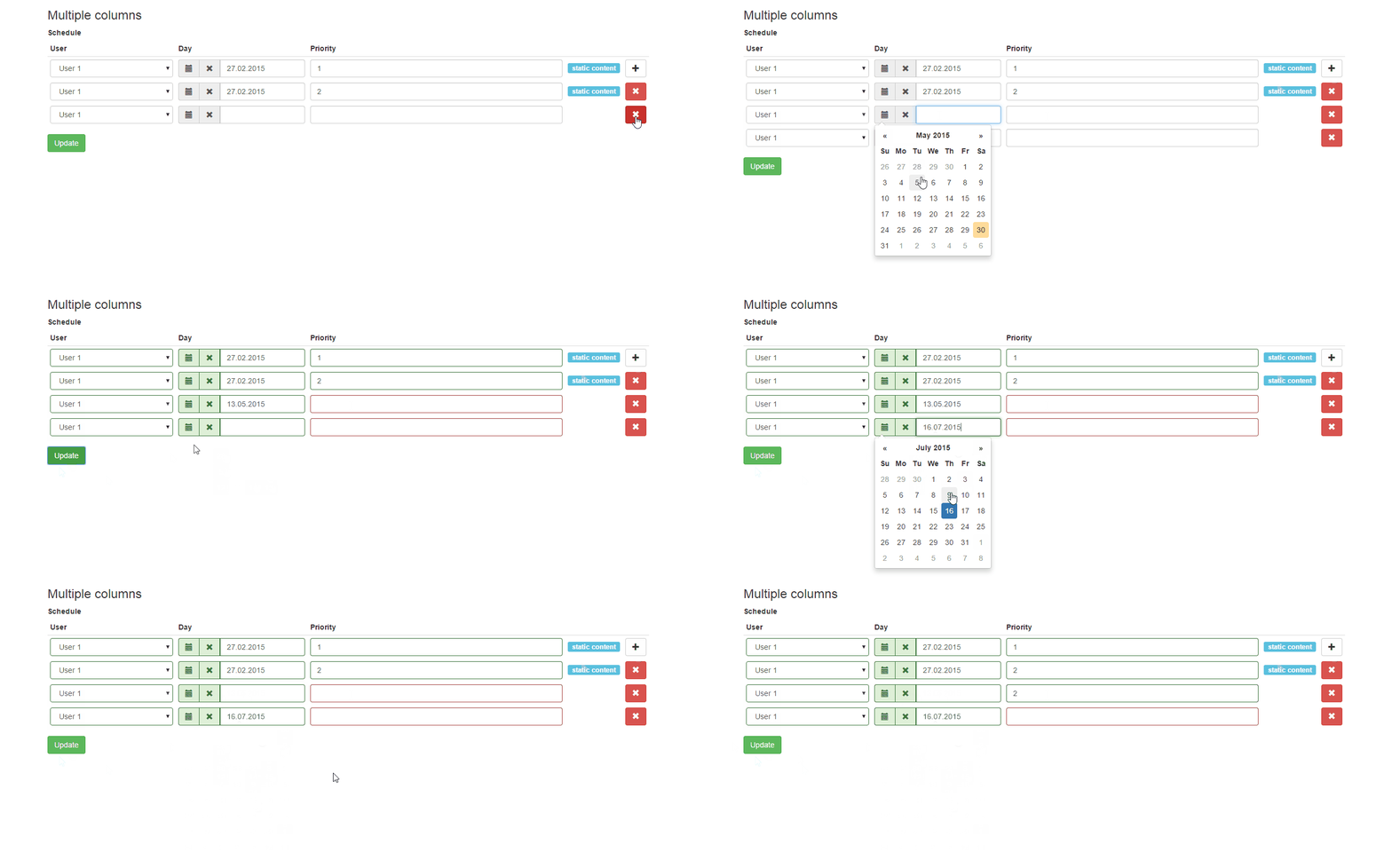
For example you want to have an interface for manage user schedule. For simplicity we will store the schedule in json string. In this case you can use yii2-multiple-input widget like in the following code
use unclead\multipleinput\MultipleInput;

...

<?= $form->field($model, 'schedule')->widget(MultipleInput::className(), [
    'max' => 4,
    'columns' => [
        [
            'name'  => 'user_id',
            'type'  => 'dropDownList',
            'title' => 'User',
            'defaultValue' => 1,
            'items' => [
                1 => 'User 1',
                2 => 'User 2'
            ]
        ],
        [
            'name'  => 'day',
            'type'  => \kartik\date\DatePicker::className(),
            'title' => 'Day',
            'value' => function($data) {
                return $data['day'];
            },
            'items' => [
                '0' => 'Saturday',
                '1' => 'Monday'
            ],
            'options' => [
                'pluginOptions' => [
                    'format' => 'dd.mm.yyyy',
                    'todayHighlight' => true
                ]
            ]
        ],
        [
            'name'  => 'priority',
            'title' => 'Priority',
            'enableError' => true,
            'options' => [
                'class' => 'input-priority'
            ]
        ]
    ]
 ]);
?>
See more in multiple columns
Clone filled rows
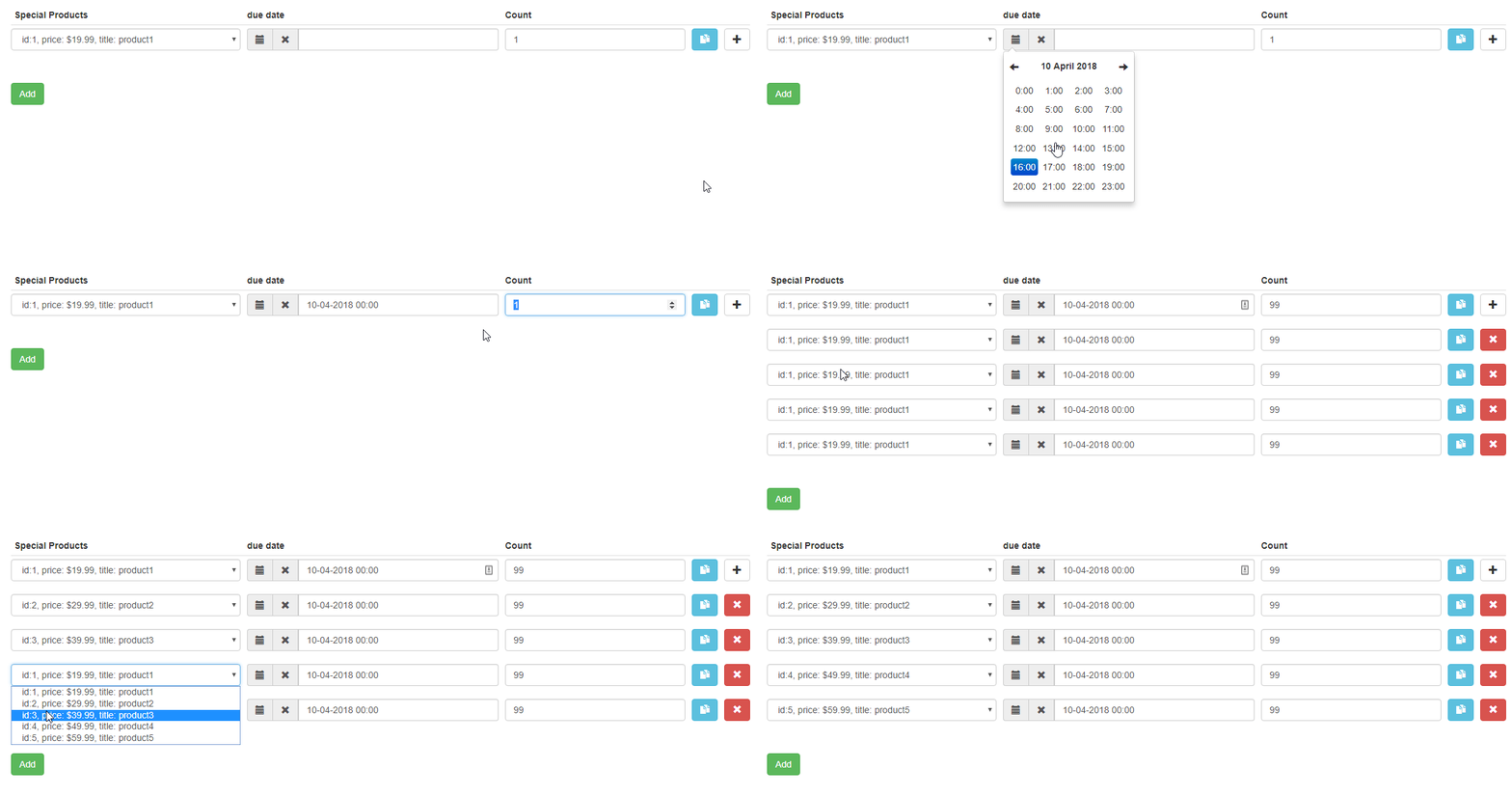
use unclead\multipleinput\MultipleInput;

...

<?= $form->field($model, 'products')->widget(MultipleInput::className(), [
    'max' => 10,
    'cloneButton' => true,
    'columns' => [
        [
            'name'  => 'product_id',
            'type'  => 'dropDownList',
            'title' => 'Special Products',
            'defaultValue' => 1,
            'items' => [
                1 => 'id: 1, price: $19.99, title: product1',
                2 => 'id: 2, price: $29.99, title: product2',
                3 => 'id: 3, price: $39.99, title: product3',
                4 => 'id: 4, price: $49.99, title: product4',
                5 => 'id: 5, price: $59.99, title: product5',
            ],
        ],
        [
            'name'  => 'time',
            'type'  => DateTimePicker::className(),
            'title' => 'due date',
            'defaultValue' => date('d-m-Y h:i')
        ],
        [
            'name'  => 'count',
            'title' => 'Count',
            'defaultValue' => 1,
            'enableError' => true,
            'options' => [
                'type' => 'number',
                'class' => 'input-priority',
            ]
        ]
    ]
])->label(false);
Using other icon libraries
Multiple input and Tabular input widgets now support FontAwesome and indeed any other icon library you chose to integrate to your project.
To take advantage of this, please proceed as follows:
- Include the preferred icon library into your project. If you wish to use fontAwesome, you can use the included FontAwesomeAsset which will integrate the free fa from their CDN;
- Add a mapping for your preferred icon library if its not in the iconMap array of the widget, like the following;
public $iconMap = [
    'glyphicons' => [
        'drag-handle' => 'glyphicon glyphicon-menu-hamburger',
        'remove' => 'glyphicon glyphicon-remove',
        'add' => 'glyphicon glyphicon-plus',
        'clone' => 'glyphicon glyphicon-duplicate',
    ],
    'fa' => [
        'drag-handle' => 'fa fa-bars',
        'remove' => 'fa fa-times',
        'add' => 'fa fa-plus',
        'clone' => 'fa fa-files-o',
    ],
    'my-amazing-icons' => [
        'drag-handle' => 'my my-bars',
        'remove' => 'my my-times',
        'add' => 'my my-plus',
        'clone' => 'my my-files',
    ]
];
- Set the preffered icon source
public $iconSource = 'my-amazing-icons';
If you do none of the above, the default behavior which assumes you are using glyphicons is retained.
Documentation
You can find a full version of documentation in wiki
License
yii2-multiple-input is released under the BSD 3-Clause License. See the bundled LICENSE.md for details.
统计信息
- 总下载量: 28
- 月度下载量: 0
- 日度下载量: 0
- 收藏数: 0
- 点击次数: 2
- 依赖项目数: 0
- 推荐数: 0
其他信息
- 授权协议: BSD-3-Clause
- 更新时间: 2019-09-16