coreproc/nova-data-sync
Composer 安装命令:
composer require coreproc/nova-data-sync
包简介
A Laravel Nova tool for importing and exporting data from CSV or Excel files.
README 文档
README
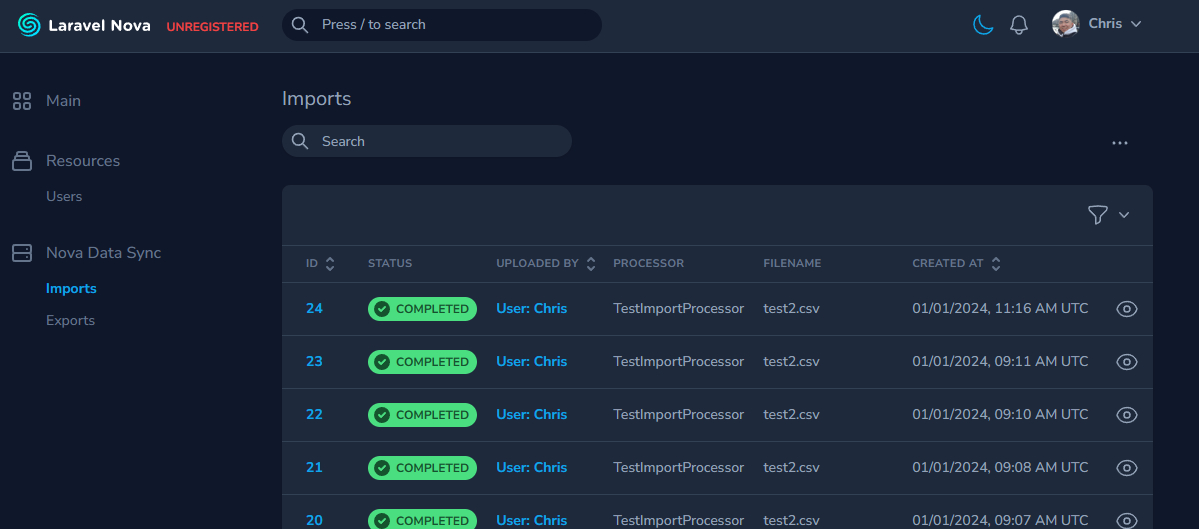
This is a Laravel Nova tool to that provides features to import and export CSV files.
Versions
When using Laravel Nova 4.x, use version ^2.0 of this package.
When using Laravel Nova 5.x, use version ^3.0 of this package.
Note to maintainers: We will be maintaining two branches for this package. The 2.x branch will be for Laravel Nova 4.x
support and the main branch will be for Laravel Nova 5.x support.
Installation
You can install the package in to a Laravel app that uses Nova via composer:
composer require coreproc/nova-data-sync
Publish the package's config and migrations:
php artisan vendor:publish --provider="Coreproc\NovaDataSync\ToolServiceProvider"
This package requires Laravel Horizon and comes with the package. If you have not gone through Horizon's install process yet, you can install it by running:
php artisan horizon:install
Make sure to configure Horizon's environment processes in config/horizon.php.
You should also migrate the job batches table:
php artisan queue:batches-table

php artisan migrate
This package also requires spatie/laravel-media-library and comes with this package. If you have not gone through the installation process of Media Library, you should publish the migrations for it:
php artisan vendor:publish --provider="Spatie\MediaLibrary\MediaLibraryServiceProvider" --tag="medialibrary-migrations"

php artisan migrate
Publish Media Library's config file:
php artisan vendor:publish --provider="Spatie\MediaLibrary\MediaLibraryServiceProvider" --tag="medialibrary-config"
Also run the following command to publish the config file for ebess/advanced-nova-media-library:
php artisan vendor:publish --tag=nova-media-library
Usage
Add the tool to your NovaServiceProvider.php:
public function tools()
{
    return [
        // ...
        new \Coreproc\NovaDataSync\NovaDataSync(),
    ];
}
The Nova Data Sync tool should now appear in Nova's sidebar.
Importing Data Using a Nova Action
To start with creating an Import feature, you will need two create two classes that extend the following:
- an
ImportProcessclass that contains the validation rules and process logic for each row of an imported CSV file. - and an
ImportNovaActionclass that is essentially a Nova Action
Here is a sample ImportProcessor:
<?php

namespace App\Nova\Imports\TestImport;

use Coreproc\NovaDataSync\Import\Jobs\ImportProcessor;use Illuminate\Support\Facades\Log;

class TestImportProcessor extends ImportProcessor
{
    public static function expectedHeaders(): array
    {
        return ['field1', 'field2'];
    }

    protected function rules(array $row, int $rowIndex): array
    {
        // Use Laravel validation rules to validate the values in each row.
        return [
            'field1' => ['required'],
            'field2' => ['required'],
        ];
    }

    protected function process(array $row, int $rowIndex): void
    {
        Log::info('processing row ' . $rowIndex);

        // Put the logic to process each row in your imported CSV here
    }

    /**
    * Optional: The number of rows to process per chunk. If not defined, it will use the
    * default chunk size defined in the config file.
    */
    public static function chunkSize(): int
    {
        return 100;
    }
}
The rules() method is where you can define the validation rules for each row of the CSV file. It will be passed the
$row and $rowIndex parameters. The $row parameter is an array of the CSV row's data. The $rowIndex parameter is
the index. Return an array of Laravel's validation rules.
The expected headers are defined in the expectedHeaders() method. This is used to validate the headers of the CSV.
The process() method is where you can define the logic for each row of the CSV file. It will be passed the $row and
$rowIndex parameters. The $row parameter is an array of the CSV row's data. The $rowIndex parameter is the index.
If you throw an Exception inside the process() method, the row will be marked as failed and the exception message
will be shown in the failed report for the Import.
Next, create an ImportNovaAction class and define the $processor class you just created.
<?php

namespace App\Nova\Imports\TestImport;

use Coreproc\NovaDataSync\Import\Nova\Actions\ImportNovaAction;

class TestImportAction extends ImportNovaAction
{
    // A sample processor will be shown below
    public string $processor = TestImportProcessor::class;
}
Next, put your ImportNovaAction inside the actions() method of one of your Nova Resources:
public function actions(Request $request)
{
    return [
        new TestImportAction(),
    ];
}
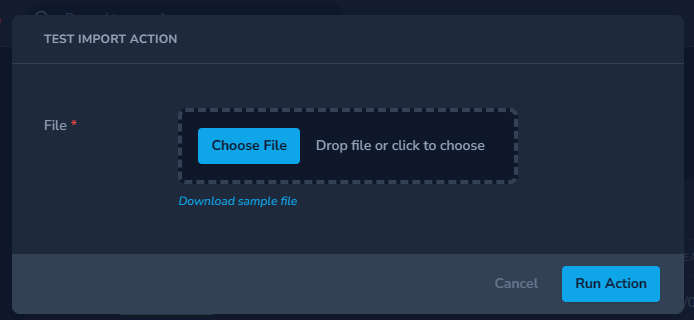
It should look something like this:
Using the Import feature without the Nova Action
If you want to use the Import feature without the Nova Action, you can still use your ImportProcessor class. Here is an example of grabbing a file from S3 and importing it:
use Coreproc\NovaDataSync\Import\Actions\ImportAction;

// Get the file from s3
$file = Storage::disk('s3')->get('file-for-import.csv');

// Put it in your local storage
Storage::disk('local')->put('file-for-import.csv', $file);

// Get the filepath of the file we just saved
$filePath = Storage::disk('local')->path('file-for-import.csv');

try {
    // Use ImportAction::make() to dispatch the jobs necessary to handle the import
    ImportAction::make(TestImportProcessor::class, $filePath);
} catch (Exception $e) {
    // Handle exception
    \Log::error($e->getMessage());
}
This will dispatch the jobs necessary to handle the import. You'll also be able to see the progress of the import in the Nova Data Sync tool.
Importing Configuration
You can find configuration options for the Import feature in config/nova-data-sync.php.
'imports' => [
    'disk' => env('MEDIA_DISK', 'public'),
    'chunk_size' => 1000,
    'queue' => 'default',
],
Exporting Data Using a Nova Action
To start with creating an Export feature, you will need two create two classes that extend ExportProcessor and
ExportNovaAction.
Here is a sample ExportProcessor:
namespace App\Nova\Exports;

use App\Models\Product;
use Coreproc\NovaDataSync\Export\Jobs\ExportProcessor;
use Illuminate\Contracts\Database\Query\Builder;

class UserExportProcessor extends ExportProcessor
{
    public function query(): Builder
    {
        return Product::query()->with('productCategory');
    }
}
You can also format the row data by defining the formatRow() method:
namespace App\Nova\Exports;

use App\Models\Product;
use Coreproc\NovaDataSync\Export\Jobs\ExportProcessor;
use Illuminate\Contracts\Database\Query\Builder;

class UserExportProcessor extends ExportProcessor
{
    public function query(): Builder
    {
        return Product::query()->with('productCategory');
    }

    public function formatRow($row): array
    {
        return [
            'name' => $row->name,
            'product_category' => $row->productCategory->name ?? null,
            'price' => $row->price,
        ];
    }
}
You can also define the query() method to return a query builder. This is useful if you want to export data from a
database table.
namespace App\Nova\Exports;

use Coreproc\NovaDataSync\Export\Jobs\ExportProcessor;
use DB;
use Illuminate\Contracts\Database\Query\Builder;

class UserExportProcessor extends ExportProcessor
{
    public function query(): Builder
    {
        return \DB::query()->from('users')
            ->select([
                'id',
                'email',
            ]);
    }
}
You can also override methods in the ExportProcessor class to customize the export process. The following methods can
be overridden:
<?php

namespace App\Nova\Exports\Products;

use App\Models\Product;
use Coreproc\NovaDataSync\Export\Jobs\ExportProcessor;
use Illuminate\Contracts\Database\Query\Builder;

class ProductExportProcessor extends ExportProcessor
{
    public function __construct(public string $startDate, public string $endDate)
    {
        // Always remember to call the parent constructor when overriding the constructor
        parent::__construct();
    }

    public function query(): Builder
    {
        $startDate = Carbon::make($this->startDate)->startOfDay();
        $endDate = Carbon::make($this->endDate)->endOfDay();

        return Product::query()
            ->whereBetween('created_at', [$startDate, $endDate])
            ->with('productCategory');
    }

    public function formatRow($row): array
    {
        return [
            'name' => $row->name,
            'product cat' => $row->productCategory->name ?? null,
            'price' => $row->price,
        ];
    }

    public static function queueName(): string
    {
        return 'custom-queue-name'; // Default is whatever is set in the config
    }

    public function allowFailures(): bool
    {
        return true; // Default is whatever is set in the config
    }

    public function disk(): string
    {
        return 'custom-disk-name'; // Default is whatever is set in the config
    }

    public static function chunkSize(): int
    {
        return 100; // Default is whatever is set in the config
    }
}
Next, in order to use it as a Nova Action, create an ExportNovaAction class and create a processor() function that
returns the processor class you just created.
namespace App\Nova\Exports;

use Coreproc\NovaDataSync\Export\Nova\Action\ExportNovaAction;

class ProductExportAction extends ExportNovaAction
{
    protected function processor(ActionFields $fields, Collection $models): ExportProcessor
    {
        return new ProductExportProcessor();
    }
}
If you have additional fields that you want to add to the Export feature, you can define them in the fields() method
and access them through the $fields property.
namespace App\Nova\Exports;

use Coreproc\NovaDataSync\Export\Nova\Action\ExportNovaAction;

class ProductExportAction extends ExportNovaAction
{
    protected function processor(ActionFields $fields, Collection $models): ExportProcessor
    {
        return new ProductExportProcessor($fields->get('start_date'), $fields->get('end_date'));
    }

    public function fields(NovaRequest $request): array
    {
        return [
            Date::make('Start Date')->required(),
            Date::make('End Date')->required(),
        ];
    }
}
Now, you can add the ExportNovaAction to your Nova Resource:
public function actions(Request $request)
{
    return [
        new UserExportAction(),
    ];
}
User Configuration
Each import and export have a morphable user() relationship. This is used to determine who imported or exported the
data. You will need to define Nova resource of each user type that you want to use for the import and export features.
This can be done in the config/nova-data-sync.php file.
'nova_resources' => [

    /**
     * Since users are defined as morphable, we need to specify the Nova resource
     * associated with the users we want.
     */
    'users' => [
        \App\Nova\User::class,
    ],

],
By default, this already has the App\Nova\User::class resource. You can add more user resources like
App\Nova\BackendUser as needed.
coreproc/nova-data-sync 适用场景与选型建议
coreproc/nova-data-sync 是一款 基于 PHP 开发的 Composer 扩展包,目前已累计 11.71k 次下载、GitHub Stars 达 4, 最近一次更新时间为 2024 年 01 月 01 日, 在 PHP 生态内属于活跃度较高的组件。
它主要适用于以下技术方向: 「nova」 「laravel」 等业务场景。在实际项目中,围绕这些方向常见需要落地的问题包括:接口对接、性能调优、并发安全、与既有框架(Laravel / ThinkPHP / Yii / Webman 等)的兼容适配,以及生产环境的日志埋点与稳定性保障。
我们在过去多个企业项目中使用过 coreproc/nova-data-sync 或与其功能相近的方案,如果你在选型或落地过程中遇到问题,例如 版本兼容、二次改造、私有化封装、与内部系统对接、生产 BUG 排查,欢迎联系我们协助评估。
基于 coreproc/nova-data-sync 在你已有业务上做功能扩展、字段裁剪、UI 适配、与内部账号 / 权限 / 日志系统的深度对接。
线上偶发问题、内存泄漏、慢查询、并发异常等排查修复;针对高流量场景做缓存、队列、索引层面的调优。
承接完整的项目从需求 → 设计 → 开发 → 上线 → 长期运维;也可按月提供技术保姆服务。
与 coreproc/nova-data-sync 相关的其它包
同方向 / 同关键字的高下载量 PHP Composer 包推荐,方便对比选型:
A Laravel Nova card that shows you your system information.
A Laravel Nova card.
A Laravel Nova package for publishable fields
A Laravel Nova package for translatable fields
A Laravel Nova Image field. you can paste or drag or chose an image
A Laravel Nova Mail testing tool.
统计信息
- 总下载量: 11.71k
- 月度下载量: 0
- 日度下载量: 0
- 收藏数: 4
- 点击次数: 4
- 依赖项目数: 0
- 推荐数: 0
其他信息
- 授权协议: MIT
- 更新时间: 2024-01-01