damodar-bhattarai/filament-settings
Composer 安装命令:
composer require damodar-bhattarai/filament-settings
包简介
A Filament panel plugin for managing website settings with categorized tabs. Provides a beautiful UI for the damodar-bhattarai/settings package.
README 文档
README
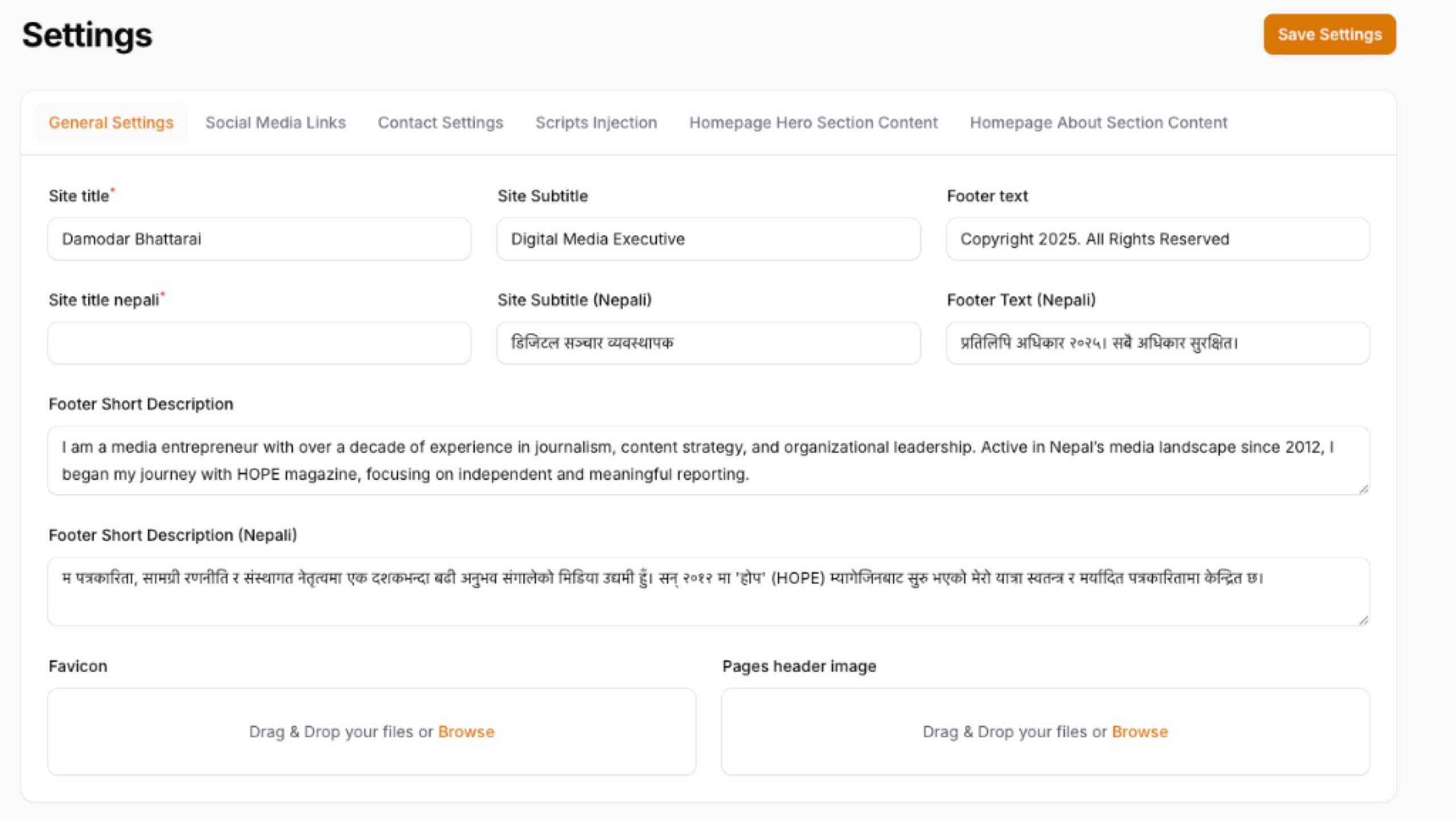
A powerful, tabbed settings management page for your Filament panel that lets you manage all your website settings — general info, social links, SEO, appearance, custom CSS/JS — from one beautiful interface.
Features
- 📑 Tabbed Interface — Settings organized into 6 default tabs: General, Contact, Social Media, SEO, Appearance, CSS & Scripts
- 🎛️ Smart Field Types — Automatically renders the right input based on setting type: text, textarea, image upload, file upload, color picker, toggle (switch), checkbox
- 🔧 Modify Fields Mode — Permission-gated mode to add new settings, delete existing ones, reorder fields, edit labels, and move settings between tabs
- 🎨 CSS & Scripts — Dedicated tab with side-by-side CSS and JavaScript editors for Header, Body, and Footer sections
- 🔐 Flexible Authorization — Control who can modify fields via plugin callback, Laravel Gate, or config
- 📦 Auto-Seeding — Default settings are automatically seeded on first page load
- ⚡ Cache-Aware — Automatically clears the settings cache after every save
- 🌗 Dark Theme Support — Fully compatible with Filament's dark mode
Requirements
- PHP 8.2+
- Laravel 10, 11, or 12
- Filament v4 or v5
damodar-bhattarai/settingspackage
Installation
Step 1: Install via Composer
composer require damodar-bhattarai/filament-settings
This will also install the damodar-bhattarai/settings base package if not already installed. The plugin automatically copies and runs all required migrations on the first page load!
Step 2: Register the Plugin
Add the plugin to your Filament panel provider (e.g., app/Providers/Filament/AdminPanelProvider.php):
use DamodarBhattarai\FilamentSettings\FilamentSettingsPlugin;

public function panel(Panel $panel): Panel
{
    return $panel
        // ... your other configuration
        ->plugins([
            FilamentSettingsPlugin::make(),
        ]);
}
Step 3: Publish Config (Optional)
php artisan vendor:publish --tag="filament-settings-config"
That's it! Navigate to Settings → App Settings in your panel.
Usage
Editing Settings
Simply visit the App Settings page, modify the values across any tab, and click Save Settings. All changes are persisted to the database and the settings cache is automatically cleared.
Using Settings in Your Application
Retrieve saved settings anywhere in your application using the base package's helpers:
// Get a single setting value
$siteName = settings('site_name');

// Get with a default fallback
$logo = settings('logo', 'default-logo.png');

// Get all settings as a collection
$all = settings();
Modify Fields Mode
Click the "Modify Fields" button in the page header to enter Modify Mode. This mode is permission-gated and allows you to:
| Action | Description |
|---|---|
| Add Setting | Create a new setting with a key, label, type, and target tab |
| Add Tab | Create a new tab group for organizing settings |
| Delete Setting | Remove a setting permanently (with confirmation) |
| Move Setting | Move a setting from one tab to another |
| Edit Label | Rename a setting's display label |
| Reorder | Move settings up or down within a tab |
Click "Exit Modify Mode" to return to value-only editing.
Configuration
Plugin Options
Customize the plugin behavior using the fluent API:
FilamentSettingsPlugin::make()
    // Navigation
    ->navigationIcon('heroicon-o-cog-6-tooth')
    ->navigationGroup('Settings')
    ->navigationLabel('App Settings')
    ->navigationSort(100)

    // Page
    ->pageTitle('App Settings')
    ->slug('app-settings')

    // Authorization
    ->canModifyFields(true)
Authorization
Control who can access the Modify Fields mode using one of three methods:
Option 1: Plugin Callback (Recommended)
Best for role-based access. Works with any permission package (Spatie, Bouncer, etc.):
FilamentSettingsPlugin::make()
    ->canModifyFields(fn () => auth()->user()->hasRole('super_admin'))
Option 2: Laravel Gate
Define a gate in your AuthServiceProvider or any service provider:
use Illuminate\Support\Facades\Gate;

Gate::define('modify-settings-fields', function ($user) {
    return $user->hasRole('admin');
});
Option 3: Config File
Set a static boolean in config/filament-settings.php:
'can_modify_fields' => true,
Resolution priority: Plugin callback → Laravel Gate → Config default.
Programmatic Control from Other Packages
Other packages can control the Modify Fields capability at runtime:
use DamodarBhattarai\FilamentSettings\FilamentSettingsPlugin;

// Disable modify mode
FilamentSettingsPlugin::get()->canModifyFields(false);

// Enable conditionally
FilamentSettingsPlugin::get()->canModifyFields(
    fn () => app('some-package')->allowsSettingsModification()
);
Default Tabs & Settings
The plugin ships with 6 pre-configured tabs. Customize them in config/filament-settings.php:
| Tab | Default Settings |
|---|---|
| General | Site Name, Tagline, Logo, Favicon, Footer Text |
| Contact | Email, Phone, Address, Map Embed URL |
| Social Media | Facebook, Twitter/X, Instagram, YouTube, LinkedIn, TikTok |
| SEO | Meta Title, Meta Description, Meta Keywords, Google Analytics ID |
| Appearance | Primary Color, Secondary Color |
| CSS & Scripts | Header/Body/Footer CSS and Scripts (side-by-side layout) |
You can add, remove, or modify any of these in the config file. Any groups created via the UI are also automatically displayed.
Supported Field Types
| Type | Component | Description |
|---|---|---|
text |
TextInput | Single-line text input |
textarea |
Textarea | Multi-line text area with autosize |
image |
FileUpload | Image upload with preview |
file |
FileUpload | General file upload |
color |
ColorPicker | Color picker with hex output |
switch |
Toggle | On/off toggle switch |
checkbox |
Checkbox | Checkbox input |
Custom Config Example
// config/filament-settings.php

'default_settings' => [
    'general' => [
        'label' => 'General',
        'icon' => 'heroicon-o-home',
        'sort' => 1,
        'settings' => [
            [
                'key' => 'site_name',
                'type' => 'text',
                'label' => 'Site Name',
                'value' => 'My Website',
            ],
            [
                'key' => 'maintenance_mode',
                'type' => 'switch',
                'label' => 'Maintenance Mode',
                'value' => false,
            ],
            // Add more settings...
        ],
    ],
    // Add more tabs...
],
Changelog
Please see CHANGELOG for more information on recent changes.
Contributing
Contributions are welcome! Please feel free to submit a Pull Request.
Credits
License
The MIT License (MIT). Please see License File for more information.
damodar-bhattarai/filament-settings 适用场景与选型建议
damodar-bhattarai/filament-settings 是一款 基于 PHP 开发的 Composer 扩展包,目前已累计 26 次下载、GitHub Stars 达 0, 最近一次更新时间为 2026 年 06 月 10 日, 在 PHP 生态内属于活跃度较高的组件。
它主要适用于以下技术方向: 「admin」 「plugin」 「panel」 「laravel」 「Settings」 「filament」 等业务场景。在实际项目中,围绕这些方向常见需要落地的问题包括:接口对接、性能调优、并发安全、与既有框架(Laravel / ThinkPHP / Yii / Webman 等)的兼容适配,以及生产环境的日志埋点与稳定性保障。
我们在过去多个企业项目中使用过 damodar-bhattarai/filament-settings 或与其功能相近的方案,如果你在选型或落地过程中遇到问题,例如 版本兼容、二次改造、私有化封装、与内部系统对接、生产 BUG 排查,欢迎联系我们协助评估。
基于 damodar-bhattarai/filament-settings 在你已有业务上做功能扩展、字段裁剪、UI 适配、与内部账号 / 权限 / 日志系统的深度对接。
线上偶发问题、内存泄漏、慢查询、并发异常等排查修复;针对高流量场景做缓存、队列、索引层面的调优。
承接完整的项目从需求 → 设计 → 开发 → 上线 → 长期运维;也可按月提供技术保姆服务。
与 damodar-bhattarai/filament-settings 相关的其它包
同方向 / 同关键字的高下载量 PHP Composer 包推荐,方便对比选型:
CakePHP 4.x AdminLTE Theme.
2lenet/EasyAdminPlusBundle
Analysis module for finding problematical shop data.
Yii2 panel widget
A Laravel Admin Package for The Control Group to make your life easier and steer your project in the right direction
ServerPilot: the best way to run PHP websites.
统计信息
- 总下载量: 26
- 月度下载量: 0
- 日度下载量: 0
- 收藏数: 0
- 点击次数: 34
- 依赖项目数: 0
- 推荐数: 0
其他信息
- 授权协议: MIT
- 更新时间: 2026-06-10