dized/module-front-acl
Composer 安装命令:
composer require dized/module-front-acl
包简介
ACL System for the Front Part of the Magento 2 project
README 文档
README
ACL System for the Front Part of the Magento 2 project.
A module that will allow you to take full advantage of the front-end ACL capabilities in the modules you develop.
Developed and tested on Magento 2.4 version and PHP 7.4 version.
Key Features:
- Ability to create your own roles and permissions via XML file.
- Ability to set default permissions for each of the roles.
- Ability to set the necessary roles and permissions for each customer in the admin panel.
- Ability to automatically set the default role and permissions for a newly created customer (using a plugin).
- Ability to easily use this functionality for controllers/actions and blocks.
Installation.
composer require dized/module-front-acl

bin/magento setup:upgrade --keep-generated
bin/magento setup:di:compile
bin/magento cache:clean
IMPORTANT to enable the module in Magento Admin: Admin Panel -> Stores -> Settings -> Configuration -> DiZed Team Extensions -> Front ACL.
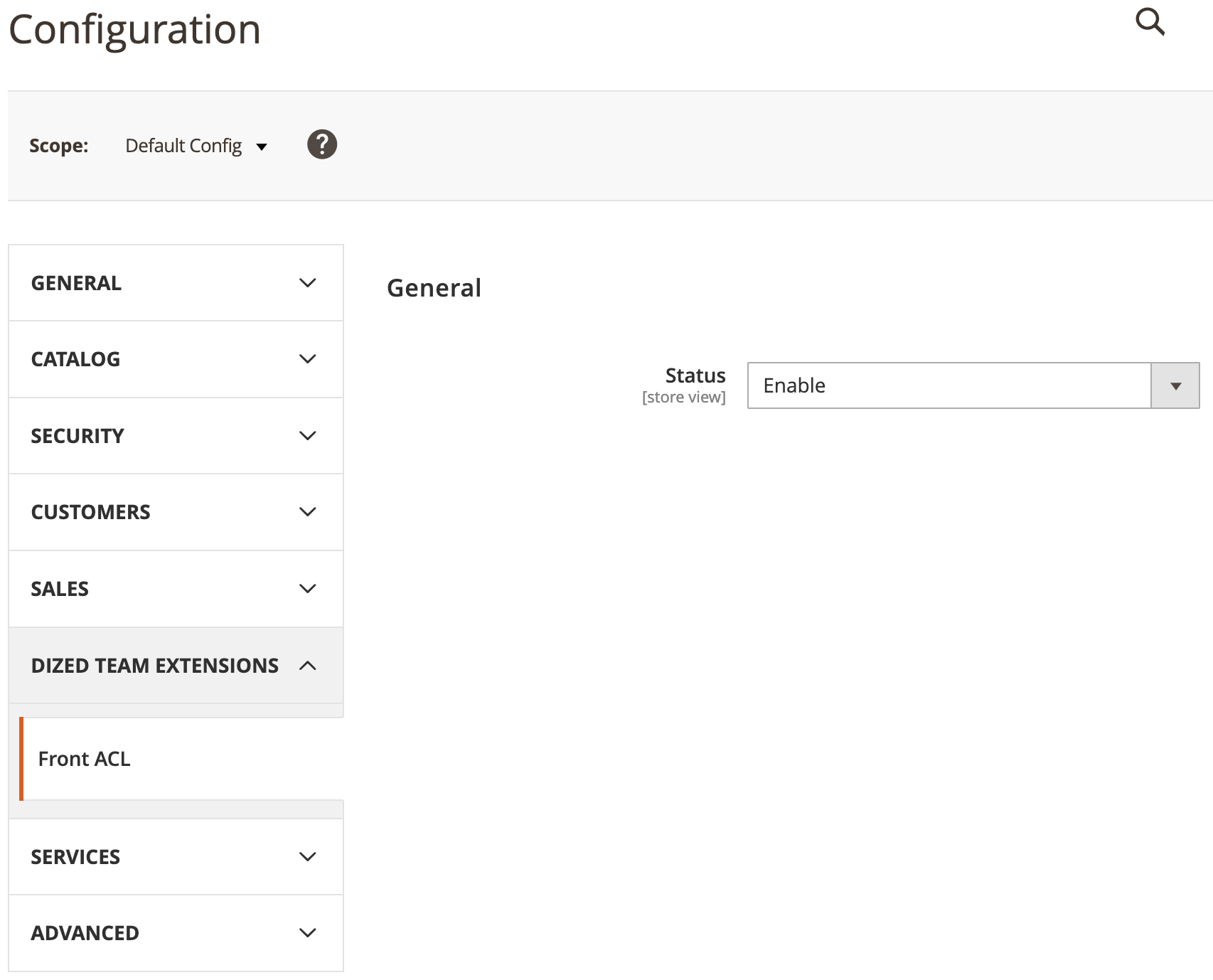
Adding Roles and Permissions.
To add new roles or permissions, create the etc/acl_front.xml file in your own project module. You can see an example of a file in this module.
Roles are inserted into the FrontAcl_Role::index resource, permissions are inserted into the FrontAcl_Permission::index resource.
If you want to set the default permissions for some roles, use the FrontAcl_Defaults::index resource. Pay attention to the syntax - Relation_ {RoleCamelCase}::permission_snake_case.
<config xmlns:xsi="http://www.w3.org/2001/XMLSchema-instance" xsi:noNamespaceSchemaLocation="urn:magento:framework:Acl/etc/acl.xsd">
    <acl>
        <resources>
            <!-- Roles: -->
            <resource id="FrontAcl_Role::index" title="Roles" translate="title">
                <resource id="FrontAcl_Role::buyer" title="Buyer" translate="title"/>
                <resource id="FrontAcl_Role::seller" title="Seller" translate="title"/>
            </resource>
            <!-- Permissions: -->
            <resource id="FrontAcl_Permission::index" title="Permissions" translate="title">
                <resource id="FrontAcl_Permission::catalog" title="Catalog" translate="title"/>
                <resource id="FrontAcl_Permission::checkout" title="Checkout" translate="title"/>
                <resource id="FrontAcl_Permission::wishlist" title="Wishlist" translate="title"/>
            </resource>
            <!-- Defaults (default relations between roles and permissions): -->
            <resource id="FrontAcl_Defaults::index" title="Default Relations" translate="title">
                <resource id="Relation_Buyer::catalog" title="Catalog"/>
                <resource id="Relation_Buyer::checkout" title="Checkout"/>
                <resource id="Relation_Buyer::wishlist" title="Wishlist"/>
                <resource id="Relation_Seller::catalog" title="Catalog"/>
            </resource>
        </resources>
    </acl>
</config>
Set customer roles and permissions in admin panel.
To set a role or permissions for a customer through the admin panel, just log in as an administrator and follow the following path: Customers -> All Customers -> Click to "Edit" for a customer in the grid -> Tab Front ACL. Select the required data here and save the customer.
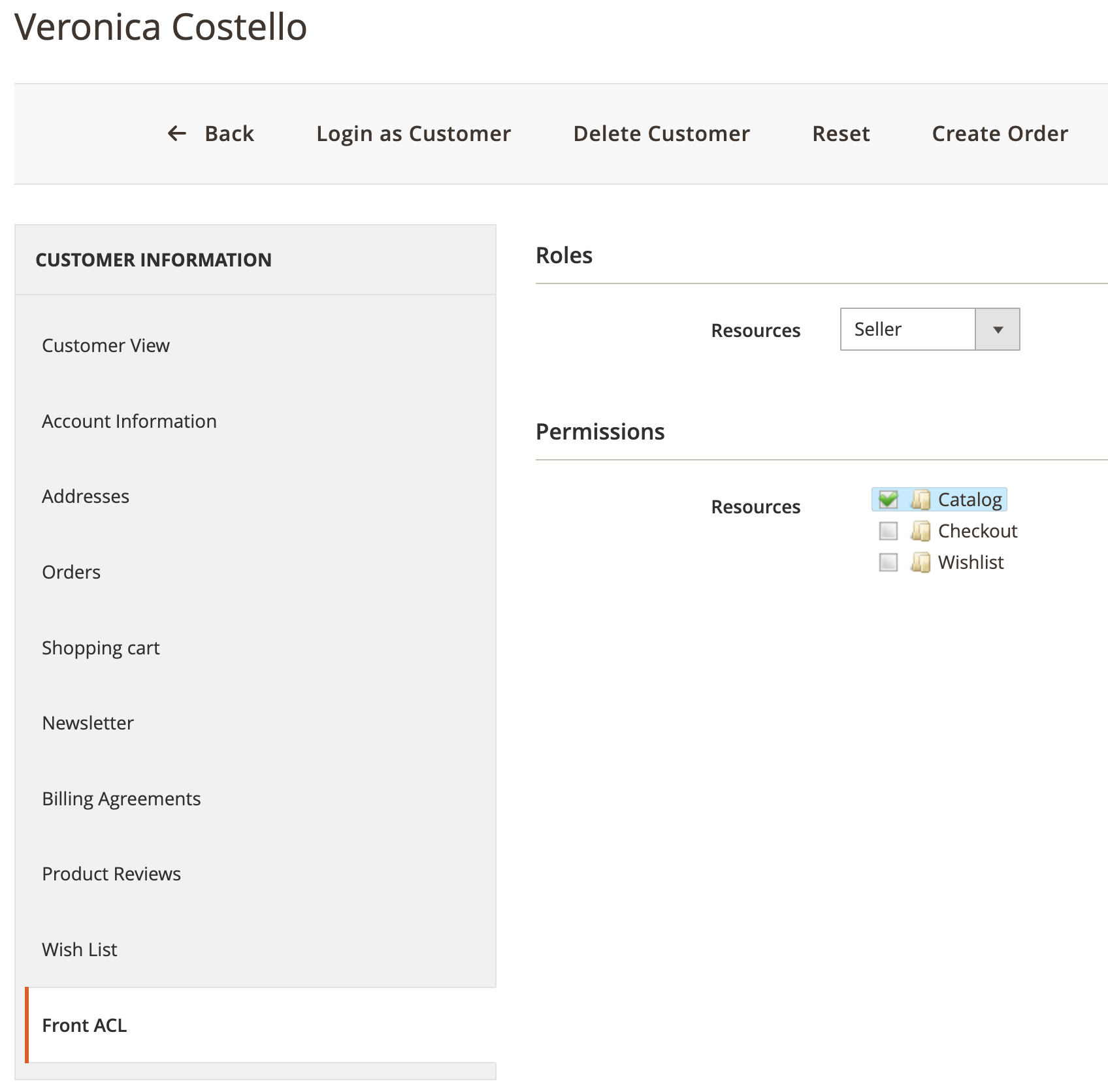
IMPORTANT If the permissions tree is not displayed, it is very likely that you are using a version of Magento with an older version of the jQuery jsTree library. In this case, try using the previous script "view/adminhtml/web/js/customer/permissions-tree.js" version.
Set the default role and permissions for a newly created customer automatically.
If you need to set roles and permissions for a new customer automatically, you can create a plugin for the function: \DiZed\FrontAcl\Plugin\Customer\Api\AccountManagement::getDetectedRole(CustomerInterface $customer). In the body of the function, you need to implement the necessary logic based on the customer object and return the required role as a string. Further, based on this role, default permissions will be automatically taken and applied to the customer.
    /**
     * Add custom logic to identify customer role.
     *
     * @param \DiZed\FrontAcl\Plugin\Customer\Api\AccountManagement $subject
     * @param string $result
     * @param \Magento\Customer\Api\Data\CustomerInterface $customer
     * @return string
     * @see \DiZed\FrontAcl\Plugin\Customer\Api\AccountManagement::getDetectedRole
     */
    public function afterGetDetectedRole(
        \DiZed\FrontAcl\Plugin\Customer\Api\AccountManagement $subject,
        string $result,
        CustomerInterface $customer
    ): string {
        // @todo Need to add custom logic here...
        return $result;
    }
Use this functionality for controllers/actions and blocks.
To check the role or permissions of a customer in a controller/action you need to implement the \DiZed\FrontAcl\Controller\App\HttpAclActionInterface interface and use the FRONT_ACL_ROLE or FRONT_ACL_PERMISSION constants. You can also use the isFrontClassAllowed() public function to specify more precise conditions.
<?php
namespace Name\Space\Sample\Action;

use DiZed\FrontAcl\Controller\App\HttpAclActionInterface;
use Magento\Framework\App\Action\HttpGetActionInterface;
use Magento\Framework\View\Result\Page;
use Magento\Framework\View\Result\PageFactory;

class Sample implements HttpGetActionInterface, HttpAclActionInterface
{
    /**
     * Front ACL Role.
     */
    const FRONT_ACL_ROLE = ['FrontAcl_Role::sample'];

    /**
     * Front ACL Permission.
     */
    const FRONT_ACL_PERMISSION = ['FrontAcl_Permission::sample'];

    /**
     * @var PageFactory
     */
    protected $resultPageFactory;

    /**
     * Action constructor.
     *
     * @param PageFactory $resultPageFactory
     */
    public function __construct(
        PageFactory $resultPageFactory
    ) {
        $this->resultPageFactory = $resultPageFactory;
    }

    /**
     * Is action allowed?
     *
     * @return bool
     */
    public function isFrontClassAllowed(): bool
    {
        return true;
    }

    /**
     * Execute action.
     *
     * @return Page
     */
    public function execute(): Page
    {
        return $this->resultPageFactory->create();
    }
}
All these properties are also available for blocks, but you need to implement the \DiZed\FrontAcl\Block\View\Element\AclBlockInterface interface.
<?php
namespace Name\Space\Sample\Block;

use DiZed\FrontAcl\Block\View\Element\AclBlockInterface;
use Magento\Framework\View\Element\Template;

class Sample extends Template implements AclBlockInterface
{
    /**
     * Front ACL Role.
     */
    const FRONT_ACL_ROLE = ['FrontAcl_Role::sample'];

    /**
     * Front ACL Permission.
     */
    const FRONT_ACL_PERMISSION = ['FrontAcl_Permission::sample'];

    /**
     * Is block allowed?
     *
     * @return bool
     */
    public function isFrontClassAllowed(): bool
    {
        return true;
    }
}
Getting a collection of customers with specific roles and permissions.
Just need to use \DiZed\FrontAcl\Helper\Data::getCustomerCollection method instead of standard $this->customerCollectionFactory->create();
Additional useful features.
- For independent work with roles and permissions in your own module: \DiZed\FrontAcl\Api\RoleManagementInterface.
- Get a list of available roles, permissions and some more features: \DiZed\FrontAcl\Helper\Data.
- Add work with permission constants to your own class: \DiZed\FrontAcl\Helper\Traits\Acl.
dized/module-front-acl 适用场景与选型建议
dized/module-front-acl 是一款 基于 PHP 开发的 Composer 扩展包,目前已累计 322 次下载、GitHub Stars 达 2, 最近一次更新时间为 2021 年 03 月 28 日, 在 PHP 生态内属于活跃度较高的组件。
它主要适用于以下技术方向: 「module」 「acl」 「front」 「magento」 「dized」 等业务场景。在实际项目中,围绕这些方向常见需要落地的问题包括:接口对接、性能调优、并发安全、与既有框架(Laravel / ThinkPHP / Yii / Webman 等)的兼容适配,以及生产环境的日志埋点与稳定性保障。
我们在过去多个企业项目中使用过 dized/module-front-acl 或与其功能相近的方案,如果你在选型或落地过程中遇到问题,例如 版本兼容、二次改造、私有化封装、与内部系统对接、生产 BUG 排查,欢迎联系我们协助评估。
基于 dized/module-front-acl 在你已有业务上做功能扩展、字段裁剪、UI 适配、与内部账号 / 权限 / 日志系统的深度对接。
线上偶发问题、内存泄漏、慢查询、并发异常等排查修复;针对高流量场景做缓存、队列、索引层面的调优。
承接完整的项目从需求 → 设计 → 开发 → 上线 → 长期运维;也可按月提供技术保姆服务。
与 dized/module-front-acl 相关的其它包
同方向 / 同关键字的高下载量 PHP Composer 包推荐,方便对比选型:
Laravel Multiauth package
This package provides a flexible way to add Role-based Permissions to Laravel 6.x
Front-end asset upload for user photos, fields, volumes and folders.
This package provides a flexible way to add Role-based Permissions to Laravel
bootstrap select field module implementing http://silviomoreto.github.io/bootstrap-select/
Front editor extension for Nette Framework
统计信息
- 总下载量: 322
- 月度下载量: 0
- 日度下载量: 0
- 收藏数: 2
- 点击次数: 5
- 依赖项目数: 1
- 推荐数: 0
其他信息
- 授权协议: MIT
- 更新时间: 2021-03-28