dtconline/filament-edit-profile
Composer 安装命令:
composer require dtconline/filament-edit-profile
包简介
Filament package to edit profile
README 文档
README
The Filament library is a user-friendly tool that simplifies profile editing, offering an intuitive interface and robust features to easily customize and manage user information.

Features & Screenshots
- Edit Information: Manage your information such as email, and password.
- Change Password: Change your password.
- Profile Photo: Upload and manage your profile photo.
- Delete Account: Manage your account, such as delete account.
- Sanctum Personal Access tokens: Manage your personal access tokens.
- Browser Sessions Manage and log out your active sessions on other browsers and devices.
- Custom Fields: Add custom fields to the form.
- Custom Components: Add custom component to the page.
- Support: Laravel 11 and Filament 3.x
Installation
You can install the package via composer:
composer require dtconline/filament-edit-profile
You can publish and run the migrations with:
Optionally, you can publish the views using
php artisan vendor:publish --tag="filament-edit-profile-views"
Optionally, you can publish the translations using
php artisan vendor:publish --tag="filament-edit-profile-translations"
You can publish and run all the migrations with:
php artisan vendor:publish --tag="filament-edit-profile-migrations"
php artisan migrate
You can publish the config file with:
php artisan vendor:publish --tag="filament-edit-profile-config"
Usage
Add in AdminPanelProvider.php
use DtcOnline\FilamentEditProfile\FilamentEditProfilePlugin;

->plugins([
    FilamentEditProfilePlugin::make()
])
if you want to show for specific parameters to sort, icon, title, navigation group, navigation label and can access, you can use the following example:
use DtcOnline\FilamentEditProfile\FilamentEditProfilePlugin;

 ->plugins([
     FilamentEditProfilePlugin::make()
        ->slug('my-profile')
        ->setTitle('My Profile')
        ->setNavigationLabel('My Profile')
        ->setNavigationGroup('Group Profile')
        ->setIcon('heroicon-o-user')
        ->setSort(10)
        ->canAccess(fn () => auth()->user()->id === 1)
        ->shouldRegisterNavigation(false)
        ->shouldShowDeleteAccountForm(false)
        ->shouldShowSanctumTokens()
        ->shouldShowBrowserSessionsForm()
        ->shouldShowAvatarForm()
        ->customProfileComponents([
            \App\Livewire\CustomProfileComponent::class,
        ])
 ])
Optionally, you can add a user menu item to the user menu in the navigation bar:
use Filament\Navigation\MenuItem;
use DtcOnline\FilamentEditProfile\Pages\EditProfilePage;

->userMenuItems([
    'profile' => MenuItem::make()
        ->label(fn() => auth()->user()->name)
        ->url(fn (): string => EditProfilePage::getUrl())
        ->icon('heroicon-m-user-circle')
        //If you are using tenancy need to check with the visible method where ->company() is the relation between the user and tenancy model as you called
        ->visible(function (): bool {
            return auth()->user()->company()->exists();
        }),
])
Profile Avatar
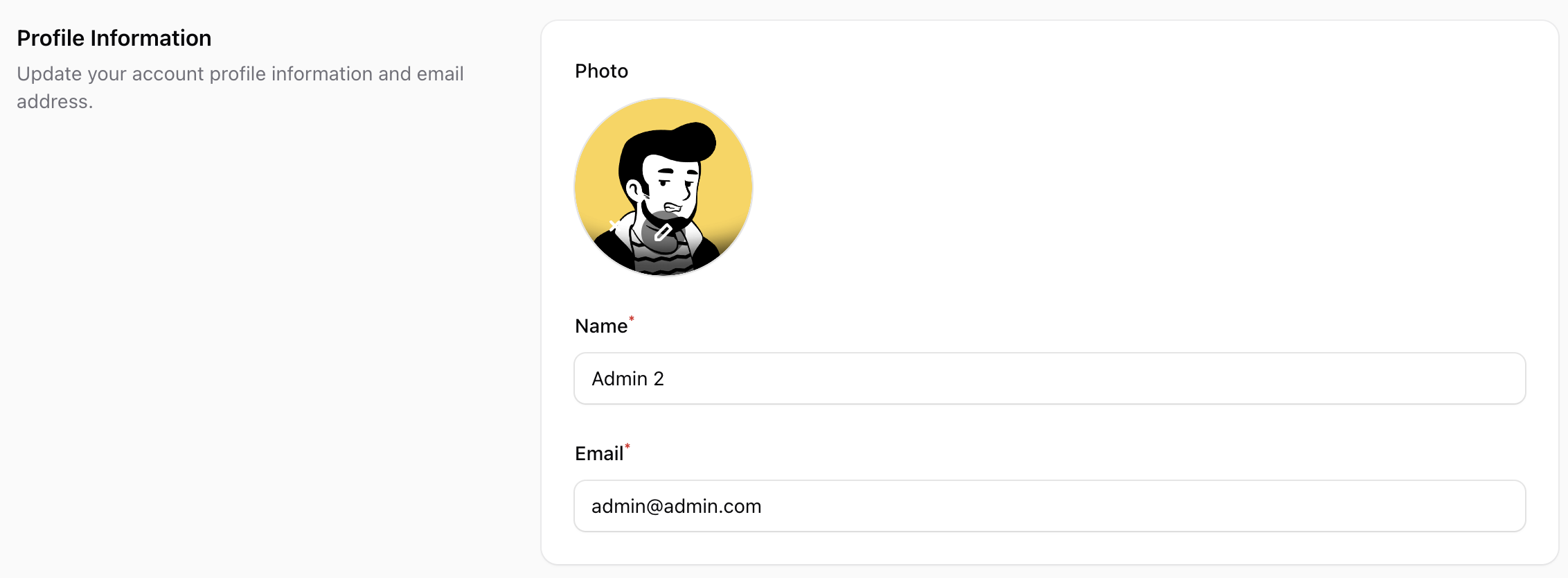 Show the user avatar form using
 shouldShowAvatarForm(). This package follows the Filament user avatar to manage the avatar.
To show the avatar form, you need the following steps:
- Publish the migration file to add the avatar_url field to the users table:
php artisan vendor:publish --tag="filament-edit-profile-avatar-migration"
php artisan migrate
- Add in your User model the avatar_url field in the fillable array:
protected $fillable = [
    'name',
    'email',
    'password',
    'avatar_url',
];
- Set the getFilamentAvatarUrlAttribute method in your User model:
use Filament\Models\Contracts\HasAvatar;
use Illuminate\Support\Facades\Storage;

class User extends Authenticatable implements HasAvatar
{
    // ...
    public function getFilamentAvatarUrl(): ?string
    {
        return $this->avatar_url ? Storage::url("$this->avatar_url") : null;
    }
}
- Optionally, you can specify the image directory path and file upload rules. :
->shouldShowAvatarForm(
    value: true,
    directory: 'avatars', // image will be stored in 'storage/app/public/avatars
    rules: 'mimes:jpeg,png|max:1024' //only accept jpeg and png files with a maximum size of 1MB
)
- Don't forget to run the command
php artisan storage:link
Sanctum Personal Access tokens
Show the Sanctum token management component:
Please review Laravel Sanctum Docs
You may install Laravel Sanctum via the install:api Artisan command:
php artisan install:api
Sanctum allows you to issue API tokens / personal access tokens that may be used to authenticate API requests to your application. When making requests using API tokens, the token should be included in the Authorization header as a Bearer token.
use Laravel\Sanctum\HasApiTokens;

class User extends Authenticatable
{
    use HasApiTokens, HasFactory, Notifiable;
}
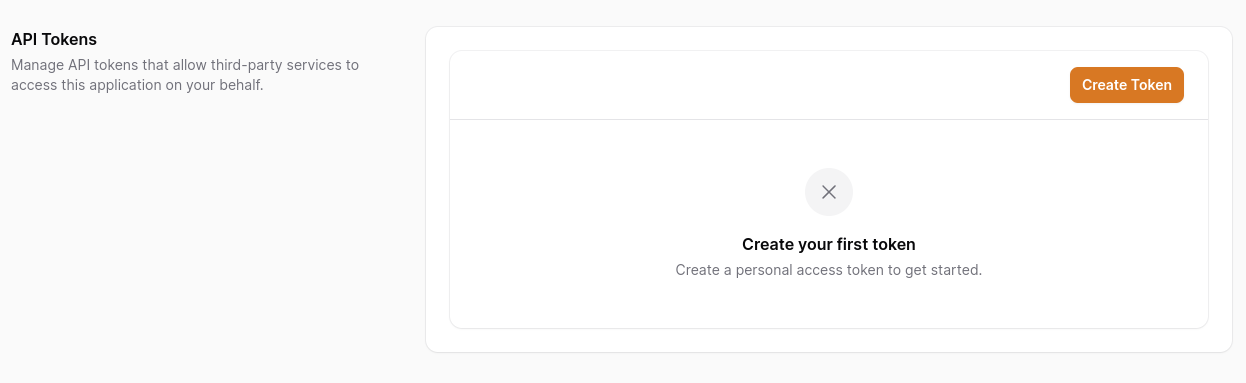
If you want to control access, you can use condition, passing Closure or Boolean
Sanctum allows you to assign "abilities" to tokens. by default we have ['create', 'view', 'update', 'delete'] use permissions to customize
 ->plugins([
    FilamentEditProfilePlugin::make()
        ->shouldShowSanctumTokens(
            condition: fn() => auth()->user()->id === 1, //optional
            permissions: ['custom', 'abilities', 'permissions'] //optional
        )
 ])
Browser Sessions
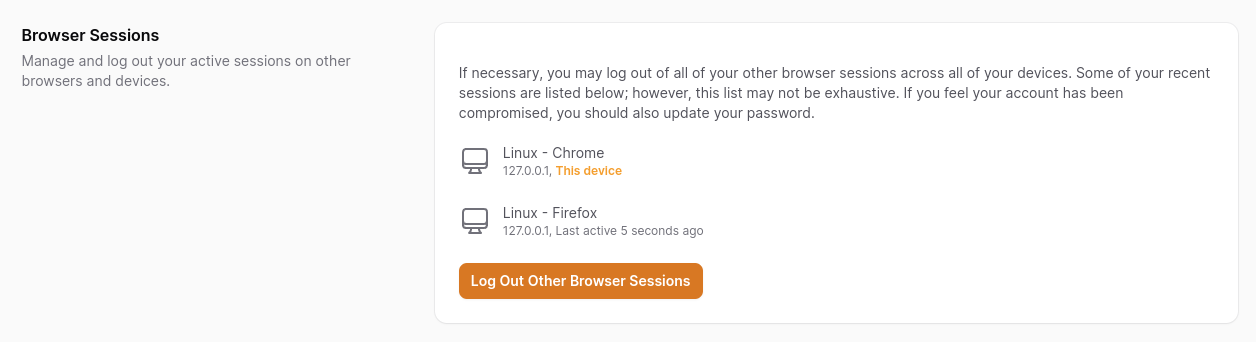
To utilize browser session, ensure that your session configuration's driver (or SESSION_DRIVER environment variable) is set to database.
SESSION_DRIVER=database
If you want to control access or disable browser sessions, you can pass a Closure or Boolean
 ->plugins([
    FilamentEditProfilePlugin::make()
        ->shouldShowBrowserSessionsForm(
            fn() => auth()->user()->id === 1, //optional
                //OR
            false //optional
        )
 ])
Custom Fields
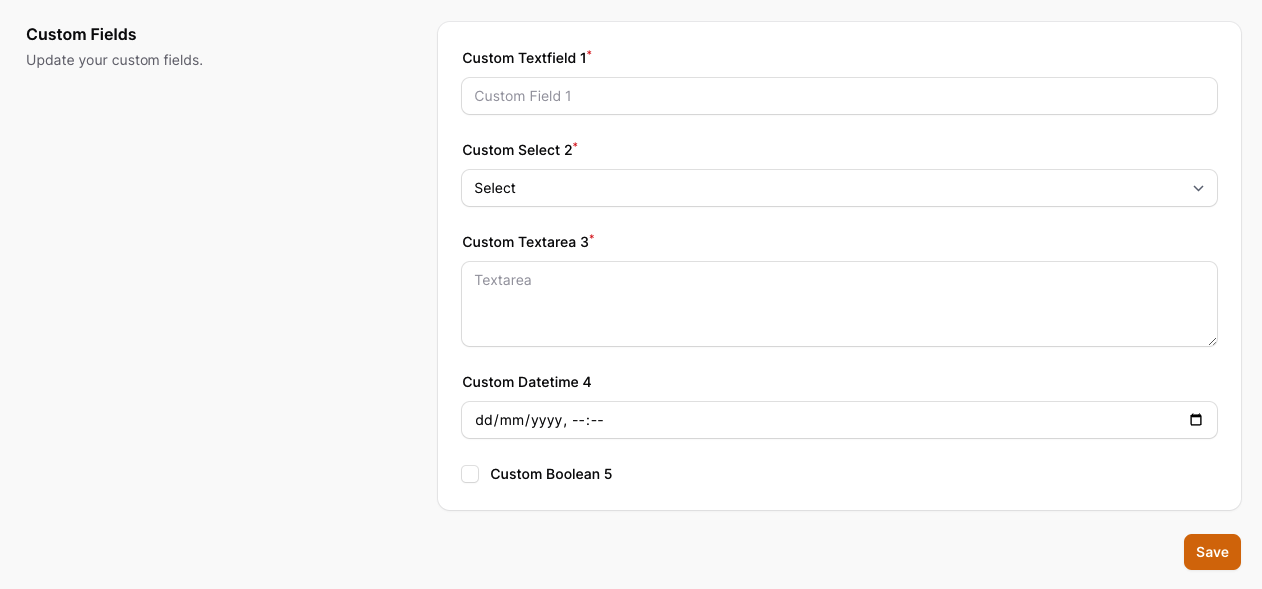 Optionally, you can add custom fields to the form.
To create custom fields you need to follow the steps below:
Optionally, you can add custom fields to the form.
To create custom fields you need to follow the steps below:
- Publish the migration file to add the custom fields to the users table:
php artisan vendor:publish --tag="filament-edit-profile-custom-field-migration"
php artisan migrate
- Add in your User model the custom field in the fillable array:
protected $fillable = [
    'name',
    'email',
    'password',
    'custom_fields',
];
- Add in your User model the custom field in the casts array:
protected function casts(): array
{
    return [
        'email_verified_at' => 'datetime',
        'password' => 'hashed',
        'custom_fields' => 'array'
    ];
}
- Publish the config file using this command:
php artisan vendor:publish --tag="filament-edit-profile-config"
- Edit the config file
config/filament-edit-profile.phpto add the custom fields to the form as example below:
<?php

return [
    'show_custom_fields' => true,
    'custom_fields' => [
        'custom_field_1' => [
            'type' => 'text',
            'label' => 'Custom Textfield 1',
            'placeholder' => 'Custom Field 1',
            'required' => true,
            'rules' => 'required|string|max:255',
        ],
        'custom_field_2' => [
            'type' => 'password',
            'label' => 'Custom Password field 2',
            'placeholder' => 'Custom Password Field 2',
            'required' => true,
            'rules' => 'required|string|max:255',
        ],
        'custom_field_3' => [
            'type' => 'select',
            'label' => 'Custom Select 3',
            'placeholder' => 'Select',
            'required' => true,
            'options' => [
                'option_1' => 'Option 1',
                'option_2' => 'Option 2',
                'option_3' => 'Option 3',
            ],
        ],
        'custom_field_4' => [
            'type' =>'textarea',
            'label' => 'Custom Textarea 4',
            'placeholder' => 'Textarea',
            'rows' => '3',
            'required' => true,
        ],
        'custom_field_5' => [
            'type' => 'datetime',
            'label' => 'Custom Datetime 5',
            'placeholder' => 'Datetime',
            'seconds' => false,
        ],
        'custom_field_6' => [
            'type' => 'boolean',
            'label' => 'Custom Boolean 6',
            'placeholder' => 'Boolean'
        ],
    ]
];
Custom Components
If you need more control over your profile edit fields, you can create a custom component. To make this process easier, just use the artisan command.
Note
If you are not confident in using custom components, please review Filament Docs
php artisan make:edit-profile-form CustomProfileComponent
This will generate a new app/Livewire/CustomProfileComponent.php component and a new resources/views/livewire/custom-profile-component.blade.php view which you can customize.
Now in your Panel Provider, register the new component.
->plugins([
    FilamentEditProfilePlugin::make()
        ->customProfileComponents([
            \App\Livewire\CustomProfileComponent::class,
        ]);
])
Testing
composer test
Changelog
Please see CHANGELOG for more information on what has changed recently.
Contributing
Please see CONTRIBUTING for details.
Security Vulnerabilities
Please review our security policy on how to report security vulnerabilities.
Credits
License
The MIT License (MIT). Please see License File for more information.
dtconline/filament-edit-profile 适用场景与选型建议
dtconline/filament-edit-profile 是一款 基于 PHP 开发的 Composer 扩展包,目前已累计 12 次下载、GitHub Stars 达 0, 最近一次更新时间为 2024 年 09 月 25 日, 在 PHP 生态内属于活跃度较高的组件。
它主要适用于以下技术方向: 「laravel」 「filament-edit-profile」 「dtconline」 等业务场景。在实际项目中,围绕这些方向常见需要落地的问题包括:接口对接、性能调优、并发安全、与既有框架(Laravel / ThinkPHP / Yii / Webman 等)的兼容适配,以及生产环境的日志埋点与稳定性保障。
我们在过去多个企业项目中使用过 dtconline/filament-edit-profile 或与其功能相近的方案,如果你在选型或落地过程中遇到问题,例如 版本兼容、二次改造、私有化封装、与内部系统对接、生产 BUG 排查,欢迎联系我们协助评估。
基于 dtconline/filament-edit-profile 在你已有业务上做功能扩展、字段裁剪、UI 适配、与内部账号 / 权限 / 日志系统的深度对接。
线上偶发问题、内存泄漏、慢查询、并发异常等排查修复;针对高流量场景做缓存、队列、索引层面的调优。
承接完整的项目从需求 → 设计 → 开发 → 上线 → 长期运维;也可按月提供技术保姆服务。
与 dtconline/filament-edit-profile 相关的其它包
同方向 / 同关键字的高下载量 PHP Composer 包推荐,方便对比选型:
Filament package to edit profile
Filament package to edit profile
Alfabank REST API integration
Laravel package for Accurate Online API integration.
Filament package to edit profile jalali
Shared RCX Laravel DataTables UI and configuration helpers.
统计信息
- 总下载量: 12
- 月度下载量: 0
- 日度下载量: 0
- 收藏数: 0
- 点击次数: 10
- 依赖项目数: 0
- 推荐数: 0
其他信息
- 授权协议: MIT
- 更新时间: 2024-09-25