erikaheidi/gdaisy
Composer 安装命令:
composer require erikaheidi/gdaisy
包简介
php-gd templating system
README 文档
README

gdaisy
A highly experimental image templating system based on PHP-GD to dynamically generate image banners and covers.
GDaisy also comes with a few sample scripts to generate common size thumbnails via bin/gdaisy.
Installation
1. Require erikaheidi/gdaisy in your project using Composer:
composer require erikaheidi/gdaisy
2. Once it's installed, you can run the default script to generate an example cover based on meta tags.
Gdaisy comes with an example script that generates a header image adequately sized for Twitter, based on a default template. The vendor/bin/gdaisy generate script expects the URL to fetch as first parameter and the output path as second parameter, as follows:
./vendor/bin/gdaisy generate cover https://www.digitalocean.com/community/tutorials/how-to-set-up-visual-studio-code-for-php-projects output.png
This will generate the following image:
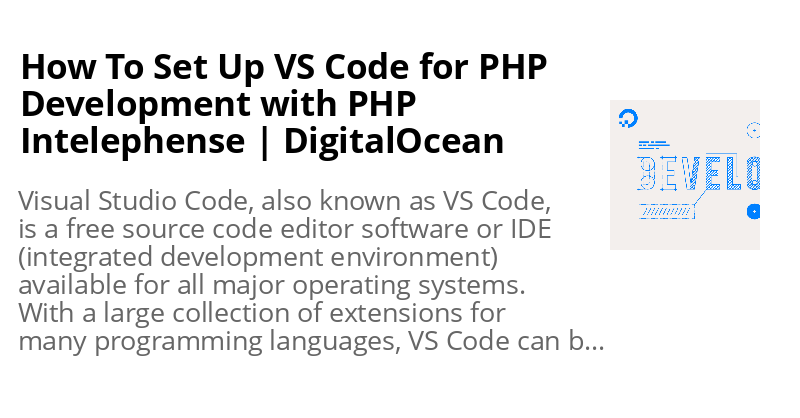
This command is defined in vendor/erikaheidi/gdaisy/bin/Command/Generate/CoverController.php, and the JSON template for this cover is defined at resources/templates/cover-default.json.
Using GDaisy Scripts
GDaisy comes with a few sample scripts in bin/Command based on default templates at resources/templates. These commands are available through the gdaisy bin script installed with Composer.
Resize
Resizes to a specific size, cropping the image to fully fit in the designated area.
./vendor/bin/gdaisy resize crop size=[size] input=[path/to/input.png] output=[path/to/output.png]
Sizes:
avatar: 150x150square: 800x800480p: 640x480720p: 1280x7201080p: 1920x10801440p: 2560x1440
Defined in resources/templates/resize-*.json:
Generate
Generates a generic banner based on Twitter meta tags in a page, or a page's title and description in case the twitter: tags aren't available.
./vendor/bin/gdaisy generate cover [URL] [path/to/output.png]
Creating Templates
In GDaisy, a Template is composed by Placeholders. A placeholder is like an image layer.
Placeholders must implement the PlaceholderInterface. Currently, there are two types of placeholders:
- Image - defines a placeholder for an image to be placed on a template, with specific coordinates. Images are automatically cropped/resized to fit the specified area.
- Text - defines a placeholder for a text to be placed on a template, with specific coordinates and font settings. Text can be wrapped at a maximum width.
There are two ways of setting up templates. You can programmatically define templates, and/or you can use a JSON file specification.
Programmatically Defining Templates
For basic templates, for instance to set up a resized thumbnail or add a watermark to an image, you can define the template along in your controller or script code.
<?php

use GDaisy\Template;
use GDaisy\Placeholder\ImagePlaceholder;

require __DIR__. '/vendor/autoload.php';

//Defining Template
$template = new Template('article-thumb', [
    'width' => 150,
    'height' => 150,
]);
$image = new ImagePlaceholder([
    'width' => 150,
    'height' => 150,
]);
$template->addPlaceholder('thumb', $image);

//Applying Template
$template->apply("thumb", [
    "image_file" => __DIR__ . '/resources/images/gdaisy.png'
]);

$template->write('output.png');
echo "Finished.\n";
This will generate a 150x150 thumbnail for the specified image, which could be provided as argument to the script for instance.
If your template has many placeholders or uses text, it might be easier to work with a JSON file instead.
Using a JSON Template
Consider the following basic.json template example:
{
  "width": 600,
  "height": 600,
  "background": "FFFFFF",
  "elements": {
    "title": {
      "type": "text",
      "properties": {
        "pos_x": 50,
        "pos_y": 20,
        "size": 30,
        "color": "666666",
        "max_width": 500,
        "align": "center"
      }
    },
    "thumbnail": {
      "type": "image",
      "properties": {
        "pos_x": 50,
        "pos_y": 50,
        "width": 500,
        "height": 500,
        "filters": [ "GDaisy\\Filter\\Rounded" ]
      }
    }
  }
}
This template has two elements: title (type text) and thumbnail (type image).
Following, a PHP script to generate a new image based on the example template:
<?php

use GDaisy\Template;

require __DIR__. '/vendor/autoload.php';

$template = Template::create(__DIR__ . '/resources/templates/basic.json');

$template->apply("thumbnail", [
    "image_file" => __DIR__ . '/resources/images/gdaisy.png'
])->apply("title", [
    "text" => "generated with gdaisy"
]);

$template->write('output.png');
echo "Finished.\n";
Template / Placeholders Reference
Template Properties:
width: Resulting image widthheight: Resulting image heightbackground: Resulting image background
Text Properties:
pos_x: X coordinate (bottom left X coordinate for the base of text)pos_y: Y coordinate (botom left Y coordinate for the base of text)size: Text sizecolor: Text Color (hex)max_width(optional): Maximum text width - text will be broken down into multiple lines when setalign(optional): Text align, possible values areleft(default),center, orright.font: path to font file (ttf)
Image Properties:
pos_x: X coordinate (top left corner) where the image will be appliedpos_y: Y coordinate (top left corner) where the image will be applied,width: width (will proportially resize to fit)height: height (will proportially resize to fit)image_file: (optional): when set, will use this image, otherwise you'll have to provide this as parameter when applying the templatecrop: (optional): when set tocenter, will resize-crop while centering the image. Default isleft, can also be set toright.filters: (optional): accepts an array ofFilterInterfaceclasses that should be applied to this element. Currently, there are two filters implemented:Rounded(src/Filter/Rounded.php): creates a rounded corners effect on the image.Circle(src/Filter/Circle.php): creates a fully rounded image.
Example Templates
Creates a circle avatar sized 600x600 with white background
{
  "width": 600,
  "height": 600,
  "background": "FFFFFF",
  "elements": {
    "thumbnail": {
      "type": "image",
      "properties": {
        "pos_x": 0,
        "pos_y": 0,
        "width": 600,
        "height": 600,
        "filters": [ "GDaisy\\Filter\\Circle" ]
      }
    }
  }
}
Creates a rounded avatar sized 600x600 with white background
{
  "width": 600,
  "height": 600,
  "background": "FFFFFF",
  "elements": {
    "thumbnail": {
      "type": "image",
      "properties": {
        "pos_x": 0,
        "pos_y": 0,
        "width": 600,
        "height": 600,
        "filters": [ "GDaisy\\Filter\\Rounded" ]
      }
    }
  }
}
erikaheidi/gdaisy 适用场景与选型建议
erikaheidi/gdaisy 是一款 基于 PHP 开发的 Composer 扩展包,目前已累计 247.69k 次下载、GitHub Stars 达 80, 最近一次更新时间为 2021 年 06 月 09 日, 在 PHP 生态内属于活跃度较高的组件。
我们在过去多个企业项目中使用过 erikaheidi/gdaisy 或与其功能相近的方案,如果你在选型或落地过程中遇到问题,例如 版本兼容、二次改造、私有化封装、与内部系统对接、生产 BUG 排查,欢迎联系我们协助评估。
基于 erikaheidi/gdaisy 在你已有业务上做功能扩展、字段裁剪、UI 适配、与内部账号 / 权限 / 日志系统的深度对接。
线上偶发问题、内存泄漏、慢查询、并发异常等排查修复;针对高流量场景做缓存、队列、索引层面的调优。
承接完整的项目从需求 → 设计 → 开发 → 上线 → 长期运维;也可按月提供技术保姆服务。
统计信息
- 总下载量: 247.69k
- 月度下载量: 0
- 日度下载量: 0
- 收藏数: 80
- 点击次数: 0
- 依赖项目数: 0
- 推荐数: 0
其他信息
- 授权协议: MIT
- 更新时间: 2021-06-09