happytodev/blogr
Composer 安装命令:
composer require happytodev/blogr
包简介
Blogr is a FilamentPHP plugin that adds a powerful blog system to your Laravel application.
README 文档
README
Blogr — Multilingual Blog Plugin for FilamentPHP
A production-ready, multilingual blog and CMS system for Laravel & FilamentPHP v4.
Features • Installation • Documentation • Screenshots • Support
✨ Overview
Blogr turns your Laravel application into a full-featured blogging platform. Built as a FilamentPHP v4 plugin, it provides a translation-first content engine, a visual CMS page builder, role-based authoring, SEO tools, analytics integration, and a modern frontend with dark mode and theme presets — all configurable from a single admin settings page.
Why Blogr?
- 🌍 Translation-First — Posts, series, categories, tags, CMS pages, and author bios are fully translatable.
- 🧱 Visual CMS Builder — Build static pages with 23 block types, 7 templates, and gradient-aware transitions.
- 🎨 Theme System — Light/dark/auto mode, 5 color presets, 16+ configurable colors, custom fonts.
- 🔌 Extensible — Plugin architecture via
BlogrExtensionfor third-party packages. - 🔍 SEO Ready — Meta tags, Open Graph, Twitter Cards, JSON-LD, XML sitemaps, RSS feeds, hreflang.
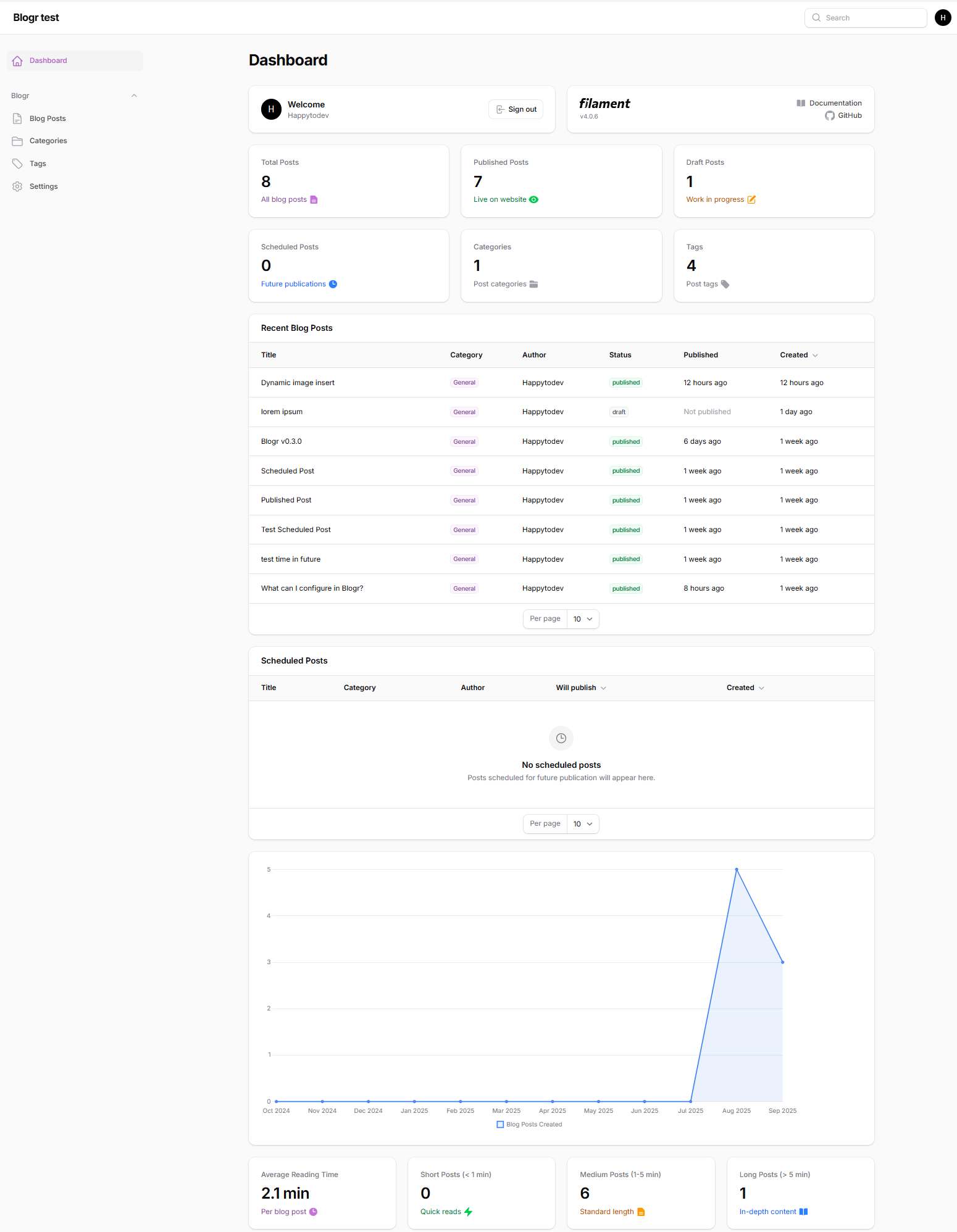
- 📊 Dashboard Widgets — 9 widgets including stats, charts, scheduled posts, SEO checklist, and more.
- 🧪 Battle Tested — 1,366+ automated tests covering every major feature.
- ♿ Accessible — WCAG 2.2 AA compliant: skip navigation, keyboard-operable galleries, carousels and mega menus, descriptive link labels, screen-reader-friendly status messages, form autocomplete, focus management, minimum touch targets, visible focus indicators, accessible icon labels, and color contrast validation in admin settings.
🎯 Key Features
✍️ Blog Engine
📚 Blog Series
🌍 Multilingual
|
📄 CMS Pages
🎨 Theming & UI
🔍 SEO & Syndication
⚙️ Admin Experience
|
📸 Screenshots
Admin Dashboard
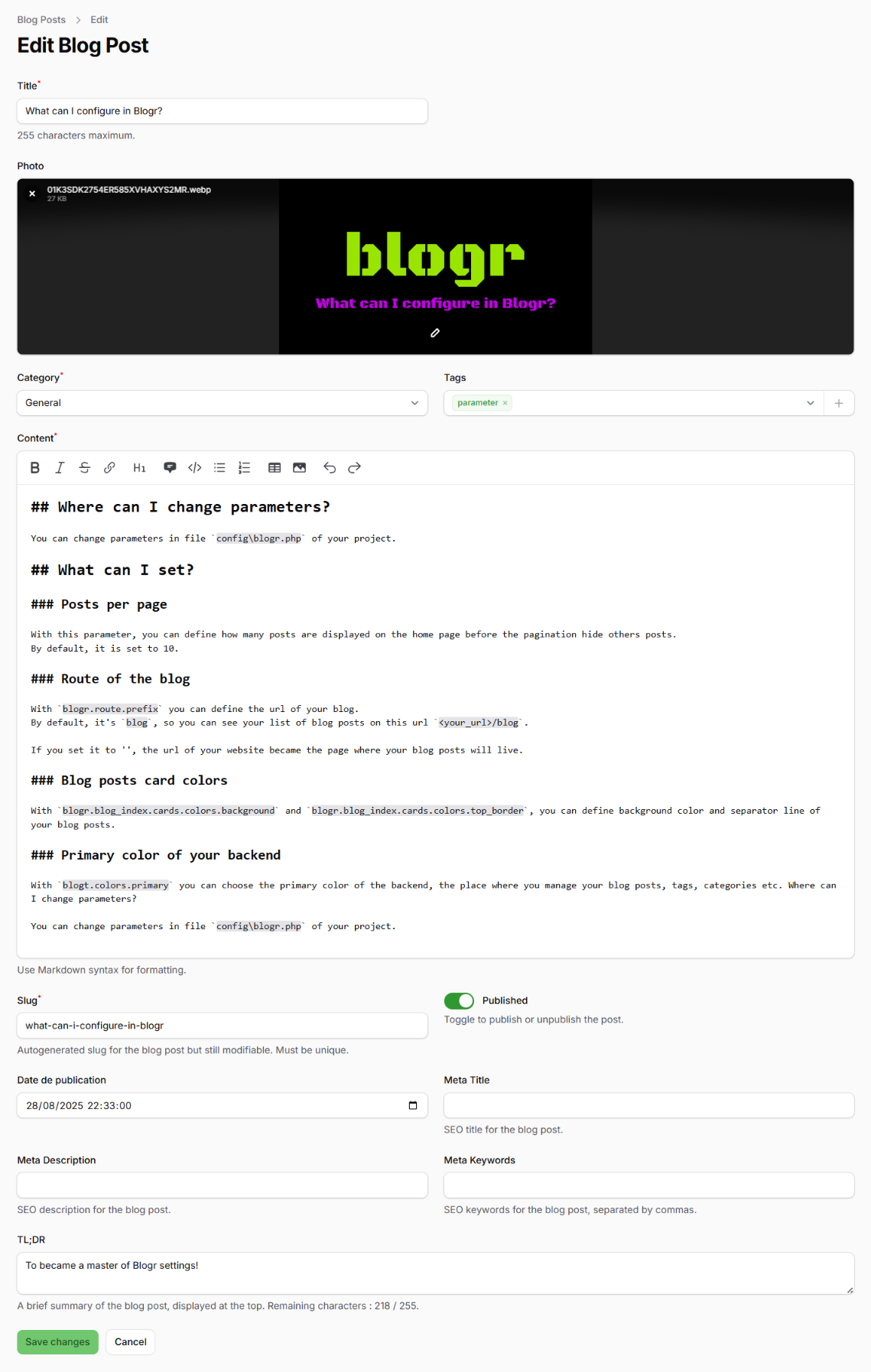
Post Editor
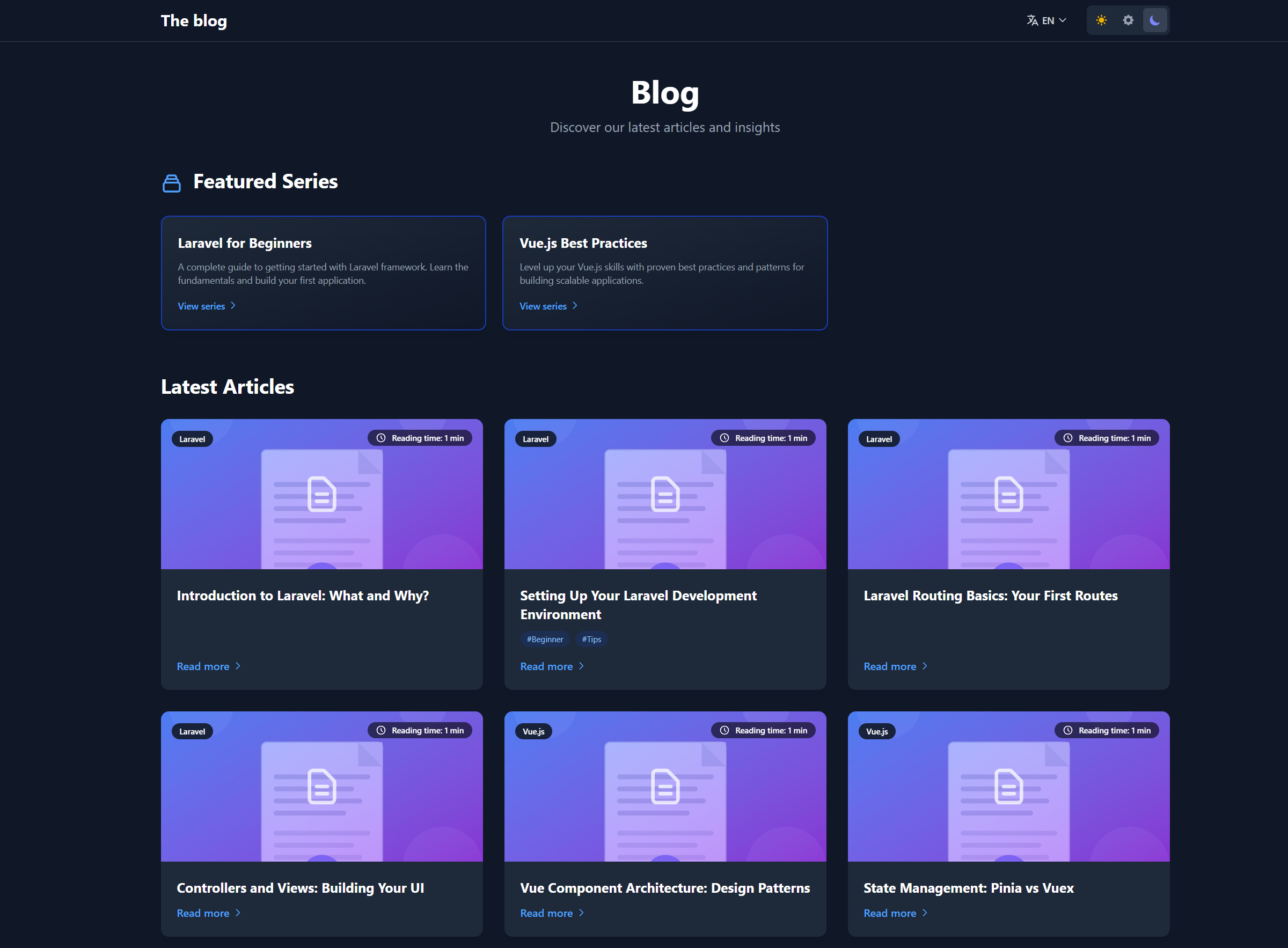
Frontend Blog Home
More screenshots are available in the
.github/imagesfolder on GitHub.
🚀 Quick Start
Prerequisites
- PHP 8.3+
- Laravel 12.x
- FilamentPHP v4.x
- Composer
- Node.js 18+ and npm
Install in a fresh Laravel + Filament project
# 1. Create a Laravel project
laravel new my-blog
cd my-blog

# 2. Install FilamentPHP
composer require filament/filament
php artisan filament:install --panels

# 3. Create an admin user
php artisan make:filament-user

# 4. Install Blogr
composer require happytodev/blogr
php artisan blogr:install
The installer will ask a few questions (CMS enabled, homepage type, admin path, theme setup, tutorials, demo pages) and then publish configs, run migrations, configure your User model, install frontend assets, and build everything.
After installation
- Log in at
/admin(or your configured admin path). - Go to Blog Posts → New Post to create content.
- Visit Blogr Settings to customize appearance, SEO, navigation, and analytics.
- View your blog at
/blogor/if you set the blog as homepage.
For a detailed walkthrough, see INSTALL.md.
🛠️ CLI Commands
Blogr ships with several Artisan commands:
| Command | Description |
|---|---|
php artisan blogr:install |
Interactive installer (recommended) |
php artisan blogr:install-tutorials |
Install tutorial posts |
php artisan blogr:remove-tutorials |
Remove tutorial posts |
php artisan blogr:list-tutorials |
List available tutorials |
php artisan blogr:publish-demo-pages |
Publish Home + Contact demo CMS pages |
php artisan blogr:export |
Export posts, series, categories, tags, users, CMS pages |
php artisan blogr:import {file} |
Import from JSON or ZIP export |
php artisan blogr:sync-admin-path |
Sync the admin panel path after changing it |
php artisan blogr:migrate-translations |
Migrate legacy posts to translation-first schema |
php artisan blogr:install-user-management |
Install User resource stubs and permissions |
⚙️ Configuration Highlights
All settings are manageable from the Blogr Settings page in the admin panel, or directly in config/blogr.php.
Routes and homepage
'route' => [
    'prefix' => 'blog',          // Change to '' for homepage
    'frontend' => ['enabled' => true],
    'middleware' => ['web'],
],

'homepage' => [
    'type' => 'blog',            // 'blog' or 'cms'
],
Locales
'locales' => [
    'enabled' => true,
    'default' => 'en',
    'available' => ['en', 'fr'],
    'auto_detect' => false,
],
CMS pages
'cms' => [
    'enabled' => true,
    'prefix' => '',              // '', 'page', 'pages', etc.
    'templates' => [
        'default', 'landing', 'contact', 'about', 'pricing', 'faq', 'custom'
    ],
],
SEO defaults
'seo' => [
    'site_name' => ['en' => 'The blog', 'fr' => 'Le blog'],
    'default_title' => ['en' => 'Blog', 'fr' => 'Blog'],
    'twitter_handle' => '@yourhandle',
    'og' => [
        'image' => '/images/blogr.webp',
        'image_width' => 1200,
        'image_height' => 630,
    ],
    'structured_data' => [
        'enabled' => true,
        'organization' => [
            'name' => env('APP_NAME'),
            'url' => env('APP_URL'),
            'logo' => env('APP_URL').'/images/logo.png',
        ],
    ],
],
Analytics
'analytics' => [
    'enabled' => false,
    'provider' => null,          // 'google', 'plausible', 'umami', 'matomo'
    'google' => ['measurement_id' => 'G-XXXXXXXXXX'],
    'plausible' => ['domain' => 'yoursite.com'],
    'umami' => ['website_id' => null, 'src' => null],
    'matomo' => ['url' => null, 'site_id' => null],
],
📊 Dashboard Widgets
Nine widgets are available and can be enabled or disabled from Settings → Dashboard:
| Widget | Description |
|---|---|
BlogStatsOverview |
Total, published, draft, scheduled posts + categories, tags, series, CMS pages |
RecentBlogPosts |
Latest posts with edit actions, filters, and column toggles |
ScheduledPosts |
Upcoming scheduled publications |
BlogPostsChart |
Post creations and publications over the last 12 months |
BlogReadingStats |
Reading time distribution (average, short, medium, long) |
CategoryPostsChart |
Doughnut chart of posts per category |
SeriesStatsOverview |
Series metrics overview |
WeeklyActivityChart |
Weekly publishing activity bar chart |
MissingSeoAlert |
SEO checklist alerting missing metadata |
🧩 CMS Blocks
The CMS page builder includes 23 block types:
Content & Marketing
- Hero Banner
- Hero Carousel
- Features Grid
- Call to Action
- Rich Content (Markdown)
- Blog Posts
- Blog Title
Social Proof & Info
- Testimonials
- Team Members
- Stats & Metrics
- Timeline
- FAQ Accordion
Interactive & Media
- Image Gallery
- Video Embed
- Map
- Contact Form
- Newsletter
Decorative & Layout
- Wave Separator
- Section Separator (diagonal)
- Transition: Clip Path
- Transition: Simple
- Transition: Animation
Each block supports 5 background types (none, solid, gradient, image, pattern), independent dark-mode settings, custom colors, and text shadows.
Plugins
Blogr supports third-party plugins via the BlogrExtension interface. Plugins can register routes, Livewire components, custom link types, and settings pages.
use Happytodev\Blogr\Contracts\BlogrExtension;
use Happytodev\Blogr\Services\ExtensionRegistry;

class MyPlugin implements BlogrExtension
{
    public function getId(): string { return 'my-plugin'; }
    public function getName(): string { return 'My Plugin'; }
    public function getDescription(): string { return 'What it does.'; }
    public function getVersion(): string { return '1.0.0'; }
    public function getAuthor(): string { return 'Your Name'; }
    public function getHomepage(): ?string { return null; }
    public function getDependencies(): array { return []; }
    public function getSettingsUrl(): ?string { return null; }
    public function registerExtension(ExtensionRegistry $registry): void {}
}
Register your plugin in your service provider:
public function packageBooted(): void
{
    if ($this->app->has(ExtensionRegistry::class)) {
        $this->app->make(ExtensionRegistry::class)->register(new MyPlugin);
    }
}
| Plugin | Description | Repository |
|---|---|---|
| GDPR | Cookie consent, privacy policy, data export and erasure | happytodev/blogr-gdpr |
| Comments | Threaded comments with moderation, voting, anti-spam, and email notifications | happytodev/blogr-comments |
| Artist Portfolio | Artist portfolio with artwork management, portfolio pages, and commission showcase | happytodev/blogr-artist |
🛡️ Security
Configurable admin path
Change the default /admin URL from Settings → Admin Panel, then run:
php artisan blogr:sync-admin-path
You can also set it via .env:
BLOGR_ADMIN_PATH=backoffice
Two-Factor Authentication
Add 2FA to your admin panel with Filament Breezy. Blogr provides an installer command:
php artisan blogr:install-breezy
See the Breezy documentation for full configuration details.
Roles and permissions
Blogr uses Spatie Permission with two default roles:
- Admin — full access
- Writer — can create and edit own posts, cannot publish or manage other users
🧪 Testing
Blogr is tested with 1,266 Pest PHP tests covering import/export, multilingual routing, CMS pages, blocks, SEO, widgets, permissions, and more.
cd vendor/happytodev/blogr
./vendor/bin/pest --parallel
CI runs on GitHub Actions with PHP 8.4, Laravel 12, and prefer-stable.
📚 Documentation
- Installation Guide
- Feature Overview
- CMS Pages in Navigation
- Theme Switcher
- RSS Feeds
- Language Switcher Fix
- Full docs folder
🤝 Support
Need Help?
📖 Full Documentation • 🐛 Report Bug • 💡 Request Feature
Love Blogr?
📄 License
MIT License — See LICENSE.md for details.
Created with ❤️ by Frédéric Blanc and the Laravel community.
Made with ❤️ using Laravel & FilamentPHP
happytodev/blogr 适用场景与选型建议
happytodev/blogr 是一款 基于 PHP 开发的 Composer 扩展包,目前已累计 334 次下载、GitHub Stars 达 20, 最近一次更新时间为 2025 年 08 月 16 日, 在 PHP 生态内属于活跃度较高的组件。
它主要适用于以下技术方向: 「laravel」 「filamentphp」 「happytodev」 「blogr」 等业务场景。在实际项目中,围绕这些方向常见需要落地的问题包括:接口对接、性能调优、并发安全、与既有框架(Laravel / ThinkPHP / Yii / Webman 等)的兼容适配,以及生产环境的日志埋点与稳定性保障。
我们在过去多个企业项目中使用过 happytodev/blogr 或与其功能相近的方案,如果你在选型或落地过程中遇到问题,例如 版本兼容、二次改造、私有化封装、与内部系统对接、生产 BUG 排查,欢迎联系我们协助评估。
基于 happytodev/blogr 在你已有业务上做功能扩展、字段裁剪、UI 适配、与内部账号 / 权限 / 日志系统的深度对接。
线上偶发问题、内存泄漏、慢查询、并发异常等排查修复;针对高流量场景做缓存、队列、索引层面的调优。
承接完整的项目从需求 → 设计 → 开发 → 上线 → 长期运维;也可按月提供技术保姆服务。
与 happytodev/blogr 相关的其它包
同方向 / 同关键字的高下载量 PHP Composer 包推荐,方便对比选型:
A Filament plugin that integrates tabler icons, allowing you to use them seamlessly across Filament forms, tables, actions, and more.
jitone-ai is a powerful FilamentPHP plugin that integrates AI-powered features directly into your Filament forms.
Send Notification to discord channel Webhook using native FilamentPHP Notification Facade class
Specific Tailwindcss color picker for Filamentphp
Filament plugin to set and display your social networks on your website
Alfabank REST API integration
统计信息
- 总下载量: 334
- 月度下载量: 0
- 日度下载量: 0
- 收藏数: 20
- 点击次数: 28
- 依赖项目数: 4
- 推荐数: 0
其他信息
- 授权协议: MIT
- 更新时间: 2025-08-16