kadegray/statamic-country-and-region-fieldtypes
Composer 安装命令:
composer require kadegray/statamic-country-and-region-fieldtypes
包简介
Statamic Country And Region Fieldtype addon
README 文档
README
Statamic Country And Region Fieldtypes is an addon that is everything you need to store and display Country and Region on your site.
Features
- Supports all Countries standardized in
ISO 3166-1. - Supports all Regions standardized in
ISO 3166-2(Principle subdivisions; for example: State, Province). - Multiselect Countries and Regions.
- Set a default Country or Region.
- On the Region fieldtype configure one or multiple Countries whose Regions will display as options.
- Locale for these Fieldtypes work in Control Panel.
- When using multi-site these fieldtypes will display the country or region in the locale of the (multi) site.
How to Install
Search 'Country and region' addon in the Tools > Addons section of the Statamic control panel and click install, or run the following command from the root of your project:
composer require kadegray/statamic-country-and-region-fieldtypes
How to Use
You will notice that there are three Fieldtypes in this addon, this gives you the most control over how you would like to store country and/or region data.
- Country Fieldtype
- Region Fieldtype
- Region in Country Fieldtype
Country Fieldtype
After adding the Country Fieldtype into your blueprint and editing an entry, the select input will display the names of countries. However, when you save the entry, the fieldtype will store the two-letter country code as the value.


If you designate the field handle as "country" you can use the following code in the template to display the name of the country.
{{ country }}
If you are using multi-site, the aforementioned code will correctly display the country name in the language associated with the locale of the current site you are visiting.
Region Fieldtype


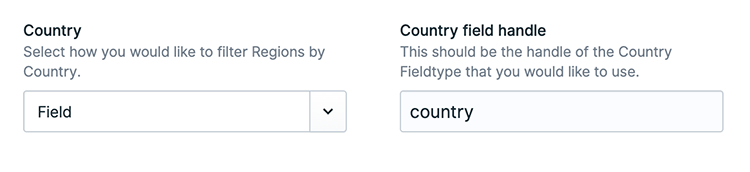
The Region Fieldtype functions similarly to the Country Fieldtype. However, in order to determine which regions of a country should be displayed, you need to configure them using the Country config.
The Country config offers two options:
- Manual - This option allows you to manually select a country.
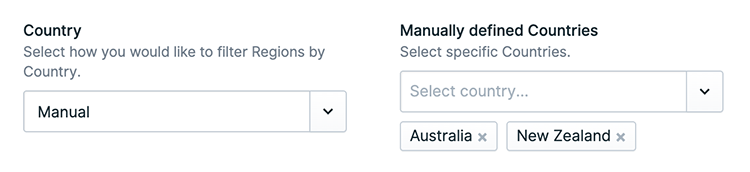
- Field - By choosing this option, you can define the handle of a Country Fieldtype that is within the same blueprint. When a country is selected in the Country Fieldtype, the Region Fieldtype will dynamically update its list of regions to correspond with the selected country.


Region in Country Fieldtype
The Region in Country Fieldtype is a combination of the Country Fieldtype and the Region Fieldtype. In order to select a region, the country must be chosen first. This selection of the country dynamically updates the available options in the Region Fieldtype.

Locale configuration
Control Panel
In the control panel these Fieldtypes are designed to support different locales. This means that when you change the locale for the control panel, the fieldtypes will be displayed in the corresponding language.
To configure the locale of the control panel, you need to set the locale value in the config/app.php file. Don't forget to run php artisan config:clear afterwards to ensure the changes take effect.
Multi site
When using multi-site, rendering one of the Fieldtypes in an Antler {{ region }} will display the value in the language specific to the site's locale.
The configuration for these locales can be found in the config/statamic/sites.php file.
countries_and_regions tag
Iterate over countries or regions in antlers with the countries_and_regions tag.
Countries countries_and_regions:countries
The param default can be used to set selected to true for the country that matches.
<ul>
{{ countries_and_regions:countries default="AU" }}
    <li>{{ isoCode }} - {{ countryName }}</li>
{{ /countries_and_regions:countries }}
</ul>
Example use in a register form:
{{ user:register_form }}
...
<label for="country">Country:</label>
<select name="country" id="country">
    {{ countries_and_regions:countries default="AU" }}
    <option value="{{ isoCode }}" {{ selected }}>
        {{ countryName }}
    </option>
    {{ /countries_and_regions:countries }}
</select>
...
{{ /user:register_form }}
Regions countries_and_regions:regions
The param country can be used to filter for a country by code. This can also be multiple: "AU,US".
The param default can be used to set selected to true for the region that matches.
<ul>
{{ countries_and_regions:regions country="AU" default="AU-NSW" }}
    <li>{{ isoCode }} - {{ regionName }} - {{ selected }}</li>
{{ /countries_and_regions:regions }}
</ul>
Example use in a register form:
{{ user:register_form }}
...
<label for="region">Region:</label>
<select name="region" id="region">
    {{ countries_and_regions:regions country="AU" default="AU-NSW" }}
    <option value="{{ isoCode }}" {{ selected }}>{{ regionName }}</option>
    {{ /countries_and_regions:regions }}
</select>
...
{{ /user:register_form }}
If you have a country select above a region select please see the below subheading.
Endpoint: /countries_and_regions/{countryCode}/regions
If you have a country select above a region select and you want the region options to update when the country is selected. Then see this example:
<select name="country" id="country" onchange="reloadRegions()">
    ...options
</select>

<select name="region" id="region">
    ...options
</select>

<script>
    async function reloadRegions() {
        const countryCode = document.getElementById("country").value;
        if (!countryCode) {
            return;
        }
        const response = await fetch(
            `/countries_and_regions/${countryCode}/regions`,
            {
                method: "POST",
                headers: {
                    "X-CSRF-Token": "{{ csrf_token }}",
                },
            }
        );
        const regions = await response.json();
        const regionElement = document.getElementById("region");
        regionElement.innerHTML = "";
        for (let region of regions) {
            let option = document.createElement("option");
            option.text = region.label;
            option.value = region.value;
            regionElement.add(option);
        }
    }
</script>
kadegray/statamic-country-and-region-fieldtypes 适用场景与选型建议
kadegray/statamic-country-and-region-fieldtypes 是一款 基于 PHP 开发的 Composer 扩展包,目前已累计 2.04k 次下载、GitHub Stars 达 3, 最近一次更新时间为 2023 年 03 月 24 日, 在 PHP 生态内属于活跃度较高的组件。
我们在过去多个企业项目中使用过 kadegray/statamic-country-and-region-fieldtypes 或与其功能相近的方案,如果你在选型或落地过程中遇到问题,例如 版本兼容、二次改造、私有化封装、与内部系统对接、生产 BUG 排查,欢迎联系我们协助评估。
基于 kadegray/statamic-country-and-region-fieldtypes 在你已有业务上做功能扩展、字段裁剪、UI 适配、与内部账号 / 权限 / 日志系统的深度对接。
线上偶发问题、内存泄漏、慢查询、并发异常等排查修复;针对高流量场景做缓存、队列、索引层面的调优。
承接完整的项目从需求 → 设计 → 开发 → 上线 → 长期运维;也可按月提供技术保姆服务。
统计信息
- 总下载量: 2.04k
- 月度下载量: 0
- 日度下载量: 0
- 收藏数: 3
- 点击次数: 15
- 依赖项目数: 0
- 推荐数: 0
其他信息
- 授权协议: Unknown
- 更新时间: 2023-03-24