konafets/typo3_debugbar
Composer 安装命令:
composer require konafets/typo3_debugbar
包简介
Utilizes the PHP Debugbar to provide information of the system health to the frontend.
关键字:
README 文档
README
This is a package to integrate PHP Debug Bar with TYPO3. It uses several hooks to include the assets and itself into frontend output. It bootstraps some Collectors to work with TYPO3 and implements a couple custom DataCollectors, specific for TYPO3.
Read the documentation for more configuration options.

Info: Use the DebugBar only in development. It can slow the application down (because it has to gather data). So when experiencing slowness, try disabling some of the collectors.
The extension comes with the default collectors:
- PhpInfoCollector: Show the PHP version
- MessagesCollector: Collects messages from within the Application and pushing them to the DebugBar
- TimeDataCollector: Here you can start and stop a timer. Default it times the Application. More in the Usage section
- MemoryCollector: Show the Memory usage
- ExceptionsCollector: Collects exceptions from withing the Application and pushing them to the DebugBar
And includes some custom collectors:
- InfoCollector: Show the same information like the Info pane of the Admin Panel
- MySqliCollector: Show all queries, including timing and the values of prepared statements
- Typo3Collector: Show the TYPO3 version, Locale and Environment
- AuthCollector: Show the username of the logged-in backend user
- SessionCollector: Show session data
Installation
Require this package with composer. It is recommended to only require the package for development.
composer require konafets/typo3_debugbar --dev
Afterwards you need to activate the extension in the Extension Manager. The DebugBar is enabled by default and will be displayed to you if you are logged into the backend as an administrator.
Usage
The extension is configurable through the Extension Manager. There you can enable/disable the DebugBar as well as the DataCollectors.
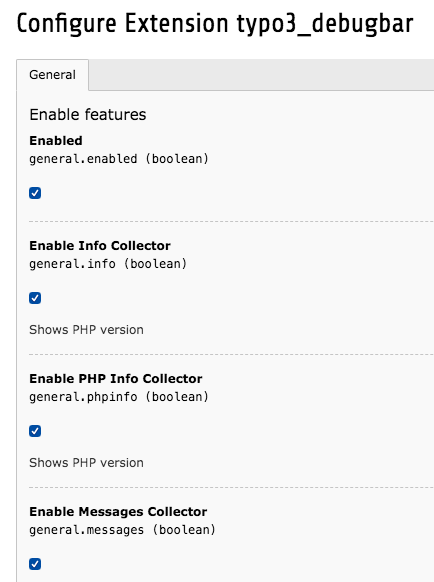
Use it everywhere
The Typo3DebugBar implements the SingletonInterface, therefore you
can get the same instance via debugbar(). This opens the
possibility to interact with the DebugBar from within TYPO3.
Log Exceptions
try {
    throw new Exception('foobar');
} catch (Exception $e) {
    debugBar()->addThrowable($e);
}
These will be shown in the Exception pane.
Add messages
debugBar()->info($object);
debugBar()->error('Error!');
debugBar()->warning('Watch out…');
debugBar()->addMessage('Another message', 'mylabel');

Add timers
And start/stop timing:
debugBar()->startMeasure('render', 'Time for rendering');
debugBar()->stopMeasure('render');
debugBar()->addMeasure('now', TYPO3_START, microtime(true));
debugBar()->measure('My long operation', function() {
    // Do something…
});
debugbar_debug($value);
or even shorter:
startMeasure('render', 'Time for rendering');
stopMeasure('render');
addMeasure('now', TYPO3_START, microtime(true));
measure('My long operation', function() {
    // Do something…
});
Database
This pane shows all issued queries of the connection with the name Default. Is there is no connection with this name, the first connection of the ConnectionPool will be used.
With placeholders
Per default, the statements were shown as Prepared Statements, meaning the placeholders are inside the statement while the actual values are in a hidden table below each statement. To see them, click on the statement.

With params
To render the values directly inside the statements, activate the option with_params in the extension settings.
Info: The extension uses the connectToDB hook to
inject Doctrine\DBAL\Logging\DebugStack as a logger to the
connection. At the end of the rendering process it retrieves the Logger
and shows the logged queries. Its important to understand, that the
extension adds Doctrine\DBAL\Logging\DebugStack in any case, even if
its not shown in the frontend. This is due to log all queries from the
very beginning ... but at that point the BE User is not initialized yet
and its unclear if the DebugBar is enabled or not. Classical
Chicken-and-egg problem.
VarDump
Everybody knows the output of DebugUtility::var_dump() ... and everybody knows that it breaks the layout. Lets move the output
to the TYPO3 Debugbar. Use Konafets\Typo3Debugbar\Overrides\DebuggerUtility::var_dump($variable) and get an output like this:
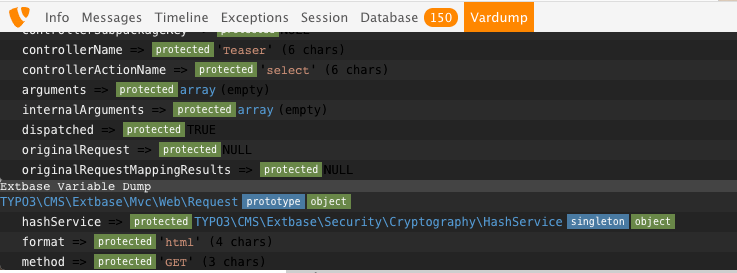
Lifecycle
As mentioned above the extension uses hooks. The following figure shows the usage during a request life cycle.

Credits
The extension is heavily inspired by the Laravel Debugbar. Thanks for your good work Barry vd. Heuvel. I also copied the idea of a ServiceProvider from Laravel.
konafets/typo3_debugbar 适用场景与选型建议
konafets/typo3_debugbar 是一款 基于 PHP 开发的 Composer 扩展包,目前已累计 21.42k 次下载、GitHub Stars 达 36, 最近一次更新时间为 2018 年 02 月 14 日, 在 PHP 生态内属于活跃度较高的组件。
它主要适用于以下技术方向: 「php」 「debugging」 「cms」 「debugbar」 「typo3」 等业务场景。在实际项目中,围绕这些方向常见需要落地的问题包括:接口对接、性能调优、并发安全、与既有框架(Laravel / ThinkPHP / Yii / Webman 等)的兼容适配,以及生产环境的日志埋点与稳定性保障。
我们在过去多个企业项目中使用过 konafets/typo3_debugbar 或与其功能相近的方案,如果你在选型或落地过程中遇到问题,例如 版本兼容、二次改造、私有化封装、与内部系统对接、生产 BUG 排查,欢迎联系我们协助评估。
基于 konafets/typo3_debugbar 在你已有业务上做功能扩展、字段裁剪、UI 适配、与内部账号 / 权限 / 日志系统的深度对接。
线上偶发问题、内存泄漏、慢查询、并发异常等排查修复;针对高流量场景做缓存、队列、索引层面的调优。
承接完整的项目从需求 → 设计 → 开发 → 上线 → 长期运维;也可按月提供技术保姆服务。
与 konafets/typo3_debugbar 相关的其它包
同方向 / 同关键字的高下载量 PHP Composer 包推荐,方便对比选型:
GraphQL authentication for your headless Craft CMS applications.
Set Links with a specific language parameter
Supercharged text field validation.
A PHP package that takes a snapshot of your application and allows you to retrieve it later to help with debugging.
Laravel Database Query Logger and debug helper.
Integrate with Snipcart.
统计信息
- 总下载量: 21.42k
- 月度下载量: 0
- 日度下载量: 0
- 收藏数: 36
- 点击次数: 16
- 依赖项目数: 1
- 推荐数: 0
其他信息
- 授权协议: GPL-2.0
- 更新时间: 2018-02-14