laplace-demon-ai/laravel-mcp-log
Composer 安装命令:
composer require laplace-demon-ai/laravel-mcp-log
包简介
MCP tool for Laravel log analysing with AI.
README 文档
README
MCP tool for Laravel log analysing with AI.
This package uses the core log reading functionality provided by the Laravel Log Reader, so for the details about how the log reading works, please check that repository.
Installation
You can install the package (that you created with this template) via composer:
composer require laplace-demon-ai/laravel-mcp-log
You can publish the configuration file with:
php artisan vendor:publish --tag="laravel-mcp-log"
Configuration
You can enable/disable the MCP Log Reader as:
'enabled' => env('MCP_LOG_READER_ENABLED', true),
The package supports two log storage drivers: file and db for now.
Database Logs
If your logs are stored in database (e.g. log_entries table), in the config file (laravel-mcp-log.php) set the driver to db as:
'driver' => env('LOG_READER_DRIVER', LogDriverType::DB->value),
And set the other database related configurations as:
'table' => env('LOG_DB_TABLE_NAME', 'log_entries'),
'limit' => env('LOG_READER_DB_QUERY_LIMIT', 10000), // max number of records to fetch in queries

// Column mapping: maps DB columns to LogData properties
'columns' => [
    LogTableColumnType::ID->value => 'id',
    LogTableColumnType::LEVEL->value => 'level', // e.g. 'ERROR', 'INFO'
    LogTableColumnType::MESSAGE->value => 'message', // main log message
    LogTableColumnType::TIMESTAMP->value => 'created_at', // time of the log entry (e.g. 'created_at' or 'logged_at')
    LogTableColumnType::CHANNEL->value => 'channel', // e.g. 'production', 'local'
    LogTableColumnType::CONTEXT->value => 'context', // additional context info, often JSON e.g. '{"action":"UserLogin"}'
    LogTableColumnType::EXTRA->value => 'extra', // any extra data, often JSON e.g. '{"ip":172.0.0.1, "session_id":"abc", "user_id":123}'
],

'searchable_columns' => [
    ['name' => LogTableColumnType::MESSAGE->value, 'type' => ColumnType::TEXT->value],
    ['name' => LogTableColumnType::CONTEXT->value, 'type' => ColumnType::JSON->value],
    ['name' => LogTableColumnType::EXTRA->value, 'type' => ColumnType::JSON->value],
],
Basically we do a mapping between the database columns of your log table and the package, so that it can read the logs properly.
- The
searchable_columnsdefines which columns are searchable and their types. It is used for thesearchqueries. And we requiretextandjsoncolumn types so that we choose the right search strategy (default istext). - The
limitdefines the maximum number of records to fetch in queries to avoid performance issues.
File Logs
If your logs are stored in files (laravel.log), in the config file (laravel-mcp-log.php) set the driver to file as:
'driver' => env('LOG_READER_DRIVER', LogDriverType::FILE->value),
And set the log file path as:
'path' => env('LOG_FILE_PATH', storage_path('logs/laravel.log')),
'limit' => env('LOG_READER_FILE_QUERY_LIMIT', 10000), // max number of lines to read
- The
pathdefines the full path to your Laravel log file. - The
limitdefines the maximum number of lines to read in queries to avoid performance issues
Usage
This package automatically registers MCP Server (LogReaderServer) and MCP tool (LogReaderTool) in LaravelMcpLogServiceProvider, so you don't need to register it manually within the ai.php in your Laravel application.
Warning
You only need to install official Laravel MCP package so that MCP can recognize this server.
We defined the log reader endpoint as following in the LaravelMcpLogServiceProvider:
Mcp::web('mcp/log-reader', LogReaderServer::class);
It means that you can access the log reader MCP tool in your MCP dashboard at your-app-url/mcp/log-reader URL.
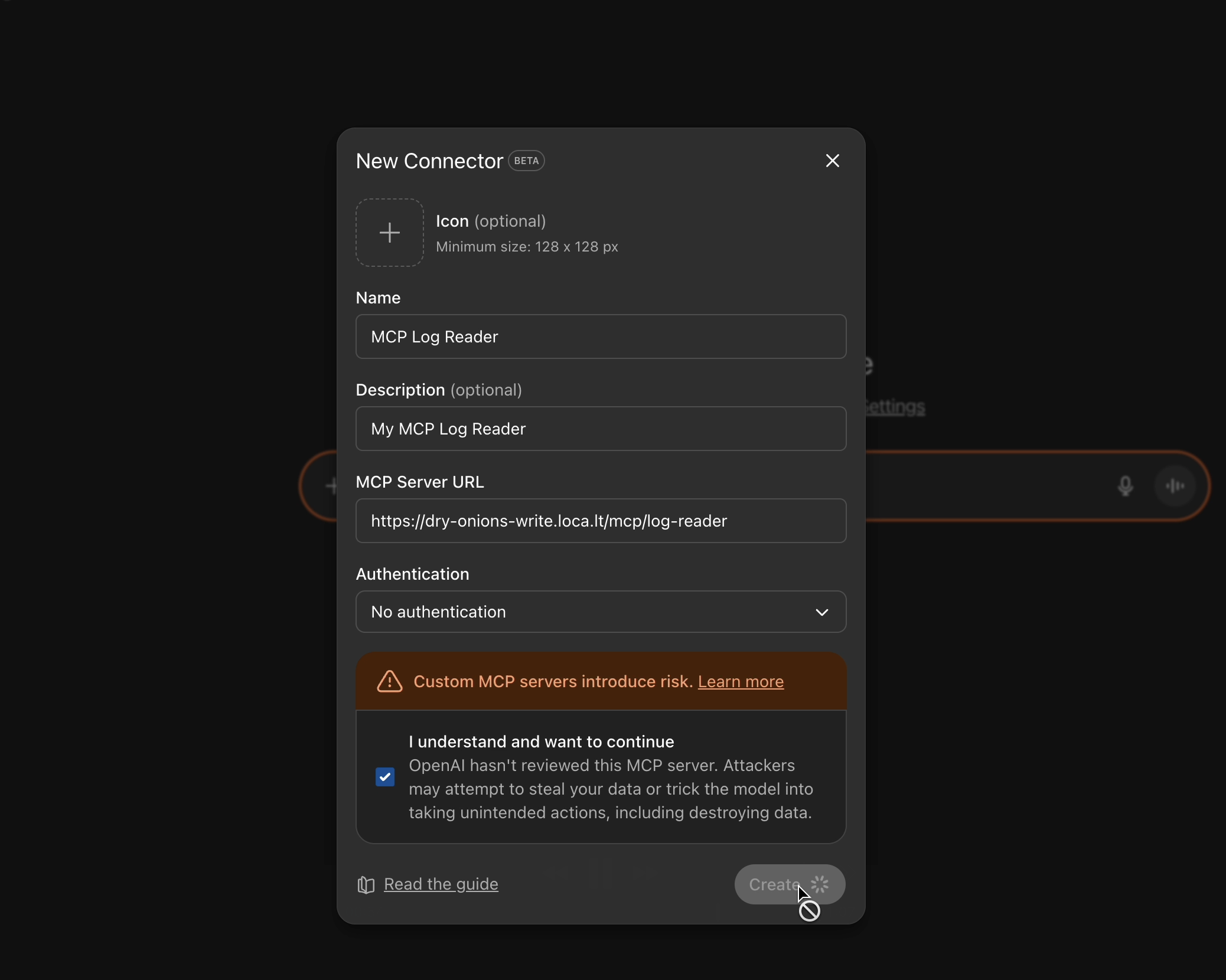
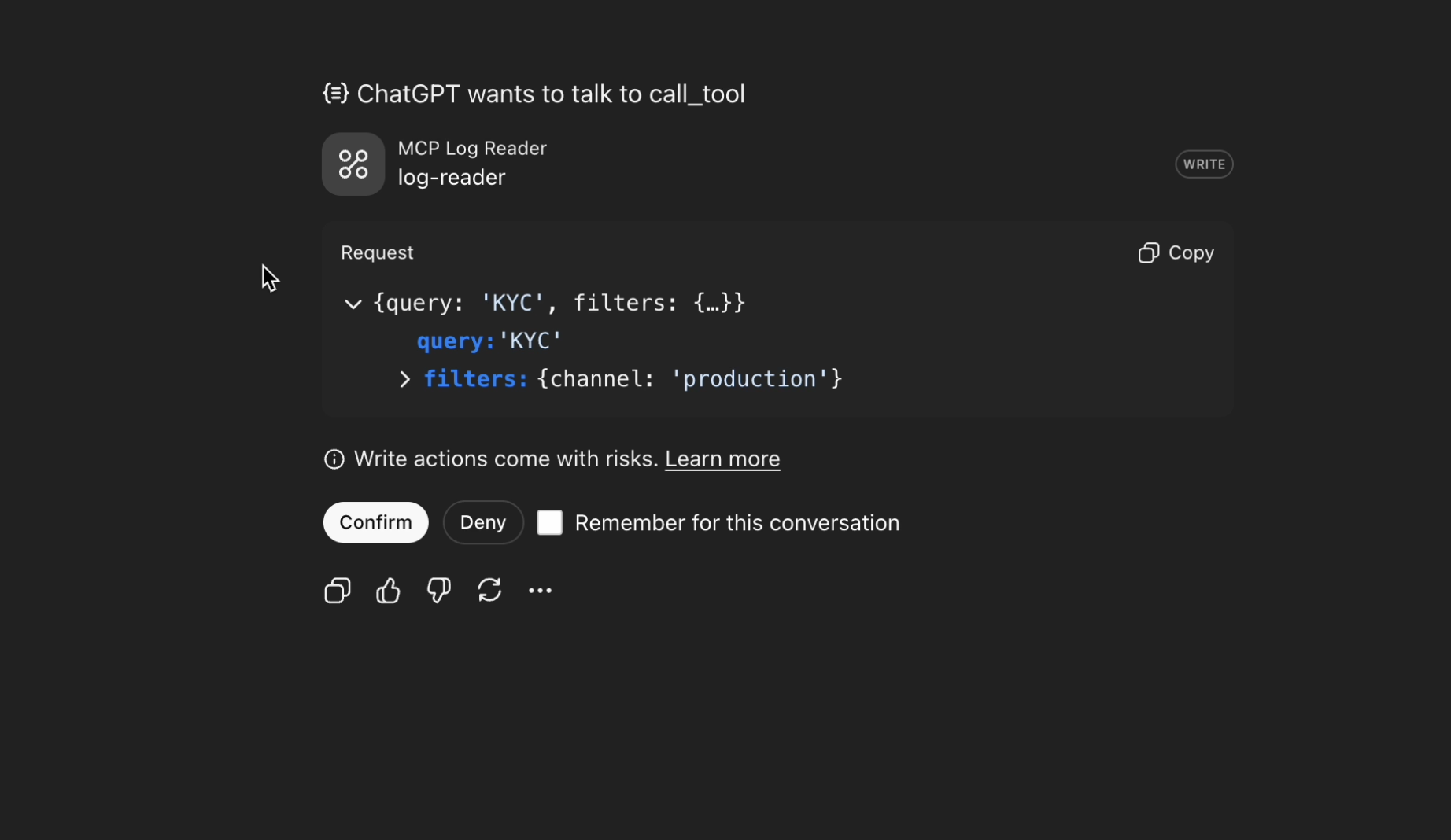
Following is the video for a quick demo of how it works:
- This is how you can use localtunnel to expose your local Laravel application to the internet for MCP access:
- And this is a demo of how the MCP Log Reader works with sample prompts:
TODO (this is for Laravel Log Reader )
- Add a
log_insightsmigration/table which will be a normalized, summarized, and searchable table.- It unifies different log mechanisms into a single canonical format, enabling faster lookups over large data.
- A background task should sync new log data periodically, basically everyday it summarizes the previous day's logs and inserts them into
log_insights.- Be aware that summarization may lose some details (e.g., exact errors or stack traces).
- Add support for cloud log readers (AWS CloudWatch, Azure Monitor, Google Cloud Logging).
- Add streaming responses for overall logic.
- Use a cheap/free model to summarize large log files before search/filter (experimental approach).
- Laravel MCP Log can be integrated into coding agents where periodically logs are analysed by this tool, and issues are caught and reported to different channels (slack etc). And maybe even PRs can be generated by using the logs.
Contributing
Your contributions are welcome! If you'd like to improve this project, simply create a pull request with your changes. Your efforts help enhance its functionality and documentation.
If you find this project useful, please consider ⭐ it to show your support!
Authors
This project is created and maintained by Moe Mizrak.
License
Laravel Package Template is an open-sourced software licensed under the MIT license.
laplace-demon-ai/laravel-mcp-log 适用场景与选型建议
laplace-demon-ai/laravel-mcp-log 是一款 基于 PHP 开发的 Composer 扩展包,目前已累计 11 次下载、GitHub Stars 达 3, 最近一次更新时间为 2025 年 10 月 18 日, 在 PHP 生态内属于活跃度较高的组件。
它主要适用于以下技术方向: 「laravel」 「php 8」 「Laplace Demon AI」 「laravel-mcp-log」 等业务场景。在实际项目中,围绕这些方向常见需要落地的问题包括:接口对接、性能调优、并发安全、与既有框架(Laravel / ThinkPHP / Yii / Webman 等)的兼容适配,以及生产环境的日志埋点与稳定性保障。
我们在过去多个企业项目中使用过 laplace-demon-ai/laravel-mcp-log 或与其功能相近的方案,如果你在选型或落地过程中遇到问题,例如 版本兼容、二次改造、私有化封装、与内部系统对接、生产 BUG 排查,欢迎联系我们协助评估。
基于 laplace-demon-ai/laravel-mcp-log 在你已有业务上做功能扩展、字段裁剪、UI 适配、与内部账号 / 权限 / 日志系统的深度对接。
线上偶发问题、内存泄漏、慢查询、并发异常等排查修复;针对高流量场景做缓存、队列、索引层面的调优。
承接完整的项目从需求 → 设计 → 开发 → 上线 → 长期运维;也可按月提供技术保姆服务。
与 laplace-demon-ai/laravel-mcp-log 相关的其它包
同方向 / 同关键字的高下载量 PHP Composer 包推荐,方便对比选型:
Alfabank REST API integration
Matrix maths package
Zero-dependency raw PHP DNS resolver, domain-ownership verification, and intoDNS/MxToolbox-style diagnostics. Queries authoritative nameservers directly over sockets — never trusts the recursive cache for ownership checks.
Laravel package for Accurate Online API integration.
A lightweight plain-PHP framework for database-backed CRUD APIs.
bughq error tracking - PHP SDK
统计信息
- 总下载量: 11
- 月度下载量: 0
- 日度下载量: 0
- 收藏数: 4
- 点击次数: 19
- 依赖项目数: 0
- 推荐数: 0
其他信息
- 授权协议: MIT
- 更新时间: 2025-10-18