legacy-icons/famfamfam-silk
Composer 安装命令:
composer require legacy-icons/famfamfam-silk
包简介
FamFamFam Silk icon pack, as individual icons or as a CSS spritesheet
README 文档
README
About
The Silk icon pack, as available on famfamfam website.
All credits for these icons go to their original author: Mark James (mjames@gmail.com)
The aim of this project is to make this icon pack available through various package managers, such as:
All icons are supplied in PNG format.
CSS spritesheets
You can insert the icons directly into your HTML with a common IMG tag:
<img alt="Delete" src="dist/png/key_delete.png" width="16" height="16">
In addition to the icons by themselves, this project also ships a CSS spritesheet for the icon-pack. This spritesheet allows to load the entire icon-pack in just 1 image, and thus reduce HTTP calls.
This is what it actually looks:
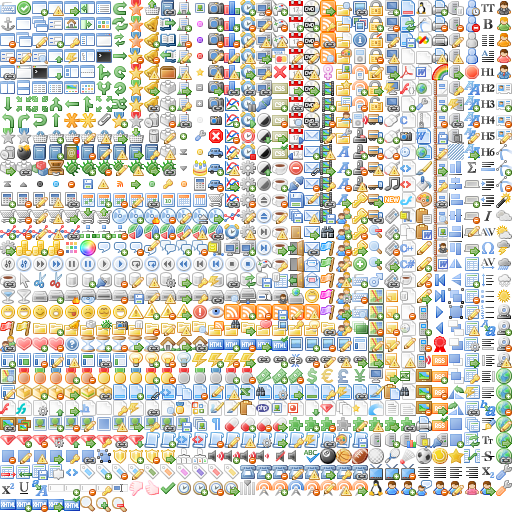
All the positioning of the icons inside this alone image is made through CSS, which allows you to just add block-type tags with the proper class and get the same result:
<div class="famfamfam-silk key_delete"></div>
Just remember to add the CSS stylesheet to the HEAD of your HTML page!
Install
Get the package with NPM
npm install famfamfam-silk
Get the package with Bower
bower install famfamfam-silk
Get the package with Composer / Packagist
composer require legacy-icons/famfamfam-silk
Get the package with NuGet
Install-Package famfamfam-silk
Build the whole project or your custom project
We use Gulp to build the project, so if you want to re-build or customize this project, you'll need Gulp.
After gulp is installed, and your CLI is pointed to your work directory, first install the dependencies:
with NPM 2.x.x
npm install
with NPM 3.x.x (resolve dependencies for node-spritesheet before this module's ones)
npm install grunt grunt-contrib-coffee grunt-contrib-clean
npm install
then be sure that you have ImageMagick installed for building spritesheet.
then, you can run the gulp build task to build the project:
gulp build
What the build task does?
First, it takes PNG files from the src folder, and pastes them to the dist folder.
Then it creates a spritesheet from the PNG images located in the src folder, and thus creates the sprite folder in dist.
If, for example you just want application_put and monitor_edit icons in a spritesheet, you just have to fork this project, point your CLI to the working directory,
empty the src directory, except application_put and monitor_edit icons in PNG format, and then run the gulp build task.
You'll get the proper spritesheet and copies of the icons directly in the dist folder.
License
See License
统计信息
- 总下载量: 225
- 月度下载量: 0
- 日度下载量: 0
- 收藏数: 337
- 点击次数: 2
- 依赖项目数: 1
- 推荐数: 0
其他信息
- 授权协议: CC-BY-2.5
- 更新时间: 2016-02-18