masev/settings-bundle
Composer 安装命令:
composer require masev/settings-bundle
包简介
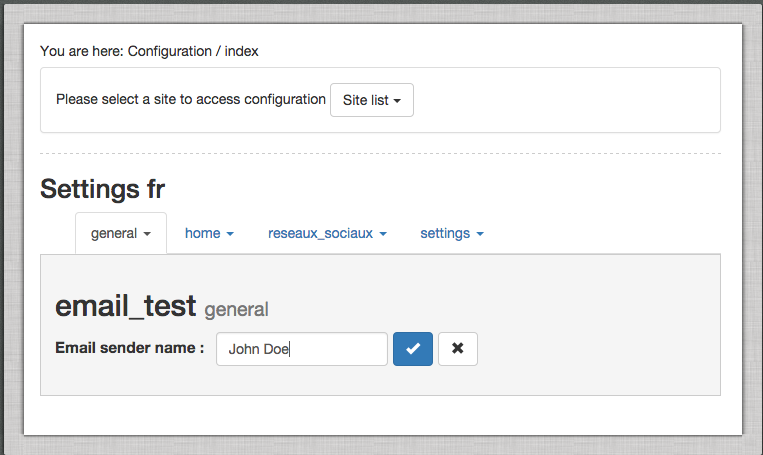
Masev SettingsBundle introduce a settings system into eZ Publish 5.x, administration is possible thanks to an interface in legacy admin.
README 文档
README
Masev SettingsBundle introduce a settings system into eZ Publish 5.x, administration is possible thanks to an interface in legacy admin (AngularJS powered). All settings are injected in Symfony container as a parameter. There are compatible with the eZ Publish Config Resolver allowing you the define settings per siteaccess.
Install
Step 1: Download MasevSettingsBundle using composer
Add MasevSettingsBundle in your composer.json:
{
    "require": {
        "masev/settings-bundle": "dev-master"
    }
}
Now tell composer to download the bundle by running the command:
$ php composer.phar update masev/settings-bundle
Composer will install the bundle to your project's vendor/masev/settings-bundle directory.
Step 2: Enable the bundle
Enable the bundle in the kernel:
<?php
// ezpublish/AppKernel.php

public function registerBundles()
{
    $bundles = array(
        // ...
        new Masev\SettingsBundle\MasevSettingsBundle(),
    );
}
Step 3: Configuration
Edit your application config file to provide connections informations to your storage and to list the bundle wich contains configurable parameters.
Mysql example :
# ezpublish/config/config.yml
masev_settings:
    mysql:
        host: 127.0.0.1
        user: root
        password: root
        dbname: mysettings
    varnish_purge:
        enabled: true (to enable varnish purge)
        purger_interface_id: mybundle.masev_settings.purger (id of service, it had to implement Masev\SettingsBundle\Purger\PurgerInterface
    bundles: [ ... ]
    form:
        browse_limit: 500 (default 100) #change browse limit search
- bundles : list of bundles that will contains configurable settings
For Mysql Storage you need to initialize the setting table with the following query :
CREATE TABLE `masev_settings` (
  `id` int(11) unsigned NOT NULL AUTO_INCREMENT,
  `identifier` varchar(255) NOT NULL DEFAULT '',
  `value` TEXT NOT NULL,
  `scope` varchar(255) NOT NULL DEFAULT 'default',
  PRIMARY KEY (`id`),
  UNIQUE KEY `identifier_scope` (`identifier`,`scope`)
) ENGINE=InnoDB AUTO_INCREMENT=12 DEFAULT CHARSET=utf8;
Step 4: Declaring configurable settings
In your bundle, create a file name settings.xml in the folder <bundle_dir>/Resources/config/.
<?xml version="1.0" encoding="UTF-8" ?>
<settings xmlns="http://william-pottier.fr/schema/settings"
          xmlns:xsi="http://www.w3.org/2001/XMLSchema-instance"
          xsi:schemaLocation="http://william-pottier.fr/schema/settings https://raw.github.com/wpottier/WizadSettingsBundle/master/Resources/schema/settings-1.0.xsd">

    <parameter key="category.sub_category.sender_name">
        <name>Email sender name</name>
        <default>Me</default>
    </parameter>

    <parameter key="category.sub_category.sender_email">
        <name>Email sender address</name>
        <default>me@my-site.com</default>
    </parameter>

    <parameter key="category.sub_category.message">
        <name>Message</name>
        <default></default>
        <form type="textarea" cols="30" rows="10"></form>
    </parameter>

</settings>
Settings key must have a category and sub_category name to be displayed correctly in the legacy UI.
Clear the Symfony cache :
php ezpublish/console cache:clear
At this step you should be able the define settings in the legacy UI (configuration tab in the eZ Publish Legacy Administration).
Step 5 : Query your settings
Now that you have define settings you can query them with the eZ Publish config resolver.
// Get the 'category.sub_category.sender_name' settings in the current scope (i.e. current siteaccess)
$this->configResolver->getParameter('category.sub_category.sender_name', 'masev_settings');

// You can force siteaccess
$this->configResolver->getParameter('category.sub_category.sender_name', 'masev_settings', 'my_site_access');
In a twig template you can use the getMasevSettings() Twig function.
统计信息
- 总下载量: 1.24k
- 月度下载量: 0
- 日度下载量: 0
- 收藏数: 5
- 点击次数: 0
- 依赖项目数: 0
- 推荐数: 0
其他信息
- 授权协议: GPL-2.0
- 更新时间: 2014-10-09