mezcalito/ux-search
Composer 安装命令:
composer require mezcalito/ux-search
包简介
Effortless search and faceted search with Symfony UX and Mezcalito UX Search
README 文档
README
A powerful, flexible, and easy-to-use search and faceted search system for Symfony applications, built with Twig Components and Live Components.
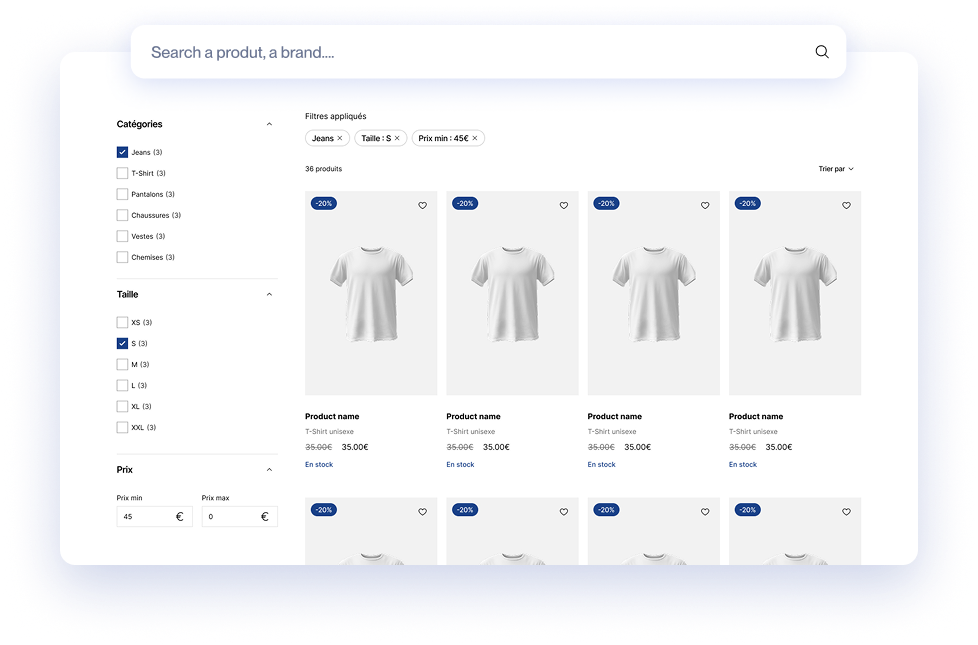
View Live Demo | Documentation | Report Issues
Why Use This Bundle?
- 🚀 Quick Setup: Get a working search in minutes with the maker command
- 🔌 Multiple Adapters: Support for Algolia, Meilisearch, and Doctrine ORM
- 🎨 Fully Customizable: Override templates and components to match your design
- ⚡ Live Updates: Built with Symfony UX Live Components for reactive UI
- 🎯 Faceted Search: Rich filtering with refinement lists, range sliders, and more
- 📦 Production Ready: Used in production with comprehensive test coverage
Features
- Multiple Search Configurations: Create and manage multiple searches, each with its own unique configuration
- Flexible Adapters:
- Algolia: Cloud-based search with advanced features
- Meilisearch: Self-hosted open-source search engine
- Doctrine ORM: Use your existing database for small datasets
- Rich UI Components: Pre-built components for search input, facets, pagination, sorting, and more
- Faceted Navigation: Multiple facet types (refinement lists, range inputs, range sliders)
- Live Components: Real-time updates without page reloads
- Event System: Customize search behavior with pre/post search events
- SEO Friendly: URL rewriting support for search parameters
- Customizable: Override any template or extend any component
Requirements
- PHP 8.3 or higher
- Symfony 6.4+ or 7.0+ or 8.0+
- Symfony UX (Live Components, Twig Components)
Installation
Install the bundle via Composer:
composer require mezcalito/ux-search
If you're not using Symfony Flex, you'll need to manually register the bundle in config/bundles.php:
// config/bundles.php
return [
    // ...
    Mezcalito\UxSearchBundle\MezcalitoUxSearchBundle::class => ['all' => true],
];
Quick Start
1. Configure an Adapter
Create a configuration file config/packages/mezcalito_ux_search.yaml:
mezcalito_ux_search:
    default_adapter: 'default'
    adapters:
        default: '%env(MEZCALITO_UX_SEARCH_DEFAULT_DSN)%'
Add the DSN to your .env file (choose one):
# For Algolia
MEZCALITO_UX_SEARCH_DEFAULT_DSN=algolia://YOUR_API_KEY@YOUR_APP_ID

# For Meilisearch
MEZCALITO_UX_SEARCH_DEFAULT_DSN=meilisearch://YOUR_MASTER_KEY@localhost:7700

# For Doctrine ORM
MEZCALITO_UX_SEARCH_DEFAULT_DSN=doctrine://default
2. Create Your First Search
Use the maker command to generate a search class:
php bin/console make:search
The command will ask you for:
- Index name: For Algolia/Meilisearch, the index name. For Doctrine, the entity FQCN (e.g.,
App\Entity\Product) - Search name (optional): Custom name for your search (defaults to class name without "Search" suffix)
- Adapter (optional): Which adapter to use (defaults to
default_adapter)
This creates a search class in src/Search/ that you can customize.
3. Render the Search in Your Template
In any Twig template:
{# Using Twig component syntax #}
<twig:Mezcalito:UxSearch:Layout name="product"/>

{# Or using component function #}
{{ component('Mezcalito:UxSearch:Layout', { name: 'product' }) }}
That's it! You now have a working search with facets, pagination, and live updates. 🎉
Choosing an Adapter
Three adapters are available, each with different strengths:
| Adapter | Best For | Performance | Cost | Setup Complexity |
|---|---|---|---|---|
| Algolia | Production, large datasets | ⭐⭐⭐ | 💰 Paid | Easy |
| Meilisearch | Self-hosted production | ⭐⭐⭐ | 🆓 Free | Medium |
| Doctrine | Development, small datasets | ⭐⭐ | 🆓 Free | Very Easy |
Adapter DSN Format
| Adapter | DSN Format | Documentation |
|---|---|---|
| Algolia | algolia://apiKey@appId |
View docs |
| Meilisearch | meilisearch://key@host:port |
View docs |
| Doctrine | doctrine://entityManagerName |
View docs |
Need another provider? You can create your own adapter.
Customizing Your Search
Adding Facets, Sorting, and More
Once you've created a search class, customize it by editing the build() method:
use Mezcalito\UxSearchBundle\Search\AbstractSearch;
use Mezcalito\UxSearchBundle\Attribute\AsSearch;
use Mezcalito\UxSearchBundle\Twig\Components\Facet\RangeInput;

#[AsSearch(index: 'products', adapter: 'default')]
class ProductSearch extends AbstractSearch
{
    public function build(array $options = []): void
    {
        // Add facets for filtering
        $this->addFacet('brand', 'Brand');
        $this->addFacet('category', 'Category');
        $this->addFacet('price', 'Price', RangeInput::class);

        // Add sorting options
        $this->addAvailableSort('name', 'Name');
        $this->addAvailableSort('price', 'Price');
        $this->addAvailableSort('created_at', 'Newest');

        // Configure pagination
        $this->setAvailableHitsPerPage([12, 24, 48]);

        // Adapter-specific parameters
        $this->setAdapterParameters([
            // Adapter-specific options here
        ]);
    }
}
Customizing the UI
The bundle provides a complete set of UI components that you can use individually or override:
Core Components
| Component | Description | Documentation |
|---|---|---|
| Layout | Root wrapper component containing all search elements | Docs |
| SearchInput | Text search input with live updates | Docs |
| Hits | Display search results with customizable item templates | Docs |
| Pagination | Navigate through search results | Docs |
Facet Components
| Component | Description | Documentation |
|---|---|---|
| RefinementList | Checkbox/radio list for categorical filtering | Docs |
| RangeInput | Min/max input fields for numeric ranges | Docs |
| RangeSlider | Slider for numeric range filtering | Docs |
Utility Components
| Component | Description | Documentation |
|---|---|---|
| CurrentRefinements | Display active filters with remove buttons | Docs |
| ClearRefinements | Button to clear all active filters | Docs |
| SortBy | Dropdown to change sort order | Docs |
| TotalHits | Display total number of results | Docs |
Overriding Templates
You can override any component template by creating a file in your app's templates/ directory:
templates/
└── components/
    └── Mezcalito/
        └── UxSearch/
            ├── Layout.html.twig          # Override the main layout
            ├── SearchInput.html.twig     # Override search input
            ├── Hits.html.twig            # Override results display
            └── Facet/
                └── RefinementList.html.twig
Custom Hit Template
The most common customization is the hit (result item) template. Override Hits.html.twig:
{# templates/components/Mezcalito/UxSearch/Hits.html.twig #}
<div {{ attributes }}>
    {% for hit in this.resultSet.hits %}
        <article class="product-card">
            <img src="{{ hit.image }}" alt="{{ hit.name }}">
            <h3>{{ hit.name }}</h3>
            <p class="price">{{ hit.price|format_currency('EUR') }}</p>
            <a href="{{ path('product_show', {id: hit.id}) }}">View details</a>
        </article>
    {% endfor %}
</div>
Advanced Usage
Event System
Customize search behavior with event subscribers:
use Mezcalito\UxSearchBundle\Event\PreSearchEvent;
use Symfony\Component\EventDispatcher\EventSubscriberInterface;

class SearchSubscriber implements EventSubscriberInterface
{
    public static function getSubscribedEvents(): array
    {
        return [
            PreSearchEvent::class => 'onPreSearch',
        ];
    }

    public function onPreSearch(PreSearchEvent $event): void
    {
        $query = $event->getQuery();
        // Modify the query before search execution
        $query->addFilter('status', 'published');
    }
}
Multiple Search Configurations
You can have multiple search configurations in one application:
// Product search with Algolia
#[AsSearch(index: 'products', adapter: 'algolia')]
class ProductSearch extends AbstractSearch { }

// Blog search with Meilisearch
#[AsSearch(index: 'posts', adapter: 'meilisearch')]
class BlogSearch extends AbstractSearch { }

// User search with Doctrine
#[AsSearch(index: 'App\Entity\User', adapter: 'orm')]
class UserSearch extends AbstractSearch { }
Each search can have its own adapter, facets, and configuration.
Documentation
Getting Started
Adapters
Components
- Layout - Root wrapper
- SearchInput - Search box
- Hits - Results display
- Pagination - Page navigation
- Facets - All facet components
- View all components
Advanced
- Customizing Your Search - Facets, sorting, events
- Component Customization - Override templates and behavior
Contributing
Contributions are welcome! Here's how you can help:
- Report bugs - Open an issue with a clear description
- Request features - Suggest new features with use cases
- Submit PRs - Fork, create a feature branch, and submit a pull request
- Improve docs - Documentation improvements are always appreciated
Development Setup
# Clone the repository
git clone https://github.com/mezcalito/ux-search.git
cd ux-search

# Start the Docker development environment
make up

# Install dependencies
make install

# Run tests
make test

# Run code quality checks
make ci
Support
- Issues: GitHub Issues
- Discussions: GitHub Discussions
- Demo: Live Demo
License
This bundle is released under the MIT License.
mezcalito/ux-search 适用场景与选型建议
mezcalito/ux-search 是一款 基于 PHP 开发的 Composer 扩展包,目前已累计 12.66k 次下载、GitHub Stars 达 66, 最近一次更新时间为 2025 年 01 月 22 日, 在 PHP 生态内属于活跃度较高的组件。
它主要适用于以下技术方向: 「search」 「listing」 「faceted search」 「meilisearch」 「symfony-ux」 等业务场景。在实际项目中,围绕这些方向常见需要落地的问题包括:接口对接、性能调优、并发安全、与既有框架(Laravel / ThinkPHP / Yii / Webman 等)的兼容适配,以及生产环境的日志埋点与稳定性保障。
我们在过去多个企业项目中使用过 mezcalito/ux-search 或与其功能相近的方案,如果你在选型或落地过程中遇到问题,例如 版本兼容、二次改造、私有化封装、与内部系统对接、生产 BUG 排查,欢迎联系我们协助评估。
基于 mezcalito/ux-search 在你已有业务上做功能扩展、字段裁剪、UI 适配、与内部账号 / 权限 / 日志系统的深度对接。
线上偶发问题、内存泄漏、慢查询、并发异常等排查修复;针对高流量场景做缓存、队列、索引层面的调优。
承接完整的项目从需求 → 设计 → 开发 → 上线 → 长期运维;也可按月提供技术保姆服务。
与 mezcalito/ux-search 相关的其它包
同方向 / 同关键字的高下载量 PHP Composer 包推荐,方便对比选型:
Search Extension for TYPO3, including faceting search functions.
PHP Faceted search
A Laravel package to retrieve data from Google Search Console
Indexed Search Autocomplete - Extends the TYPO3 Core Extension Indexed_Search searchform with an autocomplete feature.
Easy Catalog Images extension from Swissup
Abstraction Layer to index and search entities
统计信息
- 总下载量: 12.66k
- 月度下载量: 0
- 日度下载量: 0
- 收藏数: 66
- 点击次数: 12
- 依赖项目数: 0
- 推荐数: 0
其他信息
- 授权协议: MIT
- 更新时间: 2025-01-22