otago/moodle
Composer 安装命令:
composer require otago/moodle
包简介
Moodle webservice
README 文档
README
Easily connect Moodle to SilverStripe via the web services REST API.
Project Setup
- Plop the moodle/ folder into your SilverStripe directory or composer require otago/moodle
- create _config/moodle.yml
- run /dev/build?flush=all
And you've installed the module! The examples/MoodleExamplePage.php.example file contains three example web service requests that to help you get started.
You'll need to configure moodle.yml with a password/username or a token supplied by Moodle. (Under Site administration > Advanced features > Plugins > Web services > Manage tokens)
Example moodle.yml file:
---
Name: MoodleWebservice
---
OP\MoodleWebservice:
    authentication:
        username: my_moodle_username
        password: my_password
        service: webservice_name
        statictoken:
        locationTest: http://moodle.yourtertiaryaddress.com/
        locationDev: http://moodle.yourtertiaryaddress.com/
        locationLive: http://moodle.yourtertiaryaddress.com/
Your Moodle instance will need to be configured to accept web service requests.
Example calls
/**
 * returns a user's profile
 * @return \Dataobject|null
 */
public function getUserProfile() {
	// connect to moodle
	$moodle = MoodleWebservice::connect();
	if(!$moodle) {
		return Debug::message('Failed to connect to Moodle Webservice');
	}

	// create a user list containing one generic user
	$params = array('userlist' => array(
		(object) array(
			'userid'=>'2',
			'courseid' => '1'
		)
	));

	// call the function core_user_get_course_user_profiles
	$userprofile = $moodle->call ('core_user_get_course_user_profiles', $params);

	// return it
	return $userprofile->Data();
}
Example 2: get a list of programmes from a user
$moodle = MoodleWebservice::connect();
if(!$moodle) {
	return Debug::message('Failed to connect to Moodle Webservice');
}

// find programmes belonging to this user
$params = array('userid' => '2');
$courselist = $moodle->call ('core_enrol_get_users_courses', $params);
return $courselist->Data();
Example 3: find a user by their email address
$moodle = MoodleWebservice::connect();
if(!$moodle) {
	return Debug::message('Failed to connect to Moodle Webservice');
}

$params = array('values' => array('email@op.ac.nz'), 'field' => 'email');
$userdata = $moodle->call ('core_user_get_users_by_field', $params);

return $userdata->Data();
Configure Moodle
The most difficult integration task for this module will be configuring your Moodle instance to allow web service requests. There are many resources on the web explaining how to do this, but by far the most helpful is the Moodle check list under Site administration > Advanced features > Plugins > Web services > Overview.

Moodle configuration summary:
- Create a user that will be used for the service
- Create the roll for this user, with access to the web services
- Assign your new roll to the user
- Create an external service
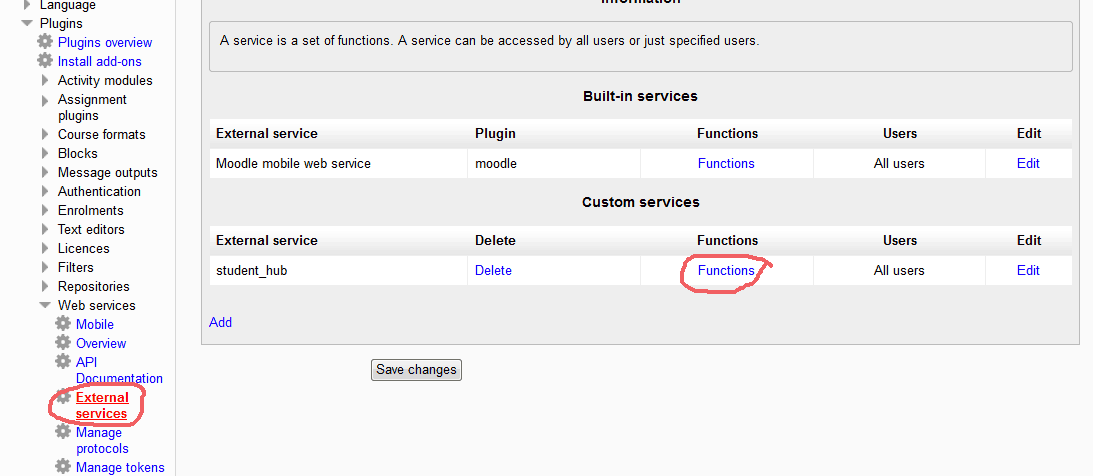 Note: Moodle 2.5 users will have to manually set the shortname in the db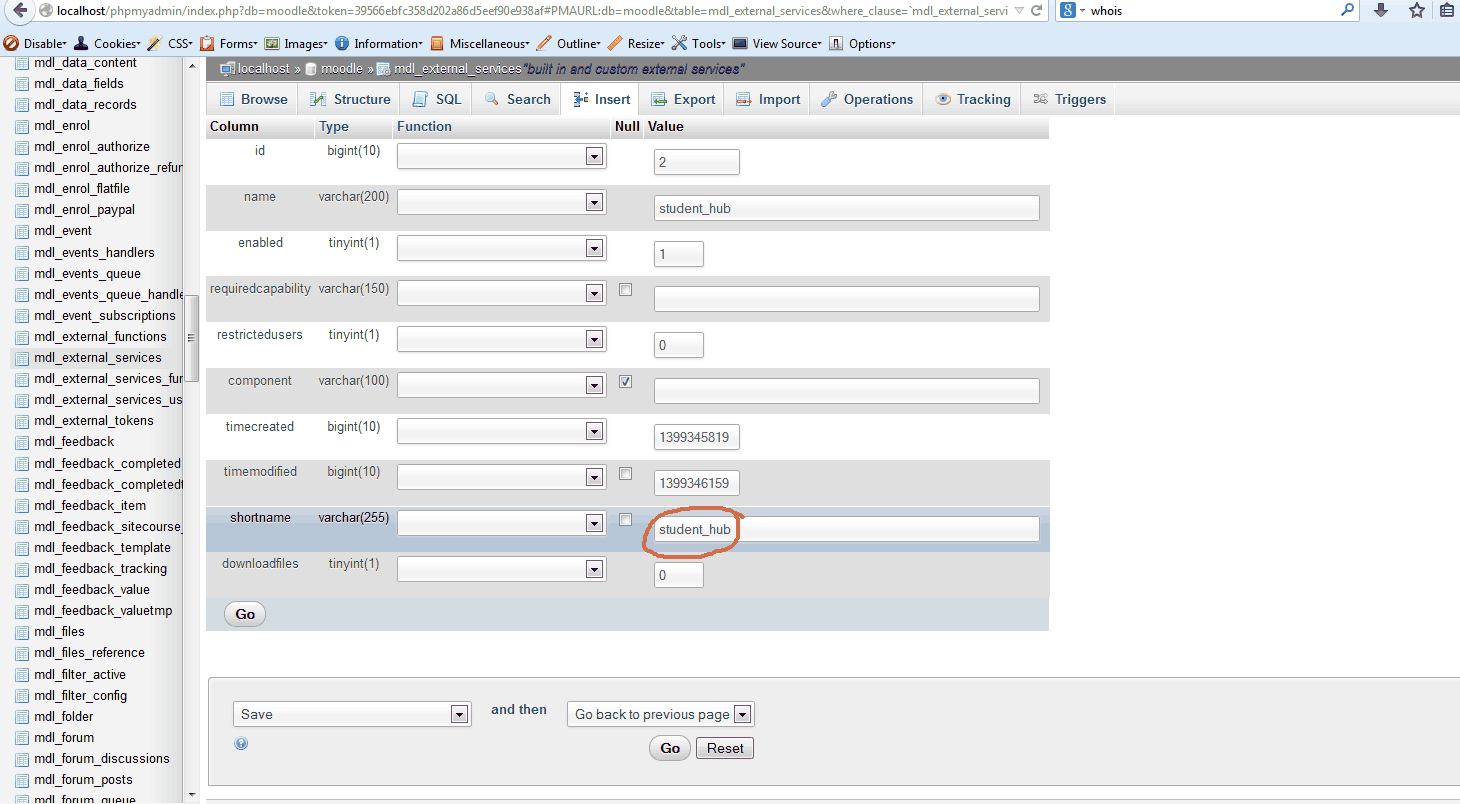
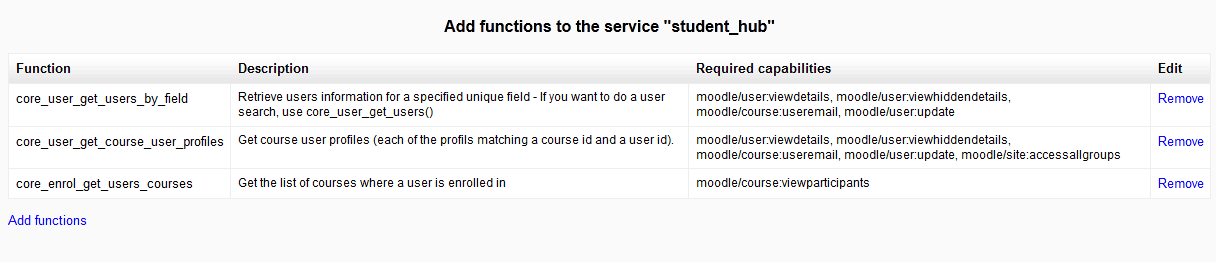
- Add the functions you want to call to the external service


Requirements
- cURL PHP module
- Moodle 2.2+ for JSON/REST
- SilverStripe 3.x
Integration Tests
- Create MoodleExamplePage on a test instance
- Save and load the page
- Update MoodleExamplePage.php to relevent user IDs
- View the raw output by using
Debug::show();on the output from$moodle->call()
Troubleshooting & Useful Tools
I recommend using Advanced REST Client for Google Chrome for debugging purposes.
debuging your moodleWebService:
- Make sure your $params match the API docs (Under Site administration > Advanced features > Plugins > Web services > API Documentation)
- Moodle's API Documentation can be notirious to read, make sure you tripple check the varibles you're using
Debug::show()your call()die(print_r($url, true));inside MoodleWebservice->call()- Make sure it's working using Advanced REST Client
common errors
- Invalid parameter value detected - match your params with the Moodle web service client documentation
- Access to the function XXXXXX() is not allowed. - add this function to the external service (see Project Setup)
- functions return nothing - enable debugging mode, you'll see debug messages.
Contributing changes
- Fork on git
- Raise an issue
License
BSD
otago/moodle 适用场景与选型建议
otago/moodle 是一款 基于 PHP 开发的 Composer 扩展包,目前已累计 7.02k 次下载、GitHub Stars 达 1, 最近一次更新时间为 2016 年 11 月 20 日, 在 PHP 生态内属于活跃度较高的组件。
它主要适用于以下技术方向: 「web service」 「silverstripe」 「moodle」 等业务场景。在实际项目中,围绕这些方向常见需要落地的问题包括:接口对接、性能调优、并发安全、与既有框架(Laravel / ThinkPHP / Yii / Webman 等)的兼容适配,以及生产环境的日志埋点与稳定性保障。
我们在过去多个企业项目中使用过 otago/moodle 或与其功能相近的方案,如果你在选型或落地过程中遇到问题,例如 版本兼容、二次改造、私有化封装、与内部系统对接、生产 BUG 排查,欢迎联系我们协助评估。
基于 otago/moodle 在你已有业务上做功能扩展、字段裁剪、UI 适配、与内部账号 / 权限 / 日志系统的深度对接。
线上偶发问题、内存泄漏、慢查询、并发异常等排查修复;针对高流量场景做缓存、队列、索引层面的调优。
承接完整的项目从需求 → 设计 → 开发 → 上线 → 长期运维;也可按月提供技术保姆服务。
与 otago/moodle 相关的其它包
同方向 / 同关键字的高下载量 PHP Composer 包推荐,方便对比选型:
Model of a web-based resource
A fast and intuitive dependency injection container.
Registry service.
Retrieve a WebResourceInterface instance over HTTP
Analytics chooser extensions for site settings.
统计信息
- 总下载量: 7.02k
- 月度下载量: 0
- 日度下载量: 0
- 收藏数: 1
- 点击次数: 3
- 依赖项目数: 0
- 推荐数: 0
其他信息
- 授权协议: BSD-3-Clause
- 更新时间: 2016-11-20