plasticstudio/dev-tools
Composer 安装命令:
composer require plasticstudio/dev-tools
包简介
Development tools for SilverStripe
关键字:
README 文档
README
Adds additional functionality to assist in developing SilverStripe websites.
Dependencies
- SilverStripe 3.1+
- Betterbuttons
Features
- Performance of page loads
- Visualisation of current site state (DEV/TEST/LIVE)
- Admins can emulate any other user
IconSelectFieldto use icon libraries within the CMS- Automatic redirection from development domains, when in LIVE mode
LogJamlogging to append system error log- BugHerd integration
Installation
- Add to your composer requirements
composer require jaedb/dev-tools - Edit your theme's
templates/Page.sstemplate and add$DebugToolsimmediately before the</body>tag - Run /dev/build?flush=1
- Toggle debug tools by turning your site to DEV or TEST modes (disabled on LIVE sites for obvious reasons)
- Set the site's BugHerd project key in
config.yml. See config/dev-tools.yml for an example.
Usage
Primary domain redirection
When you set your SS_PRIMARY_DOMAIN property on a live website, we automatically redirect to this primary domain. This avoids the need for bloated .htaccess redirections and allows control at the environment level.
- Set your preferred domain in
_ss_environment.php - Consider whether you want http vs https, and include this in your domain (but exclude trailing slash!).
- Example:
define('SS_PRIMARY_DOMAIN', 'https://plasticstudio.co.nz');will redirect http://www.plasticstudio.co.nz/some-section/subpage to https://plasticstudio.co.nz/some-section/subpage. - To completely disable this functionality set
disable_primary_domain_redirection: truein your project'sconfig.yml
Debug Tools

- Manage the visibility of the Debug Tools from within the CMS, under Settings
- Manage ability to Emulate users, also under Settings
IconSelectField
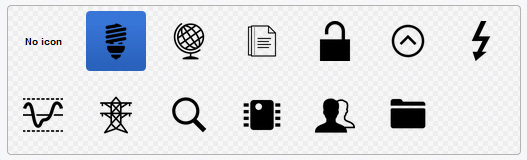
- Set your
$dbfield to typeIcon(eg'PageIcon' => 'Icon') IconSelectField::create($name, $title, $iconFolder)$nameis the database field as defined in your class$titleis the label for this field$iconFolder(optional) defines the directory where your icons can be found. Defaults to/site/icons.- Use your icon in templates as you would any other property (eg
$PageIcon). If your icon is an SVG, the SVG image data will be injected into the template. To prevent this, you can call$PageIcon.IMGinstead to enforce use of<img>tags.
LogJam
LogJam::Log($message, $environment)$messagea string that you'd like to log$environment(optional) the type of environment that should log this message (ie test, dev, live). Defaults todev.
- Enable LogJam in
_config.phpby addingLogJam::EnableLog(); - Check your log file location. Set this in
_ss_environment.phpwith the following:
ini_set('log_errors','on');
ini_set('error_log','/home/mywebsite/logs/php.log');
plasticstudio/dev-tools 适用场景与选型建议
plasticstudio/dev-tools 是一款 基于 Scheme 开发的 Composer 扩展包,目前已累计 2.01k 次下载、GitHub Stars 达 0, 最近一次更新时间为 2017 年 04 月 20 日, 在 PHP 生态内属于活跃度较高的组件。
它主要适用于以下技术方向: 「silverstripe」 等业务场景。在实际项目中,围绕这些方向常见需要落地的问题包括:接口对接、性能调优、并发安全、与既有框架(Laravel / ThinkPHP / Yii / Webman 等)的兼容适配,以及生产环境的日志埋点与稳定性保障。
我们在过去多个企业项目中使用过 plasticstudio/dev-tools 或与其功能相近的方案,如果你在选型或落地过程中遇到问题,例如 版本兼容、二次改造、私有化封装、与内部系统对接、生产 BUG 排查,欢迎联系我们协助评估。
基于 plasticstudio/dev-tools 在你已有业务上做功能扩展、字段裁剪、UI 适配、与内部账号 / 权限 / 日志系统的深度对接。
线上偶发问题、内存泄漏、慢查询、并发异常等排查修复;针对高流量场景做缓存、队列、索引层面的调优。
承接完整的项目从需求 → 设计 → 开发 → 上线 → 长期运维;也可按月提供技术保姆服务。
与 plasticstudio/dev-tools 相关的其它包
同方向 / 同关键字的高下载量 PHP Composer 包推荐,方便对比选型:
Analytics chooser extensions for site settings.
CitaNZ's SilverStripe picture object and field for SilverStripe 4
bootstrap select field module implementing http://silviomoreto.github.io/bootstrap-select/
Allows you to defined CMS form structure via config.yml
A module for adding a podcast or multiple podcasts to your SilverStripe site. With support for audio, video or other files.
统计信息
- 总下载量: 2.01k
- 月度下载量: 0
- 日度下载量: 0
- 收藏数: 0
- 点击次数: 0
- 依赖项目数: 0
- 推荐数: 0
其他信息
- 授权协议: BSD-3-Clause
- 更新时间: 2017-04-20