riodwanto/filament-logger
Composer 安装命令:
composer require riodwanto/filament-logger
包简介
Activity logger for filament
README 文档
README
A comprehensive activity logging solution for Filament applications, powered by spatie/laravel-activitylog. Track user actions, model changes, and system events with a beautiful, configurable interface.
Features
- 📊 Comprehensive Logging: Track Filament Resource events, user logins, notifications, and custom model events
- 🎨 Beautiful Interface: Clean, responsive UI with advanced filtering and search capabilities
- 🌍 Multi-language Support: Available in 19+ languages with easy translation publishing
- ⚙️ Highly Configurable: Enable/disable specific loggers, customize colors, and configure retention
- 🔍 Advanced Filtering: Filter by date range, user, event type, and property changes
- 🏢 Multi-tenant Support: Built-in support for Filament's multi-tenancy features
- 📱 Mobile Responsive: Optimized for all device sizes
- 🔧 Extensible: Easy to extend with custom loggers and events
What Gets Logged
By default, this package logs:
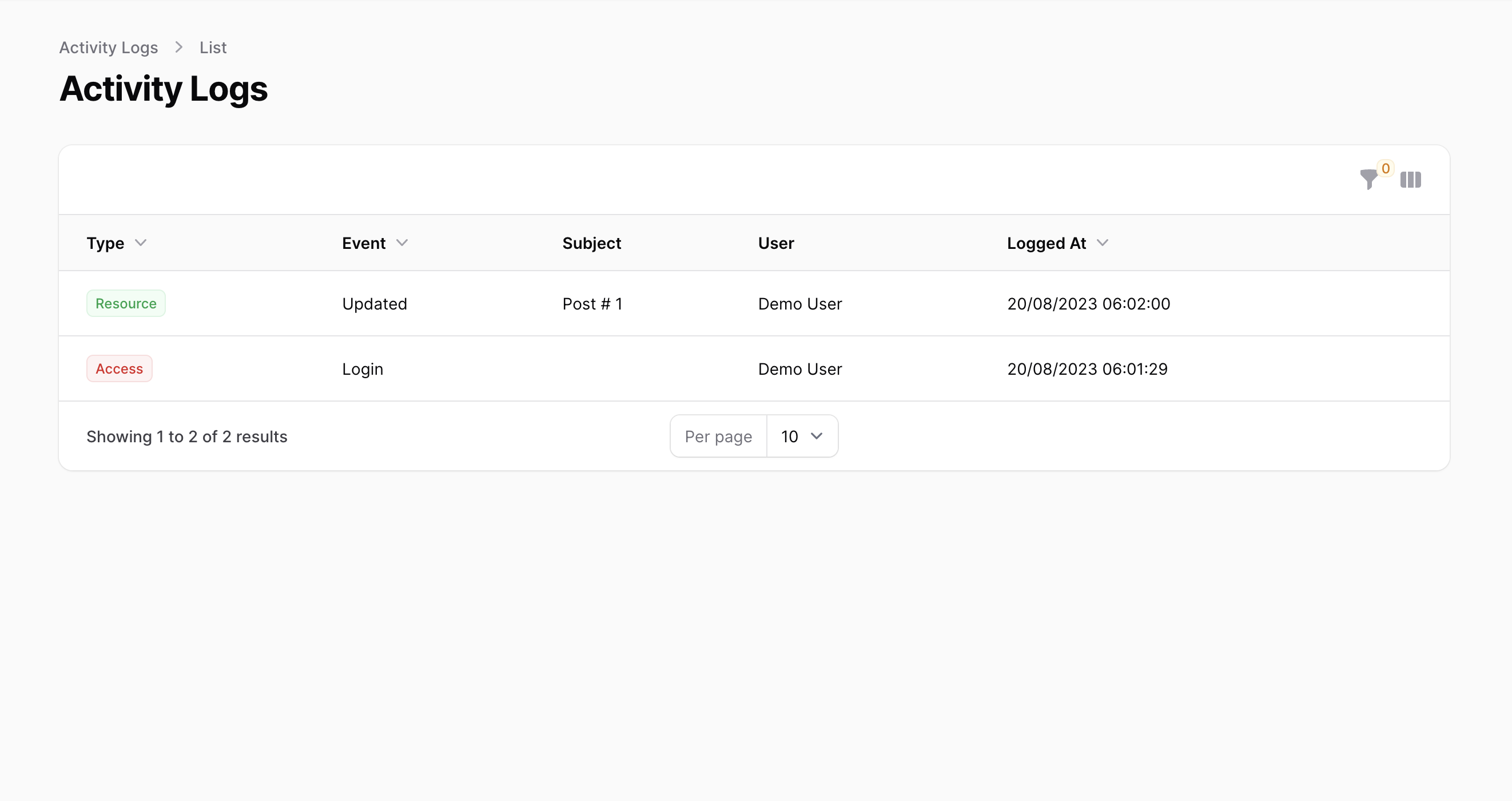
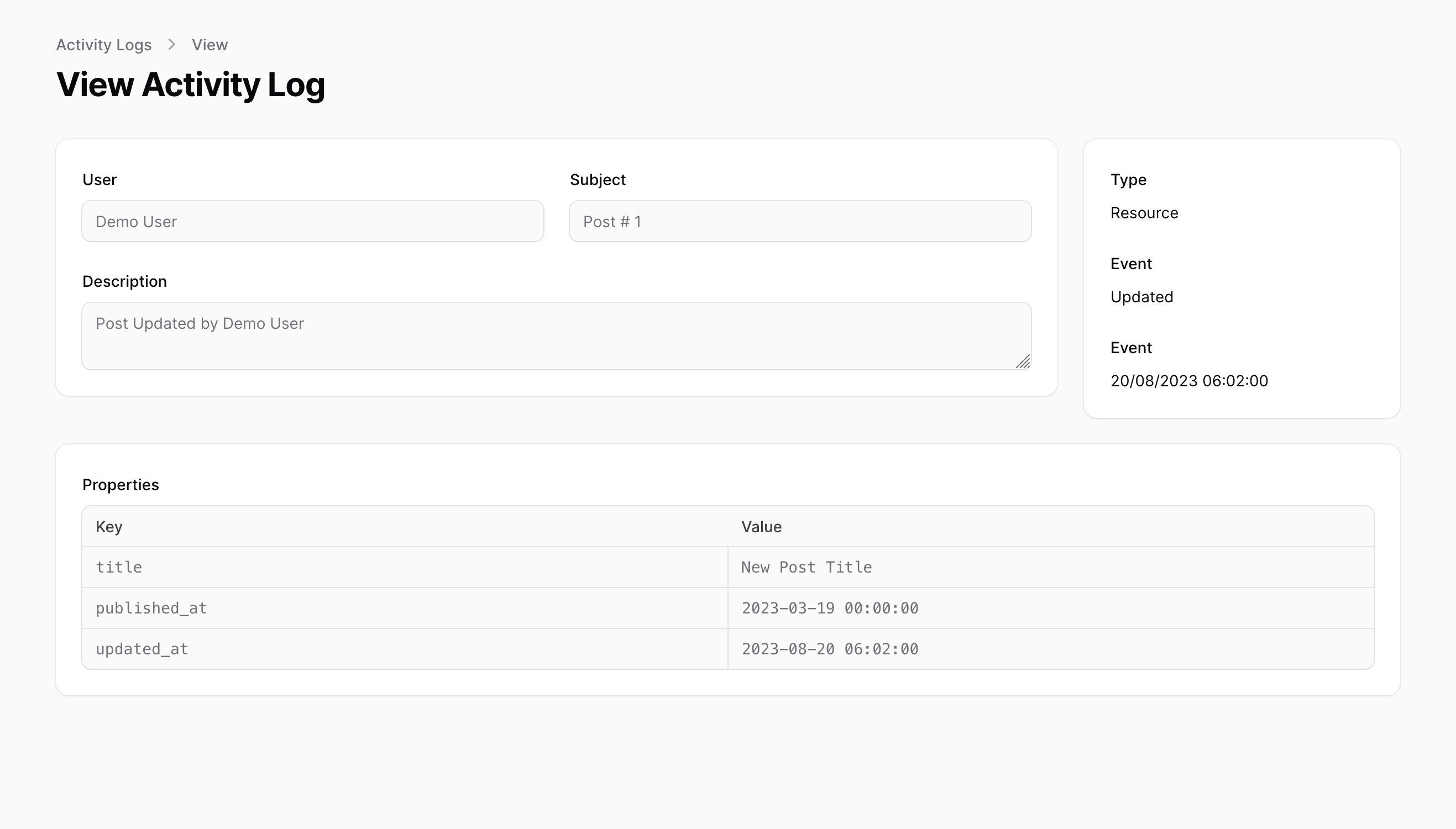
- Resource Events: Create, update, delete operations on Filament Resources
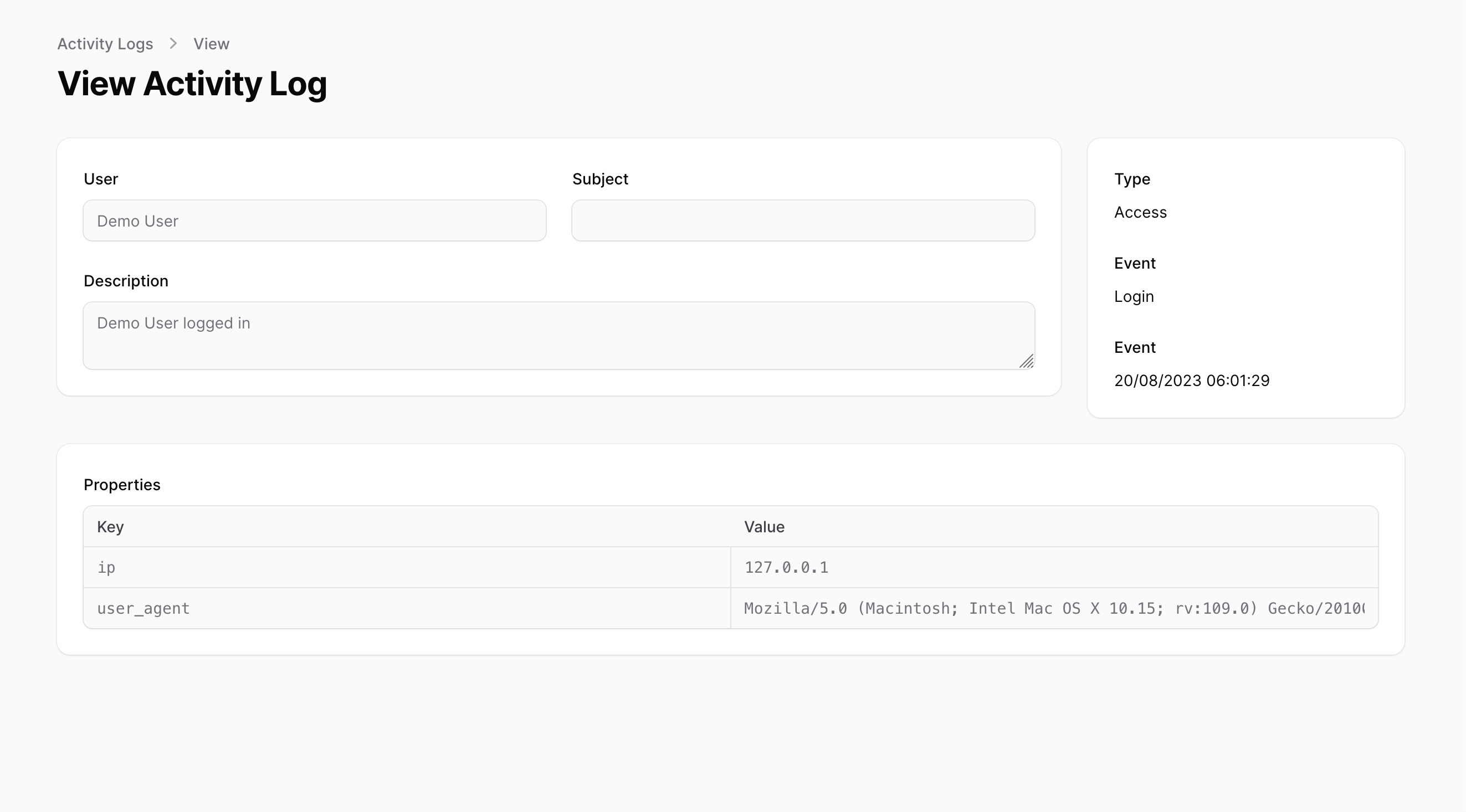
- Access Events: User login/logout activities with IP and user agent
- Notification Events: Sent and failed notification attempts
- Model Events: Custom model changes (when configured)
Note: If you want to log models that are not Filament Resources, you'll need to manually register them in the configuration file.
Installation
This package uses spatie/laravel-activitylog, instructions for its setup can be found here
Requirements
- PHP 8.1 or higher
- Laravel 8.0 or higher
- Filament 3.x
Installation
- Install the package via Composer:
composer require riodwanto/filament-logger
- Run the installation command:
php artisan filament-logger:install
This command will:
- Publish the configuration file
- Publish migrations from
spatie/laravel-activitylog - Set up the necessary database tables
- Run the migrations:
php artisan migrate
- Register the Activity Resource in your Panel Provider:
<?php

namespace App\Providers;

use Filament\Panel;
use Filament\PanelProvider;

class AdminPanelProvider extends PanelProvider
{
    public function panel(Panel $panel): Panel
    {
        return $panel
            ->resources([
                config('filament-logger.activity_resource')
            ]);
    }
}
Quick Start
After installation, you'll immediately see activity logs for:
- All Filament Resource operations (create, update, delete)
- User login events
- Notification events
Navigate to your Filament admin panel and look for the "Activity Log" menu item to view the logs.
Configuration
The package is highly configurable through the config/filament-logger.php file. Here are the main configuration options:
Basic Configuration
return [
    'datetime_format' => 'd/m/Y H:i:s',
    'date_format' => 'd/m/Y',
    'activity_resource' => \Riodwanto\FilamentLogger\Resources\ActivityResource::class,
    'scoped_to_tenant' => true,
    'navigation_sort' => null,
];
Logger Configuration
Resource Logger
'resources' => [
    'enabled' => true,
    'log_name' => 'Resource',
    'logger' => \Riodwanto\FilamentLogger\Loggers\ResourceLogger::class,
    'color' => 'success',
    'exclude' => [
        // App\Filament\Resources\UserResource::class,
    ],
    'cluster' => null,
    'navigation_group' => 'Settings',
],
Access Logger
'access' => [
    'enabled' => true,
    'logger' => \Riodwanto\FilamentLogger\Loggers\AccessLogger::class,
    'color' => 'danger',
    'log_name' => 'Access',
],
Notification Logger
'notifications' => [
    'enabled' => true,
    'logger' => \Riodwanto\FilamentLogger\Loggers\NotificationLogger::class,
    'color' => null,
    'log_name' => 'Notification',
],
Model Logger
'models' => [
    'enabled' => true,
    'log_name' => 'Model',
    'color' => 'warning',
    'logger' => \Riodwanto\FilamentLogger\Loggers\ModelLogger::class,
    'register' => [
        // App\Models\User::class,
        // App\Models\Post::class,
    ],
],
Custom Loggers
You can create custom loggers for specific events:
'custom' => [
    [
        'log_name' => 'Payment',
        'color' => 'primary',
        'logger' => \App\Loggers\PaymentLogger::class,
    ],
],
Customization
Creating Custom Loggers
Create a custom logger by extending the AbstractModelLogger:
<?php

namespace App\Loggers;

use Riodwanto\FilamentLogger\Loggers\AbstractModelLogger;

class PaymentLogger extends AbstractModelLogger
{
    protected function getLogName(): string
    {
        return 'Payment';
    }

    public function paymentProcessed($payment)
    {
        $this->log($payment, 'Processed', 'Payment was processed successfully');
    }
}
Excluding Resources from Logging
To exclude specific resources from being logged:
'resources' => [
    'exclude' => [
        \App\Filament\Resources\UserResource::class,
        \App\Filament\Resources\ActivityResource::class,
    ],
],
Customizing Navigation
// In your config
'navigation_group' => 'Audit',
'navigation_sort' => 10,
'scoped_to_tenant' => false, // Set to false for global logs
Customizing Date Formats
'datetime_format' => 'Y-m-d H:i:s', // Database format
'date_format' => 'Y-m-d',          // Display format
Advanced Features
Multi-tenant Support
The package supports Filament's multi-tenancy out of the box. Set scoped_to_tenant to true in your config to enable tenant-scoped activity logs.
Advanced Filtering
The activity log interface includes powerful filtering options:
- Date Range: Filter logs by creation date range
- Event Type: Filter by specific events (created, updated, deleted, etc.)
- User: Filter by specific user ID
- Subject Type: Filter by model type
- Property Changes: Search within old/new values
Export Functionality
You can easily add export functionality by extending the ActivityResource:
use Filament\Tables\Actions\BulkAction;

// In your ActivityResource table method
BulkAction::make('export')
    ->label('Export Selected')
    ->icon('heroicon-o-download')
    ->action(function ($records) {
        // Your export logic here
    }),
Troubleshooting
Common Issues
Activity Logs Not Appearing
- Ensure the ActivityResource is registered in your PanelProvider
- Check that the migrations have been run
- Verify that the loggers are enabled in the config
Missing Translation Keys
If you see missing translation keys, publish the translations:
php artisan vendor:publish --tag="filament-logger-translations"
Performance Issues
For high-traffic applications:
- Consider disabling certain loggers
- Implement log rotation
- Use database indexing on frequently queried columns
Multi-tenant Issues
If logs aren't scoped correctly:
- Verify
scoped_to_tenantsetting - Ensure your tenant model is properly configured
- Check that the Activity model uses the correct tenant relationship
Debug Mode
Enable debug mode to see detailed logging information:
// In your config/filament-logger.php
'debug' => env('FILAMENT_LOGGER_DEBUG', false),
Authorization
To enforce policies on ActivityResource, after generating a policy, you would need to register Spatie\Activitylog\Models\Activity to use that policy in the AuthServiceProvider.
<?php

namespace App\Providers;

use App\Policies\ActivityPolicy;
use Illuminate\Foundation\Support\Providers\AuthServiceProvider as ServiceProvider;
use Spatie\Activitylog\Models\Activity;

class AuthServiceProvider extends ServiceProvider
{
    protected $policies = [
        // Update `Activity::class` with the one defined in `config/activitylog.php`
        Activity::class => ActivityPolicy::class,
    ];
    //...
}
If you are using Shield just register the ActivityPolicy generated by it
Translations
Publish the translations using:
php artisan vendor:publish --tag="filament-logger-translations"
Activity Model resolution
The main Activity class being used by the Filament Resource instance will be resolved by Spatie's service provider, which loads the model defined by the configuration key found at activitylog.activity_model in config/activitylog.php.
Screenshots
Changelog
Please see CHANGELOG for more information on what has changed recently.
Contributing
Please see CONTRIBUTING for details.
Security Vulnerabilities
Please review our security policy on how to report security vulnerabilities.
Credits
- Ziyaan Hassan - Original Author
- Rio Dwanto - Current Maintainer
- Spatie Activitylog Contributors
- All Contributors
License
The MIT License (MIT). Please see License File for more information.
Support
If you encounter any issues or have questions:
- Check the troubleshooting section above
- Search existing GitHub Issues
- Create a new issue with detailed information about your problem
Contributing
We welcome contributions! Please see our Contributing Guide for details on how to:
- Report bugs
- Suggest new features
- Submit pull requests
- Follow our coding standards
Changelog
Please see CHANGELOG for more information on what has changed recently.
Upgrade Guide
From Original Package (z3d0x/filament-logger)
If you're upgrading from the original package:
-
Update Composer dependency:
composer remove z3d0x/filament-logger
composer require riodwanto/filament-logger
-
Update namespace references (if any):
- Change
Z3d0X\FilamentLoggertoRiodwanto\FilamentLogger
- Change
-
Clear caches:
php artisan config:clear
php artisan cache:clear
-
Test your application to ensure everything works correctly
The API remains largely the same, so most applications should work without changes.
riodwanto/filament-logger 适用场景与选型建议
riodwanto/filament-logger 是一款 基于 PHP 开发的 Composer 扩展包,目前已累计 707 次下载、GitHub Stars 达 1, 最近一次更新时间为 2025 年 10 月 10 日, 在 PHP 生态内属于活跃度较高的组件。
它主要适用于以下技术方向: 「laravel」 「activity-log」 「filament」 「Z3d0X」 「filament-logger」 「riodwanto」 等业务场景。在实际项目中,围绕这些方向常见需要落地的问题包括:接口对接、性能调优、并发安全、与既有框架(Laravel / ThinkPHP / Yii / Webman 等)的兼容适配,以及生产环境的日志埋点与稳定性保障。
我们在过去多个企业项目中使用过 riodwanto/filament-logger 或与其功能相近的方案,如果你在选型或落地过程中遇到问题,例如 版本兼容、二次改造、私有化封装、与内部系统对接、生产 BUG 排查,欢迎联系我们协助评估。
基于 riodwanto/filament-logger 在你已有业务上做功能扩展、字段裁剪、UI 适配、与内部账号 / 权限 / 日志系统的深度对接。
线上偶发问题、内存泄漏、慢查询、并发异常等排查修复;针对高流量场景做缓存、队列、索引层面的调优。
承接完整的项目从需求 → 设计 → 开发 → 上线 → 长期运维;也可按月提供技术保姆服务。
与 riodwanto/filament-logger 相关的其它包
同方向 / 同关键字的高下载量 PHP Composer 包推荐,方便对比选型:
Audit logging, activity tracking, exports, alerts, and dashboards for Filament admin panels.
This is my package activity-log
Symfony Activity Log Bundle
Alfabank REST API integration
Laravel package that logs third-party HTTP traffic (outgoing requests and incoming callbacks) and actor/model activity to a dedicated Elasticsearch cluster, with redaction, queued indexing, sampling, and optional dashboards.
Eloquent model & relation change auditing for Laravel, with a pluggable transport
统计信息
- 总下载量: 707
- 月度下载量: 0
- 日度下载量: 0
- 收藏数: 1
- 点击次数: 5
- 依赖项目数: 1
- 推荐数: 0
其他信息
- 授权协议: MIT
- 更新时间: 2025-10-10