rubix/colors
Composer 安装命令:
composer create-project rubix/colors
包简介
Demonstrating unsupervised clustering using the K Means algorithm and synthetic color data.
关键字:
README 文档
README
The K Means algorithm is a popular unsupervised learner for clustering samples. In this tutorial, we'll generate a synthetic dataset of colors so that we can demonstrate how K Means clusters them into groups.
- Difficulty: Easy
- Training time: Less than a minute
Installation
Clone the project locally using Composer:
$ composer create-project rubix/colors
Requirements
- PHP 7.4 or above
Tutorial
Introduction
In machine learning, synthetic data are often used for demonstration purposes or to augment a smaller dataset with more training samples. In this tutorial we'll use synthetic data to train and test a K Means clusterer to group samples by color. K Means is a highly-scalable algorithm that works by finding the center vectors (called centroids) for every k clusters of the training set. During inference, the distance from an unknown sample to each centroid is measured to determine the cluster it belongs to.
Note: The source code for this example can be found in the train.php file in project root.
Generating the Data
Rubix ML provides a number of dataset Generators which output a dataset in a particular shape and dimensionality. For this example project, we are going to generate Blobs of color channel data using red, green, and blue (RGB) values for the features. The Agglomerate will combine and label the individual color generators to form a Labeled dataset consisting of all 10 colors weighted equally.
use Rubix\ML\Datasets\Generators\Agglomerate;
use Rubix\ML\Datasets\Generators\Blob;

$generator = new Agglomerate([
    'red' => new Blob([255, 0, 0], 20.0),
    'orange' => new Blob([255, 128, 0], 10.0),
    'yellow' => new Blob([255, 255, 0], 10.0),
    'green' => new Blob([0, 128, 0], 20.0),
    'blue' => new Blob([0, 0, 255], 20.0),
    'aqua' => new Blob([0, 255, 255], 10.0),
    'purple' => new Blob([128, 0, 255], 10.0),
    'pink' => new Blob([255, 0, 255], 10.0),
    'magenta' => new Blob([255, 0, 128], 10.0),
    'black' => new Blob([0, 0, 0], 10.0),
]);
To generate the dataset, call the generate() method with the number of samples (n) to be generated as an argument. The return value is a Dataset object that allows you to process the data fluently using its methods if needed. For example we could stratify and split the dataset into a training and testing set such that each subset contains a proportion of the dataset and each color is represented fairly in each subset. The proportion of samples in the left (training) set to the right (testing) set is given by the ratio parameter of the stratifiedSplit() method. For this example, we'll choose to generate a set of 5,000 samples and then split it 80/20 (4000 for training and 1000 for testing).
[$training, $testing] = $generator->generate(5000)->stratifiedSplit(0.8);
Now, let's take a look at the data we've generated using some plotting software such as Plotly. You'll notice that each color forms a distinct blob in 3-dimensional space.

Instantiating the Learner
Next, we'll instantiate our K Means clusterer by defining its hyper-parameters. K Means is a fast online clustering algorithm that minimizes the inertia cost function using Mini Batch Gradient Descent. The algorithm finds a set of k cluster centroids or multivariate means of the target cluster. The number of target clusters (k) is passes as a hyper-parameter to the learners constructor. For this example, we already know that the number of clusters should be 10 so we'll set k to 10.
use Rubix\ML\Clusterers\KMeans;

$estimator = new KMeans(10);
Training
Once the learner has been instantiated, call the train() method with the training set we generated earlier as an argument.
$estimator->train($training);
Training Loss
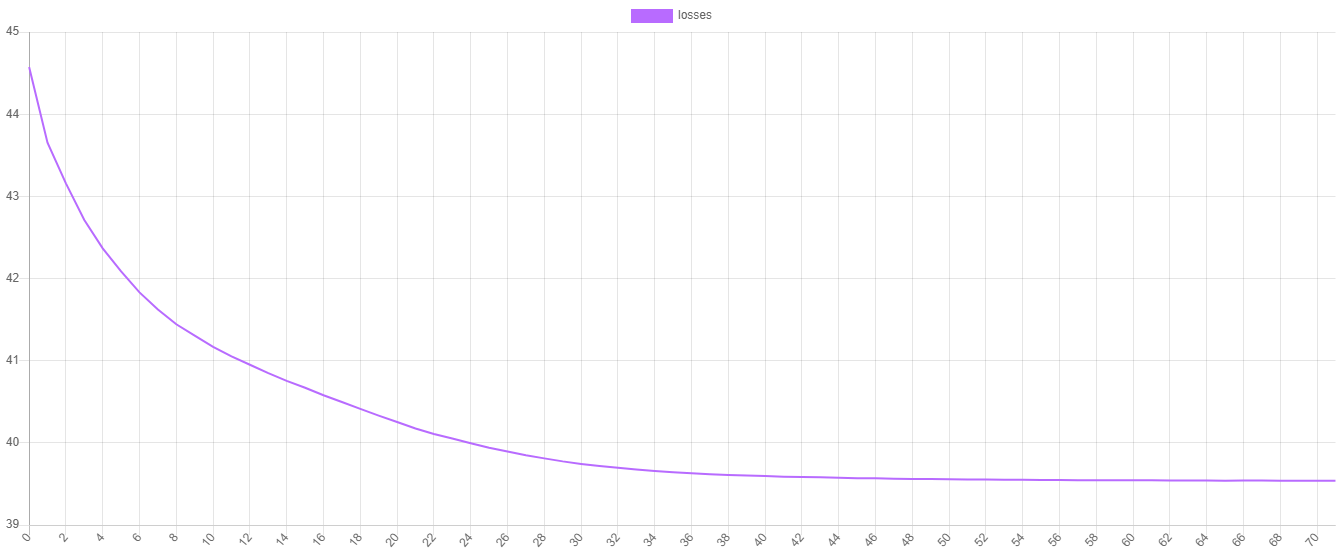
K Means uses the inertia cost function to measure the goodness of fit of each of the k centroids. We can visualize the training progress by plotting the values of the cost function at each epoch. To obtain the training losses call the steps() method on the estimator. To save the progress to a file we can pass the iterator returned by the steps() method to the export() method of a Writable extractor.
use Rubix\ML\Extractors\CSV;

$extractor = new CSV('progress.csv', true);

$extractor->export($estimator->steps());
Now, we can plot the values using our favorite plotting software. As you can see, the value of the cost function decreases at each epoch until it stops when K Means has met its stopping criteria.
Making Predictions
To make the predictions, pass the testing set to the predict() method on the estimator instance.
$predictions = $estimator->predict($testing);
Cross Validation
Lastly, to test the model we just created, let's generate a cross validation report that compares the predictions to some ground truth given by the labels we've assigned to the generators. A Contingency Table is a clustering report similar to a Confusion Matrix but for clustering instead of classification. It counts the number of times a particular cluster was assigned to a given label. A good clustering has a contingency table where each cluster contains samples with roughly the same label. We'll need the predictions we generated earlier as well as the labels from the testing set for the report's generate() method.
use Rubix\ML\CrossValidation\Reports\ContingencyTable;

$report = new ContingencyTable();

$results = $report->generate($predictions, $testing->labels());
Now we're ready to run the training and validation script from the command line.
$ php train.php
Here is an excerpt of the Contingency Report. You'll notice a misclustered magenta point within the red cluster. Not bad, nice work!
{
    "8": {
        "red": 100,
        "orange": 0,
        "yellow": 0,
        "green": 0,
        "blue": 0,
        "aqua": 0,
        "purple": 0,
        "pink": 0,
        "magenta": 1,
        "black": 0
    },
}
Note: Due to the stochastic nature of the K Means algorithm, each clustering will be a little different. If a particular clustering is poor, you can try retraining the learner.
Next Steps
Congratulations on completing the tutorial on K Means and synthetic data generation. Try generating some more data in other shapes using the Circle or Half Moon generator. Is K Means able to detect clusters of different shapes and sizes?
License
The code is licensed MIT and the tutorial is licensed CC BY-NC 4.0.
统计信息
- 总下载量: 179
- 月度下载量: 0
- 日度下载量: 0
- 收藏数: 19
- 点击次数: 0
- 依赖项目数: 0
- 推荐数: 0
其他信息
- 授权协议: MIT
- 更新时间: 2020-06-18