rurounize/laminas-flash-noty-messenger
Composer 安装命令:
composer require rurounize/laminas-flash-noty-messenger
包简介
View Helper for beautiful JS notifications for Laminas.
README 文档
README
This version support Laminas and Noty v3
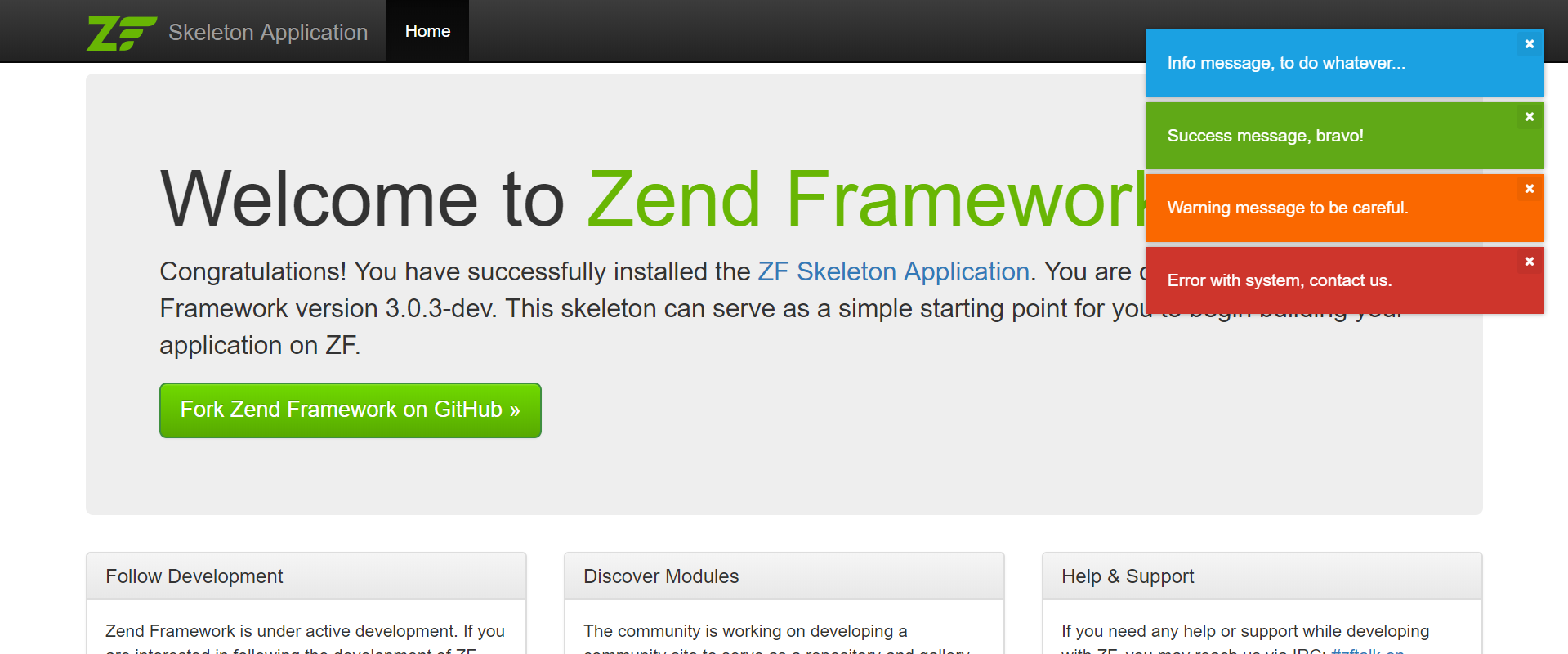
View Helper for showing flash messages with help of NOTY plugin http://ned.im/noty/#/
Install
Add in composer.json file and than run composer update
{
  "require": {
    "rurounize/laminas-flash-noty-messenger":"^4.0"
  }
}
The module should be registered in config/modules.config.php in Zend Framework 3 / Laminas
return [
    // ...
    'FlashNotyMessenger'
    // ...
]
Note FlashNotyMessenger includes local files and CDN assets, you can decide what to use.
After that, copy JS files from vendor/rurounize/zend-flash-noty-messenger/asset/
and put it on path public/js/noty/
mkdir public/js/noty/
# For develop
cp vendor/rurounize/laminas-flash-noty-messenger/asset/noty.js public/js/noty/noty.js
# For production
cp vendor/rurounize/laminas-flash-noty-messenger/asset/noty.min.js public/js/noty/noty.min.js
If you can use local assets copy CSS files from vendor/rurounize/zend-flash-noty-messenger/asset/
and put it on path public/css/noty/
mkdir public/css/noty/
# For develop
cp vendor/rurounize/laminas-flash-noty-messenger/asset/noty.css public/css/noty/noty.css
# For production
cp vendor/rurounize/laminas-flash-noty-messenger/asset/noty.min.css public/css/noty/noty.min.css
If you want to customize the configuration you can copy in config/autoload/global.php or config/autoload/local.php
return [
    // ...
    'noty_config' => [
        'layout'    => 'topRight',
        'theme'     => 'mint',
        'closeWith' => ['click', 'button'],
        /* 'animation' => [
            'open'  => 'animated fadeInRight',
            'close' => 'animated fadeOutRight'
        ] */
    ],

    'noty_assets' => [
        'use'   => 'cdn', // local for local assets
        'cdn'   => [
            'css'   => 'https://cdnjs.cloudflare.com/ajax/libs/noty/3.1.4/noty.min.css',
            'js'    => 'https://cdnjs.cloudflare.com/ajax/libs/noty/3.1.4/noty.min.js',
        ],
        'local' => [
            'css'   => 'css/noty/noty.min.css',
            'js'    => 'js/noty/noty.min.js',
        ]
    ],
    // ...
];
Setup
In layout.phtml somewhere at the end trigger fire()
/**
 * The fire() method do
 *     Collect all messages from previous and current request
 *     clear current messages because we will show it
 *     add JS files
 *     add JS notifications
 */
<?php $this->flashNoty()->fire(); ?>

<!-- if you already don't have this line, must add it for including JS files -->
<?= $this->inlineScript() ?>
Use
Use it in any controller.
Add messages in your controller and the messages will be showed (in redirected request or current)
<?php
$this->flashMessenger()->addSuccessMessage('Success message, bravo!');
$this->flashMessenger()->addErrorMessage('Error with system, contact us.');
$this->flashMessenger()->addInfoMessage('Info message, to do whatever...');
$this->flashMessenger()->addWarningMessage('Warning message to be careful.');
Credits
The original version belongs to https://github.com/tasmaniski/zend-flash-noty-messenger
统计信息
- 总下载量: 12
- 月度下载量: 0
- 日度下载量: 0
- 收藏数: 0
- 点击次数: 3
- 依赖项目数: 0
- 推荐数: 0
其他信息
- 授权协议: Unknown
- 更新时间: 2020-04-11