sinevia/laravel-cms
Composer 安装命令:
composer require sinevia/laravel-cms
包简介
Content Management System for Laravel
README 文档
README
A "plug-and-play" content managing system (CMS) for Laravel that does its job and stays out of your way.
Introduction
All of the existing Laravel CMS (OctoberCms, AsgardCms, PyroCms, etc) require a full installations from scratch. Its impossible to just add them to an exiting Laravel application, and even when added feel like you don't get what you hoped for.
This package allows to add a content management system as a package dependency in your composer file, which can be easily updated or removed as required to ANY Laravel app. It is fully self contained, and does not require any additional packages or dependencies. Removal is also a breeze just remove from your composer file.
Features
- Templates (aka master layouts)
- Pages (web pages)
- Blocks (reusable cutom pieces of code -- headers, footers)
- Widgets (dynamic reusable pre-defined components)
Installation (est. 5-10 mins)
- Install required library
composer require lesichkovm/laravel-advanced-route
composer require lesichkovm/laravel-advanced-model
- Install the CMS
composer require sinevia/laravel-cms
php artisan migrate
php artisan vendor:publish --tag=config
// If you want the migrations, usually not needed
php artisan vendor:publish --tag=migrations
// If you want the views, usually not  needed
php artisan vendor:publish --tag=views
Word of warning. Do use a stable package, as "dev-master" is a work in progress.
Uninstall (est. 5 mins)##
Removal of the package is a breeze:
composer remove sinevia/laravel-cms
Optionally, delete the CMS tables (all which start with the snv_cms_ prefix)
Configuration
After running the vendor:publish command, the CMS settings will be published in the /config/cms.php config file. Check these out, and modify according to your taste
Route Settings
- CMS Endpoint (public, catch all)
\Route::group(['prefix' => '/'], function () {
    // will match only one level deep (not recommended)
    \Route::any('/{path?}', '\Sinevia\Cms\Http\Controllers\CmsController@anyPageView');

    // or use with regex expression to match any level
    \Route::any('/{path?}', '\Sinevia\Cms\Http\Controllers\CmsController@anyPageView')
        ->where('path', '([a-zA-z0-9\/\-]++)');

    // or use with simpler regex expression to match any level
    \Route::any('/{path?}', '\Sinevia\Cms\Http\Controllers\CmsController@anyPageView')
        ->where('path', '.+');

    // or if you prefer using the class path (recommended)
    \Route::any('/{path?}', [\Sinevia\Cms\Http\Controllers\CmsController::class, 'anyPageView'])
        ->where('path', '.+');
});
- Admin endpoint (private, protect with middleware)
\Route::group(['prefix' => '/admin'], function () {
    \Route::group(['middleware'=>'adminonly'], function(){
        \AdvancedRoute::controller('/cms', '\Sinevia\Cms\Http\Controllers\CmsController');

        // or if your prefer using class path (recommended)
        \AdvancedRoute::controller('/cms', \Sinevia\Cms\Http\Controllers\CmsController::class);
    });
});
Templates
The templates are layouts, that can be used to display the pages in a uniform fashion. You may have multiple templates which is useful if you want to have different "look and feel" for different sections of your website.
Pages
The pages are the content which displays when you visit a specified URL. Each page may have an optional parent template, which can specify common elements (i.e. style sheets, scripts, etc) for all pages sharing the template.
Blocks
The blocks are small content snippets which can be embedded into pages and templates. Useful if you want to use on multiple pages, or to make pages more lightweight.
To embed in page or template use a shortcode like this: [[BLOCK_20180509052702261348]]
Widgets
The widgets are predefined dynamic modules which can be embedded into pages and templates (i.e. Google Maps, Contact Forms, etc). Depending on the action they perform, these may or may not have optional or requred parameters. Each widget files reside in its own directory.
To embed in page or template use a shortcode like this: [[WIDGET_20180509052702261348]]
More info: https://github.com/Sinevia/laravel-cms/wiki/Widgets
Human Friendly Aliases
The following shortcuts can be used to create human friendly page aliases, that can be used for pages with dynamic content
| Shortcut | Regex |
|---|---|
| :any | ([^/]+) |
| :num | ([0-9]+) |
| :all | (.*) |
| :string | ([a-zA-Z]+) |
| :number | ([0-9]+) |
| :numeric | ([0-9-.]+) |
| :alpha' | ([a-zA-Z0-9-_]+) |
Example page alias: /article/:num/:string
To retrieve back you may use the following snippet
preg_match('#^/article/([0-9]+)/([a-zA-Z]+)/([a-zA-Z]+)$#', '/' . $uri, $matched);
$articleId = $matched[1] ?? "";
Quick Snippets
- Advanced usage. Use the CMS templates to wrap around custom code with blade templates:
// A small helper function to place HTML in the CMS template
function viewInTemplate($pageTitle, $pageContent) {
    $template = \Sinevia\Cms\Models\Template::find('20180126000128528925');

    return $template->render('en', [
                'page_title' => $pageTitle,
                'page_content' => $pageContent,
    ]);
}

// Then you may use from your controller, for instance to show a login form in
$html = view('guest/auth/login', get_defined_vars())->render();
return viewInTemplate('Login', $pageContent)
Screenshots
1. Page Manager
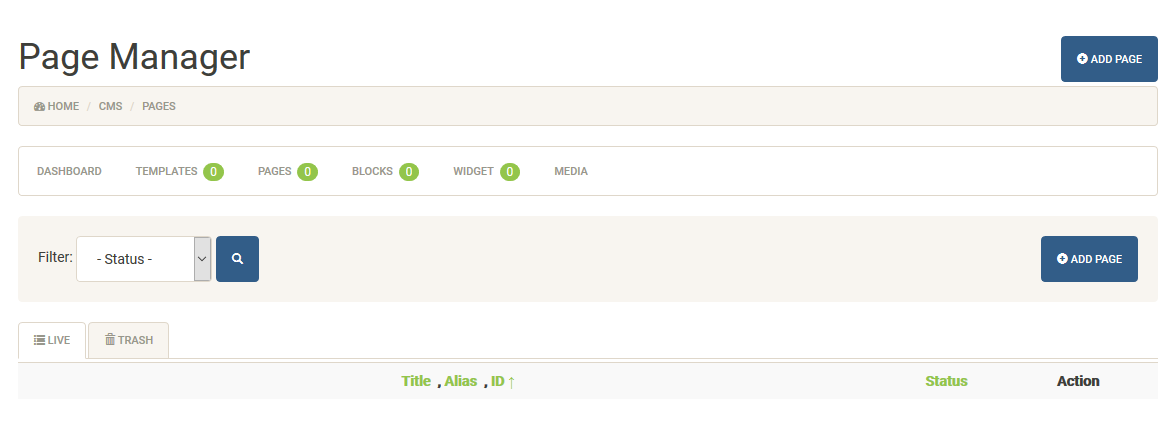
2. Create New Page

3. Edit Page. Content View

4. Edit Page. SEO View

5. Speed Test (before additional speed improvements)

Changelog
2021.07.05 - Added support for Bootstrap 5
Alternatives
- LavaLite - requires full project from scratch, cannot be embedded in existing project as package
- OctoberCms - requires full project from scratch, cannot be embedded in existing project as package
- TypiCms - requires full project from scratch, cannot be embedded in existing project as package
- PyroCMS - requires full project from scratch, cannot be embedded in existing project as package
- Laravel8SimpleCms - requires full project from scratch, cannot be embedded in existing project as package
- Winter - requires full project from scratch, cannot be embedded in existing project as package
- GraphiteInc CMS - Archived
- Twil
sinevia/laravel-cms 适用场景与选型建议
sinevia/laravel-cms 是一款 基于 Blade 开发的 Composer 扩展包,目前已累计 1.4k 次下载、GitHub Stars 达 24, 最近一次更新时间为 2018 年 01 月 06 日, 在 PHP 生态内属于活跃度较高的组件。
它主要适用于以下技术方向: 「cms」 「laravel」 「sinevia」 等业务场景。在实际项目中,围绕这些方向常见需要落地的问题包括:接口对接、性能调优、并发安全、与既有框架(Laravel / ThinkPHP / Yii / Webman 等)的兼容适配,以及生产环境的日志埋点与稳定性保障。
我们在过去多个企业项目中使用过 sinevia/laravel-cms 或与其功能相近的方案,如果你在选型或落地过程中遇到问题,例如 版本兼容、二次改造、私有化封装、与内部系统对接、生产 BUG 排查,欢迎联系我们协助评估。
基于 sinevia/laravel-cms 在你已有业务上做功能扩展、字段裁剪、UI 适配、与内部账号 / 权限 / 日志系统的深度对接。
线上偶发问题、内存泄漏、慢查询、并发异常等排查修复;针对高流量场景做缓存、队列、索引层面的调优。
承接完整的项目从需求 → 设计 → 开发 → 上线 → 长期运维;也可按月提供技术保姆服务。
与 sinevia/laravel-cms 相关的其它包
同方向 / 同关键字的高下载量 PHP Composer 包推荐,方便对比选型:
GraphQL authentication for your headless Craft CMS applications.
Set Links with a specific language parameter
Supercharged text field validation.
PHP Library Serverless
Integrate with Snipcart.
PHP Library API
统计信息
- 总下载量: 1.4k
- 月度下载量: 0
- 日度下载量: 0
- 收藏数: 24
- 点击次数: 0
- 依赖项目数: 0
- 推荐数: 0
其他信息
- 授权协议: proprietary
- 更新时间: 2018-01-06