tasmaniski/zf2-flash-noty-messenger
Composer 安装命令:
composer require tasmaniski/zf2-flash-noty-messenger
包简介
View Helper for beautiful JS notifications.
README 文档
README
New version is here! Current version support Zend Framework 3
View Helper for showing flash messages with help of NOTY jQuery plugin http://ned.im/noty/#/about
You must include the latest release of jQuery and Bootstrap.
Install
Add in composer.json file and than run composer update
"require": {
    "tasmaniski/zend-flash-noty-messenger":"^2.0"
}
The module should be registered in config/application.config.php
'modules' => array(
    '...',
    'FlashNotyMessenger'
),
After that, copy 2 JS files from vendor/tasmaniski/zend-flash-noty-messenger/asset/
and put it on path public/js/noty/
mkdir public/js/noty/
cp vendor/tasmaniski/zend-flash-noty-messenger/asset/jquery.noty.packaged.js public/js/noty/jquery.noty.packaged.js
cp vendor/tasmaniski/zend-flash-noty-messenger/asset/jquery.noty.config.js public/js/noty/jquery.noty.config.js
Setup
In layout.phtml somewhere at the end trigger fire()
/**
 * The fire() method do
 *     Collect all messages from previous and current request
 *     clear current messages because we will show it
 *     add JS files
 *     add JS notifications
 */
<?php $this->flashNoty()->fire(); ?>

<!-- if you already don't have this line, must add it for including JS files -->
<?php echo $this->inlineScript() ?>
Example from my code
//  at the end of layout.phtml

/* fire all messages */
<?php $this->flashNoty()->fire(); ?>

<!-- All Scripts to the bottom! -->
<?php echo $this->inlineScript()  // we call here inlineScript()
    ->appendFile($this->basePath('js/jquery.js'))
    ->appendFile($this->basePath('js/bootstrap.js')); ?>
Note: if you want to use it in ZF2 app, add in composer.json version ^1.0
Use
Use it in any controller.
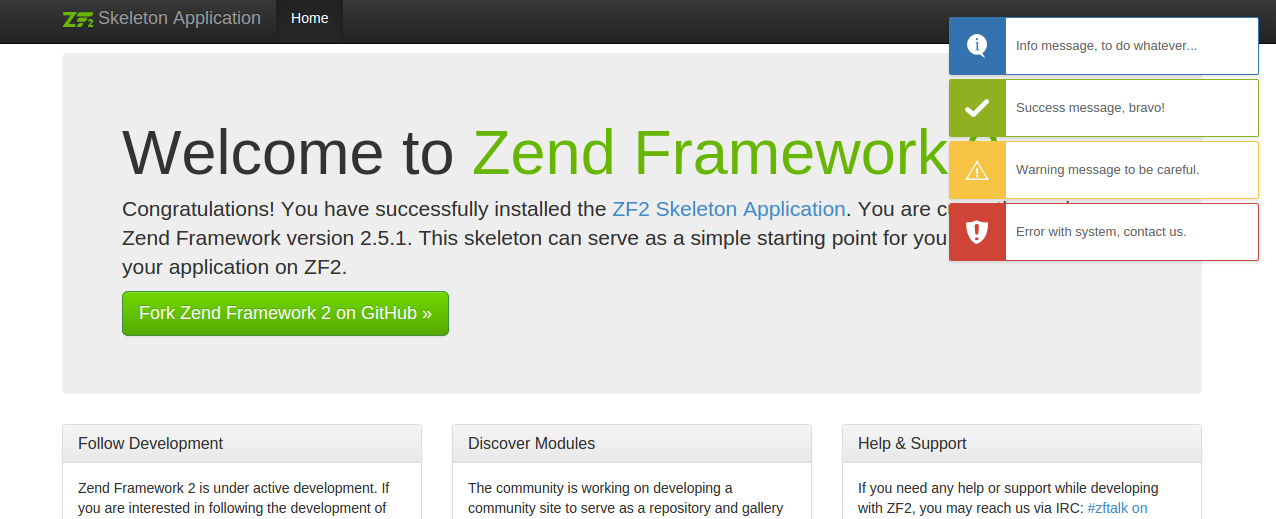
Add messages in your controller and the messages will be showed (in redirected request or current)
<?php
$this->flashMessenger()->addSuccessMessage('Success message, bravo!');
$this->flashMessenger()->addErrorMessage('Error with system, contact us.');
$this->flashMessenger()->addInfoMessage('Info message, to do whatever...');
$this->flashMessenger()->addWarningMessage('Warning message to be careful.');
Credits
I would like to give a credit to my colleague https://github.com/maksi80 for CSS style of notifications.
统计信息
- 总下载量: 219
- 月度下载量: 0
- 日度下载量: 0
- 收藏数: 10
- 点击次数: 3
- 依赖项目数: 0
- 推荐数: 0
其他信息
- 授权协议: Unknown
- 更新时间: 2016-03-06