tearoom1/kirby-content-watch
Composer 安装命令:
composer require tearoom1/kirby-content-watch
包简介
Kirby plugin that allows you to keep track of what has been changed and by whom.
README 文档
README
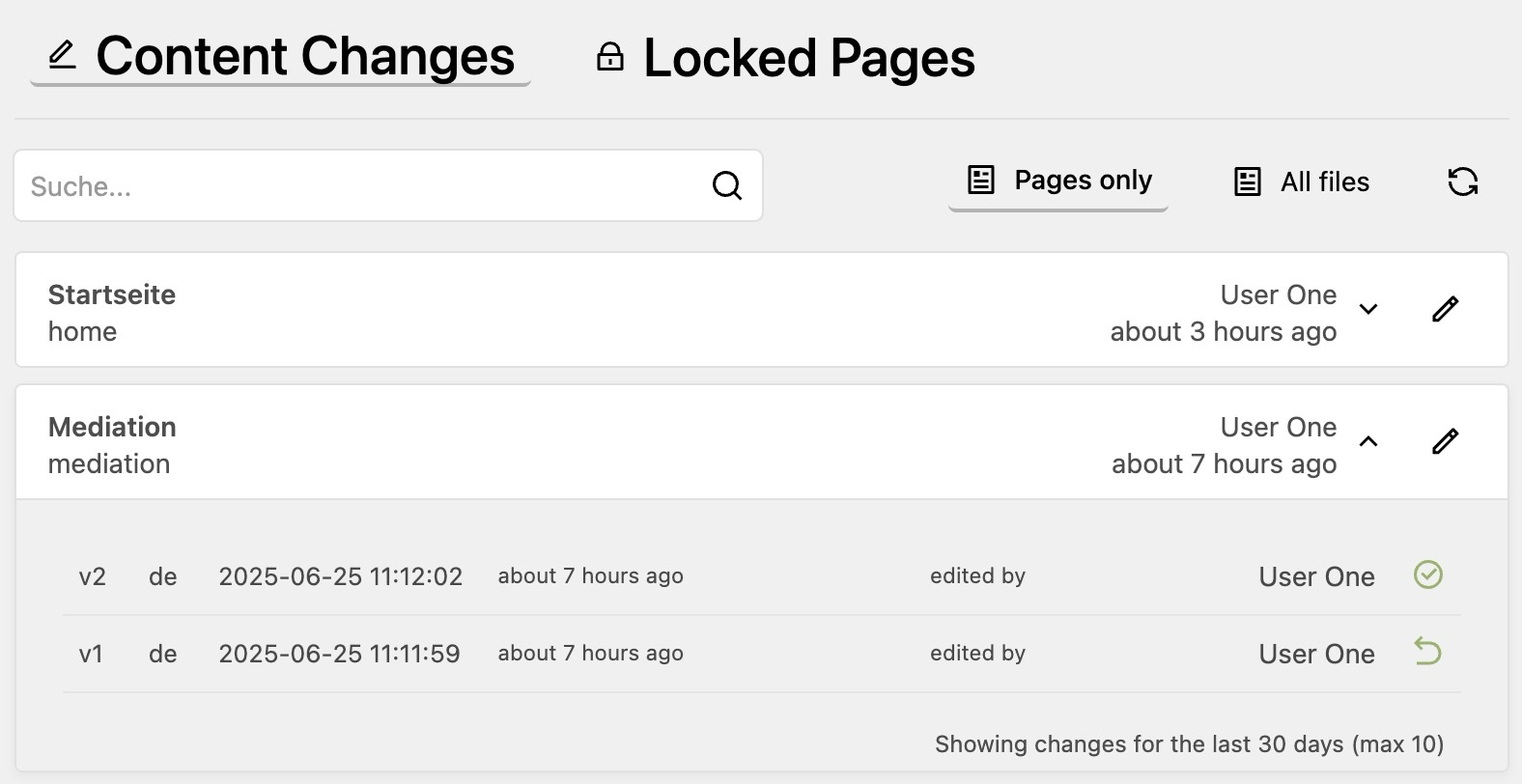
This plugin tracks all content changes in your Kirby site and adds a panel view that displays those changes. It shows modification date and editor information and the history of changes for each file. This allows you to keep track of what has been changed and who made the changes.
Additionally it provides a view to see which pages are currently locked and by whom.
Features
- Change Tracking: Automatically tracks all content changes in pages and files
- Editor Attribution: Records which editor made each change with timestamp
- History Timeline: Lists all content files across your Kirby site, sorted by modification date
- Locked Pages View: Shows which pages are currently being edited and by whom
- Search Functionality: Quickly find specific content files
- Direct Panel Links: One-click access to edit content in the Panel
- Customizable Retention: Configure how long history is kept
- Version Restore: Restore previous versions of content with a single click (optional)
- Dark Mode and Compact Layout: Supports Kirby 5 dark mode and a compact layout option
- Page Method: Access change history programmatically via
$page->contentHistory()
Known Limitations
This plugin has been developed for rather smaller websites. It has not been tested on big sites or slow servers. It stores all history entries in a single file for each content directory, and goes through them each time you open the plugins page. This may be a problem for sites with a large number of files.
The restore feature also has some limitations
- binary files are not supported
- when restoring a page, its files are not restored
Beware the restore feature is BETA and may have bugs. Use at your own risk!
Installation
Manual
- Download or clone this repository
- Place the folder
kirby-content-watchin/site/plugins/
Composer
composer require tearoom1/kirby-content-watch
Usage
After installation, you'll see a new "Content Watch" item in the Panel menu. Click on it to access:
- Files View: All content files with their modification history
- Locked Pages: Overview of currently locked pages and who is editing them
Each file in the list can be expanded to show its modification history. For each history entry with a snapshot, a restore button is available to revert to that previous version.
Configuration
You can configure the plugin in your config.php:
return [
    'tearoom1.kirby-content-watch' => [
        'allowedRoles'     => [],
        'retentionDays'    => 30,
        'retentionCount'   => 10,
        'defaultPageSize'  => 10,
        'layoutStyle'      => 'default',
        'enableLockedPages' => true,
        'enableRestore'    => false,
        'enableDiff'       => false,
        'disable'          => false,
    ]
];
| Option | Type | Default | Description |
|---|---|---|---|
allowedRoles |
array | [] |
Additional Kirby roles allowed to use the plugin. Admins always have access (see Access Control) |
retentionDays |
int |
30 |
Number of days to keep history entries before they are pruned |
retentionCount |
int |
10 |
Maximum number of history entries to keep per file |
defaultPageSize |
int |
10 |
Default number of items per page in the panel view. Possible values: 10, 20, 50 |
layoutStyle |
string |
'default' |
Layout density of the list. Set to 'compact' for a tighter layout |
enableLockedPages |
bool |
true |
Whether to show the locked pages view in the panel |
enableRestore |
bool |
false |
Enable content restore functionality. When enabled, full content snapshots are saved — increases disk usage |
enableDiff |
bool |
false |
Enable content diff view. Requires enableRestore to be true |
disable |
bool |
false |
Completely disable the plugin without uninstalling it |
Access Control
By default, only users with the admin role can access the plugin — that includes the Content Watch panel area, the menu entry, the diff API, and the restore API. Non-admins will not see the menu item, and any direct API call returns 403 Forbidden.
To grant access to additional Kirby roles, list them in allowedRoles:
'tearoom1.kirby-content-watch' => [
    'allowedRoles' => ['editor'],
]
Notes:
- Admins are always allowed; you do not need to include
'admin'in the list. - The
allowedRolescheck gates access to the plugin. Restoring content additionally requires the user to have Kirby's update permission on the target page/file — so a role allowed byallowedRolescannot use restore to overwrite content they are not normally allowed to edit. - Restore and diff API requests are authenticated and only resolve history files inside Kirby's configured content root.
- Only grant
allowedRolesto roles you trust to read every page's modification history, including drafts.
How It Works
The plugin creates a .content-watch.json file in each content directory that has been modified. This file stores the history of changes including editor information, timestamps, and content snapshots for restoration (if restore is enabled).
History entries are automatically pruned based on your retention settings.
When restore functionality is enabled:
- Each time content is changed, a snapshot of the content is saved
- You can view and restore previous versions through the interface
- When you restore a previous version, the plugin will:
- Extract the content from the saved snapshot
- Overwrite the current content file
- Record this restoration in the history with a reference to the restored version
When restore functionality is disabled:
- The plugin only tracks metadata like timestamps and editor information
- No content snapshots are stored, reducing disk usage
- The restore buttons will not be displayed in the interface
NOTE: The restore functionality only works for page content. It does not track changes of media/binary files. And when restoring a page, it does not restore its files.
Page Method
The plugin exposes a contentHistory() method on all pages, giving you programmatic access to the change history from within templates or plugins.
// Get all history entries for the current page
$history = $page->contentHistory();

// Filter by language (multilang setups)
$history = $page->contentHistory('en');
Each entry is an array with the following keys:
| Key | Description |
|---|---|
version |
Incrementing version number |
time |
Unix timestamp of the change |
editor_id |
ID of the Kirby user who made the change |
type |
Always page for page content |
language |
Language code (multilang only, requires enableRestore) |
content |
Raw content snapshot (only present when enableRestore is true) |
Example: display last editor info
$history = $page->contentHistory();
if (!empty($history)) {
    $latest = $history[0];
    $editor = kirby()->user($latest['editor_id']);
    echo 'Last edited ' . date('Y-m-d H:i', $latest['time']);
    echo ' by ' . ($editor ? $editor->name() : $latest['editor_id']);
}
Example: access field values from a snapshot (requires enableRestore: true)
foreach ($page->contentHistory() as $entry) {
    $fields = isset($entry['content'])
        ? new \Kirby\Cms\Content(\Kirby\Data\Txt::decode($entry['content']), $page)
        : null;

    echo 'v' . $entry['version'] . ' — ' . date('Y-m-d H:i', $entry['time']);

    if ($fields) {
        echo ' — title: ' . $fields->title()->html();
    }
}
This gives you full Kirby field method access (.html(), .kirbytext(), .value(), etc.) on any historical snapshot.
Diff Generation
If you like to have a more advanced diff, you can install jfcherng/php-diff
composer require jfcherng/php-diff
This will automatically make use of the advanced diff.
Requirements
- Kirby 4 or 5
- PHP 8.1+
Todo
- Add support for restoring media/binary files ?
- Language support is not perfect yet. Currently only 2 digit codes work and the display of the versions may also be improved.
License
This plugin is licensed under the MIT License
Credits
- Developed by Mathis Koblin
- Assisted by Claude (Anthropic)
tearoom1/kirby-content-watch 适用场景与选型建议
tearoom1/kirby-content-watch 是一款 基于 PHP 开发的 Composer 扩展包,目前已累计 767 次下载、GitHub Stars 达 13, 最近一次更新时间为 2025 年 05 月 25 日, 在 PHP 生态内属于活跃度较高的组件。
它主要适用于以下技术方向: 「panel」 「content」 「history」 「kirby」 等业务场景。在实际项目中,围绕这些方向常见需要落地的问题包括:接口对接、性能调优、并发安全、与既有框架(Laravel / ThinkPHP / Yii / Webman 等)的兼容适配,以及生产环境的日志埋点与稳定性保障。
我们在过去多个企业项目中使用过 tearoom1/kirby-content-watch 或与其功能相近的方案,如果你在选型或落地过程中遇到问题,例如 版本兼容、二次改造、私有化封装、与内部系统对接、生产 BUG 排查,欢迎联系我们协助评估。
基于 tearoom1/kirby-content-watch 在你已有业务上做功能扩展、字段裁剪、UI 适配、与内部账号 / 权限 / 日志系统的深度对接。
线上偶发问题、内存泄漏、慢查询、并发异常等排查修复;针对高流量场景做缓存、队列、索引层面的调优。
承接完整的项目从需求 → 设计 → 开发 → 上线 → 长期运维;也可按月提供技术保姆服务。
与 tearoom1/kirby-content-watch 相关的其它包
同方向 / 同关键字的高下载量 PHP Composer 包推荐,方便对比选型:
An improved history backend module for Neos
Implementation of the Omnibus Directive for Sylius application.
A block that displays featured content - large image, title, description and link.
Manage a history of your models simply by adding a package for Laravel
TYPO3 CMS extension to create gallery content element with preset crop ratios and pagination
Yii2 panel widget
统计信息
- 总下载量: 767
- 月度下载量: 0
- 日度下载量: 0
- 收藏数: 13
- 点击次数: 16
- 依赖项目数: 0
- 推荐数: 0
其他信息
- 授权协议: MIT
- 更新时间: 2025-05-25