tearoom1/kirby-meta-kit
Composer 安装命令:
composer require tearoom1/kirby-meta-kit
包简介
AI-powered SEO plugin for Kirby with meta descriptions, previews, and Schema.org
README 文档
README
An SEO workflow plugin for Kirby CMS with AI-assisted content generation, experimental content review, validation, previews, and centralized metadata management.
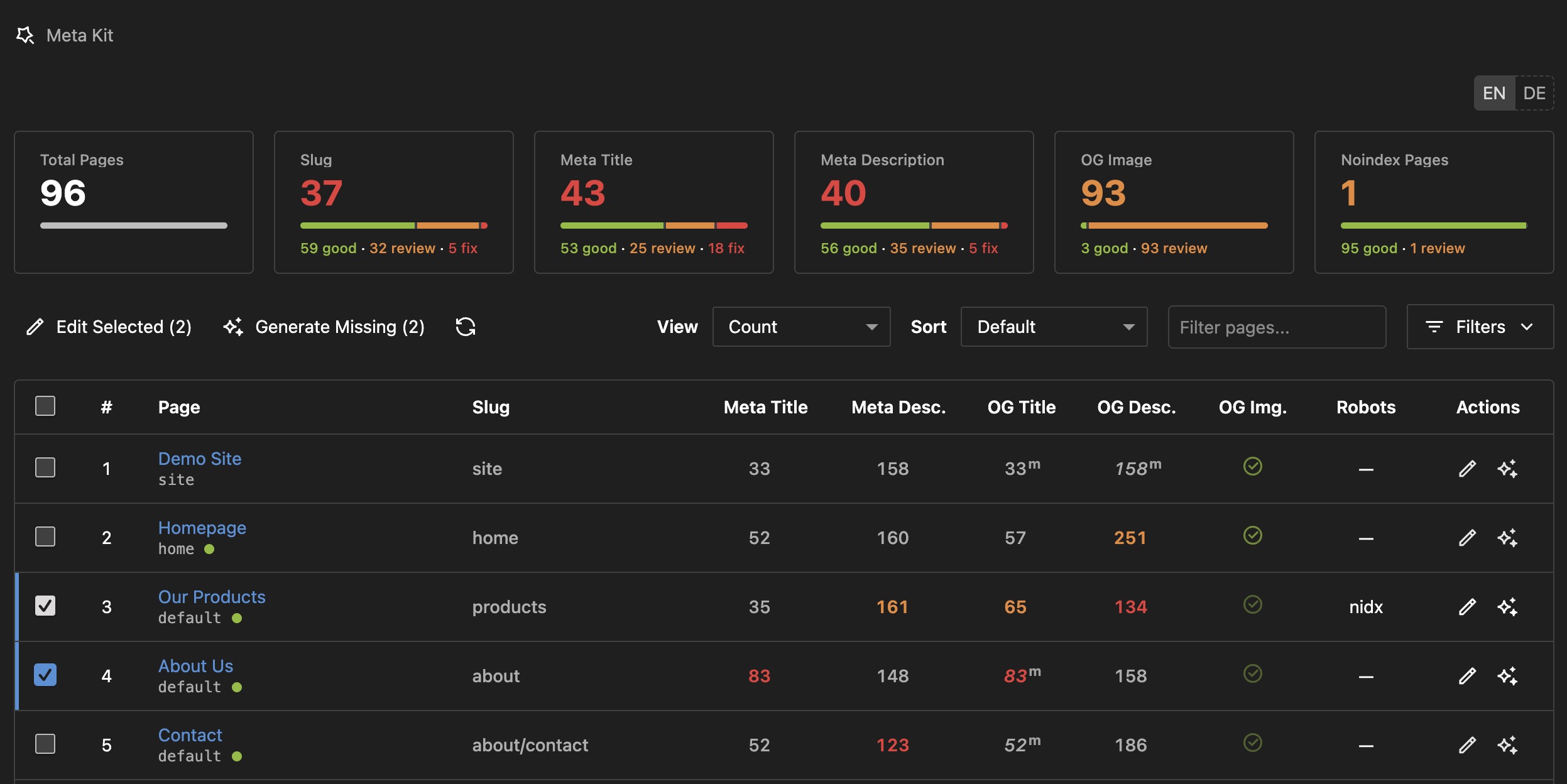
Why Meta Kit?
For Content Editors
- Single Point of Overview: Meta Kit provides a unified interface for managing metadata, making it easier to keep track of your SEO efforts
- Clear Guidelines: Visual validation shows exactly what's optimal (green), acceptable (orange), or needs fixing (red)
- AI Assistant: Generate SEO-optimized content with one click, automatically matching your configured character limits
- Preview Support: Review Google and social preview output directly in the Panel
- Bulk Operations: Edit metadata for multiple pages simultaneously with an efficient table interface
- Template-Specific Rules: Different page types can have different SEO requirements (blog posts vs. product pages)
For Developers & Agencies
- Enforce Standards: Set validation ranges globally or per template to ensure consistent SEO quality
- Client-Friendly: Editors get immediate feedback without needing SEO expertise
- AI Integration: Uses OpenRouter (free tier available) for cost-effective AI generation
- Time-Saving: Bulk edit hundreds of pages
- Complete Solution: Meta tags, Schema.org, sitemap, robots.txt - everything in one plugin
Key Advantages
-
Smart Validation System
- Set character length rules for titles and descriptions
- Configure different rules per page template (e.g., articles vs. products)
- Visual feedback: green (optimal), orange (acceptable), red (fix needed)
- Accounts for site name appending in title length calculations
-
AI That Follows Your Rules
- AI-generated content automatically matches your validation ranges
- Template-specific: AI knows that articles need longer titles than product pages
- Site name aware: Automatically adjusts title length when site name will be appended
- Multilingual: Generates content in the current language with appropriate formality
-
Professional Panel Interface
- Dedicated Meta Kit area in main menu with action-focused dashboard cards
- Bulk editor: Review multiple pages in one table and edit them in focused dialogs
- Real-time character counters with validation feedback
- Slug validation: Check URL structure, depth, and keyword usage
-
Complete SEO Coverage
- Meta tags (title, description, robots, canonical)
- OpenGraph & Twitter Cards with optimized images
- Schema.org JSON-LD structured data
- XML sitemap with visual configuration
- Dynamic robots.txt with bot blocking
Features
- 🎯 Smart Validation - Template-specific character limits with visual feedback
- 🤖 AI Generation - Auto-generates SEO content matching your validation rules
- 🧪 AI Content Review - Experimental page review with keyphrase suggestions and editorial feedback
- 🎛️ Panel Dashboard - Dedicated area for metadata management with action-focused stats
- 👁️ Live Previews - See Google, Twitter, Facebook appearance in real-time
- ⚡ Bulk Operations - Edit multiple pages simultaneously
- 📊 Slug Validation - Checks URL depth, word count, and length
- 🗺️ Sitemap - Styled XML with multilanguage & priority support
- 🤖 Robots.txt - Dynamic generation with bad bot blocking
- 🏗️ Schema.org - JSON-LD structured data
- 📱 Social Media - OpenGraph & Twitter Cards (1200×630px)
- 🌍 Multilanguage - Full support with hreflang tags
- ⚡ Kirby 5 - Fully compatible with latest version
Installation
Via Composer (Recommended)
composer require tearoom1/kirby-meta-kit
Manual Installation
- Download and extract to
site/plugins/meta-kit - Get a free API key from OpenRouter.ai (optional, for AI features)
Quick Start
1. Add SEO Snippet
Add this single line to your template's <head> section:
<head>
    <?php snippet('meta-kit/seo') ?>
    <!-- Your other head content -->
</head>
This snippet automatically includes:
- All meta tags (title, description, robots, canonical, keywords)
- OpenGraph and Twitter Card tags
- Schema.org JSON-LD structured data
- Hreflang tags for multilingual sites
2. Extend Blueprints
Site Settings (site/blueprints/site.yml):
tabs:
  seo:
    extends: meta-kit/site
Page SEO (site/blueprints/pages/default.yml):
tabs:
  seo:
    extends: meta-kit/page
3. Configure Basic Settings
Add to site/config/config.php:
return [
    'tearoom1.meta-kit' => [
        // Optional: Add AI features
        'api.key' => 'sk-or-v1-YOUR-KEY',
        'api.model' => 'google/gemma-4-31b-it:free',
    ]
];
That's it! You now have:
- ✅ SEO metadata fields in your pages
- ✅ Site-wide SEO settings
- ✅ Automatic sitemap at
/sitemap.xml - ✅ Dynamic robots.txt at
/robots.txt - ✅ (Optional) AI-powered content generation
Configuration
Meta Kit uses a two-layer configuration system for maximum flexibility:
Layer 1: Config File (Technical Settings)
Location: site/config/config.php
This is where developers set technical defaults, validation rules, and AI integration.
'tearoom1.meta-kit' => [
    // ====================================
    // ACCESS CONTROL
    // ====================================

    'allowedRoles' => [],  // Additional non-admin roles allowed to use Meta Kit. See Access Control below.

    // ====================================
    // AI INTEGRATION
    // ====================================

    'ai.enabled' => true,       // Master toggle for AI generation
    'review.enabled' => false,  // Opt-in: show experimental AI content review in the Panel

    // OpenRouter API Configuration
    'api.key' => 'sk-or-v1-YOUR-KEY',  // Get free key at openrouter.ai
    'api.model' => 'google/gemma-4-31b-it:free',  // See available models below
    'api.temperature' => 0.7,  // 0.1 (focused) to 1.0 (creative)

    // AI Behavior
    'ai.tone' => 'formal',  // 'formal' (Sie/vous) or 'informal' (du/tu)

    // ====================================
    // VALIDATION RULES
    // ====================================

    'validation' => [], // see below

    // ====================================
    // FEATURES
    // ====================================

    'sitemap.enabled' => true,
    'sitemap.exclude' => ['error', 'drafts'],  // Page IDs or patterns
    'schema.enabled' => true,
    'autoGenerate' => false,  // Auto-generate on save (not recommended)
    'excludeTemplates' => [],  // Hide from panel table
    'excludeStatus' => [],  // Hide draft/unlisted pages

    // Robots.txt configuration
    'robots' => [
        'enabled' => true,
        'blockBadBots' => true,  // Block AhrefsBot, SemrushBot, etc.
        'defaultRules' => true,
        'includeSitemap' => true,
    ],

];
Layer 2: Panel Settings (Content Settings)
Location: Site → SEO & Social Media in Kirby Panel
This is where editors configure site-wide content defaults and behavior:
SEO Tab:
- Default meta title and description
- Title separator (
|,-,•, etc.) - Auto-append site name toggle
- Choose which field types get site name (meta only, OG only, or both)
- Default robots directive
OpenRouter Tab (AI Settings):
- API key and model selection
- Creativity level (temperature slider)
- Can override config.php settings if needed
Social Media Tab:
- Social profile URLs (Facebook, Twitter, LinkedIn, etc.)
- Used in Schema.org
sameAsproperty
Sitemap Tab:
- Visual page selector for exclusions
- Homepage priority (0.1-1.0)
- Default page priority
Robots.txt Tab:
- Enable/disable custom robots.txt
- User agent rules (per-bot configuration)
- Allowed and disallowed paths
- Crawl delay settings
Settings Priority
Settings merge in this order (lowest to highest priority):
- Plugin Defaults - Built-in fallback values
- Panel Settings - Configured by editors
- Config File - Developer overrides (highest priority)
Examples:
- AI model set in Panel can be overridden in config.php
- Validation ranges in config.php apply unless template-specific rules exist
- Sitemap exclusions from Panel and config.php work together (combined)
Access Control
By default, only users with the admin role can access Meta Kit — that includes the Meta Kit panel area, the menu entry, the bulk editor, and every Meta Kit API route (page listing, single-field apply, AI generation, and the experimental review). Non-admins will not see the menu item, and any direct API call returns 403 Forbidden.
To grant access to additional Kirby roles, list them in allowedRoles:
'tearoom1.meta-kit' => [
    'allowedRoles' => ['editor'],
]
Notes:
- Admins are always allowed; you do not need to include
'admin'in the list. - Users with any of the listed roles can read SEO data for every page (including drafts) and trigger AI generation/review, which consumes your OpenRouter quota. Only grant this to roles you trust.
- Saving generated values still goes through Kirby's normal page-update permissions, so a role allowed by
allowedRolescannot use Meta Kit to overwrite fields on pages they are not normally allowed to edit.
Validation System
The validation system is Meta Kit's secret weapon for maintaining SEO quality across your entire site.
How It Works
-
Visual Feedback
- 🟢 Green: Optimal length (recommended for best SEO performance)
- 🟠 Orange: Acceptable length (will work, but not ideal)
- 🔴 Red: Too short or too long (should be fixed)
-
Real-Time Validation
- Character counters update as you type
- Validation messages guide editors
- Accounts for site name in title length
-
Template-Specific Rules
- Different page types can have different requirements
- Example: Blog posts need longer, keyword-rich titles
- Example: Product pages need concise, action-oriented descriptions
Setting Validation Ranges
Global Defaults
Set baseline rules for all pages in site/config/config.php:
'validation' => [
    'ranges' => [
        'title' => [
            'optimal' => ['min' => 20, 'max' => 60],  // Green zone
            'warning' => ['min' => 15, 'max' => 75],  // Orange zone (outside = red)
        ],
        'description' => [
            'optimal' => ['min' => 140, 'max' => 160],
            'warning' => ['min' => 126, 'max' => 176],
        ],
    ],
]
Template-Specific Overrides
Customize rules for specific page templates:
'validation' => [
    'templates' => [
        'article' => [  // For blog posts
            'title' => [
                'optimal' => ['min' => 40, 'max' => 70],  // Longer titles for articles
            ],
            'description' => [
                'optimal' => ['min' => 150, 'max' => 160],  // Detailed descriptions
            ],
        ],
        'product' => [  // For products
            'title' => [
                'optimal' => ['min' => 25, 'max' => 45],  // Shorter, punchier titles
            ],
            'ogDescription' => [
                'optimal' => ['min' => 120, 'max' => 160],  // Social sharing focus
            ],
        ],
    ],
]
Slug Validation
Meta Kit also validates URL structure:
'validation' => [
    'slug' => [
        'depth' => [
            'optimal' => ['min' => 0, 'max' => 2],  // Prefer /category/page
            'warning' => ['min' => 0, 'max' => 3],  // Allow /a/b/c/page
        ],
        'words' => [
            'optimal' => ['min' => 1, 'max' => 8],  // Keywords in URL
        ],
        'length' => [
            'optimal' => ['min' => 1, 'max' => 60],  // Total characters
        ],
    ],
]
Slug validation shows:
- Depth: How many
/slashes (URL nesting level) - Words: Number of hyphen-separated words
- Length: Total character count
- Status: Visual indicator for each metric
Why This Matters for Editors
Without validation:
- Editors guess at ideal lengths
- Inconsistent quality across pages
- Some titles too short, others too long
- No feedback until after publish
With Meta Kit validation:
- Clear visual guidance (green/orange/red)
- Learn SEO best practices while editing
- Consistent quality across all pages
- Catch issues before publishing
- Template-aware: Different rules for different content types
AI Generation
Meta Kit's AI features are designed to save time while maintaining quality and consistency.
How AI Works With Validation
The Smart Part: AI automatically generates content that matches your validation ranges.
When you click "Generate," Meta Kit:
- Looks up the validation rules for this field type and template
- Adjusts for site name appending (if applicable)
- Tells the AI exactly what character range to target
- Generates content that's already in the green zone
Example:
- Template: Article
- Field: Meta Title
- Validation Range: 40-70 characters
- Site Name: "My Blog" (7 chars + separator)
- AI Target: 30-60 characters (reserves space for site name)
- Result: AI generates a 45-character title that becomes 54 characters with site name appended ✅
Configuring AI
Required Settings
Get a free API key from OpenRouter.ai:
'api.key' => 'sk-or-v1-YOUR-KEY',
'api.model' => 'google/gemma-4-31b-it:free',
Pick any model from OpenRouter — free or paid. The plugin sends the configured model name to OpenRouter as-is, so any model your API key can reach will work.
Sample of available Models as of June 2026
Free Tier (No cost):
google/gemma-4-31b-it:free(default)meta-llama/llama-3.2-3b-instruct:freenvidia/nemotron-3-nano-30b-a3b:freestepfun/step-3.5-flash:freenvidia/nemotron-3-super-120b-a12b:freegoogle/gemma-3-27b-it:freemeta-llama/llama-3.3-70b-instruct:freedeepseek/deepseek-r1-0528-qwen3-8b:free- Many more available here
Paid Models (Higher quality):
openai/gpt-5.4oropenai/gpt-5-minianthropic/claude-sonnet-4.6google/gemini-2.5-proxiaomi/mimo-v2-prometa-llama/llama-4-maverick- Find more on OpenRouter. See also the rankings
AI Behavior Settings
Temperature (0.1 - 1.0): Controls creativity and variation in generated content.
'api.temperature' => 0.7,  // Default: balanced

// Examples:
0.3  // Very focused, consistent, factual (good for product descriptions)
0.7  // Balanced (recommended for most use cases)
0.9  // Creative, varied (good for blog posts, social media)
Tone (formal vs informal): Controls language formality in multilingual content.
'ai.tone' => 'formal',  // Use Sie (German), vous (French), usted (Spanish)
'ai.tone' => 'informal',  // Use du (German), tu (French), tú (Spanish)
Custom AI Prompts
Tailor AI generation to your specific needs:
'ai.prompt.title' => "Write a compelling meta title ({optimal_length} characters) in {language} for:\n\n{content}\n\n{tone} Focus on benefits and include power words. Write ONLY the title.",

'ai.prompt.description' => "Write an engaging meta description ({optimal_length} characters) in {language} for:\n\n{content}\n\n{tone} Include a call-to-action and primary keyword. Write ONLY the description.",
Available Placeholders:
{optimal_length}- Automatically filled with validation ranges (e.g., "40-60 characters"){language}- Current language name (e.g., "German", "English"){content}- Page content for AI context{tone}- Automatically replaced with tone instruction
AI Features in Panel
Individual Field Generation:
- Click "Generate" button next to any title or description field
- AI analyzes page content and current language
- Generates content matching validation rules for that template
- Instant feedback with character count and validation status
Bulk Generation:
- Select multiple pages in Meta Kit area
- Choose which fields to generate (meta title, OG description, etc.)
- AI processes all pages using appropriate template rules
- Review and apply changes
Smart Behavior:
- Skips pages that already have content (unless you force regenerate)
- Uses page content for context (title, text fields, structured content)
- Respects language settings (de, en, fr, es, it)
- Accounts for site name appending in title length
Experimental AI Content Review
Meta Kit also includes an experimental AI content review for single pages.
- It is meant as a fast editorial aid, not a final SEO verdict
- Use it to spot weak positioning, vague copy, thin content, and possible keyphrases
- Treat its output with care and review suggestions manually before making content decisions
- Review is disabled by default and only appears when
'review.enabled' => true
Adding the review button to a page blueprint
Add the mk-review field anywhere in your page blueprint. It renders as a single right-aligned button that opens the full review dialog. All state (AI enabled and review enabled) is computed server-side, so no extra options are required:
# site/blueprints/pages/default.yml
tabs:
  seo:
    label: SEO
    sections:
      seo:
        type: fields
        fields:
          review:
            type: mk-review
          metaTitle:
            type: mk-title
            # ...
A good place is directly above the seo-preview section so the button appears right before the live preview. The button is automatically hidden when AI is not configured or review.enabled is false.
Disabling AI
AI features are automatically disabled if:
- No API key is configured
- No model is selected
ai.enabledis set tofalse
To hide only the experimental content review from the Panel while keeping AI generation available, set:
'tearoom1.meta-kit' => [
    'review.enabled' => false
]
When disabled:
- Generate buttons are hidden
- AI routes are not registered
- Plugin still works for manual metadata management
Panel Interface
Meta Kit Area
Access via the main menu (wand icon):
Dashboard
- Action-Focused Stats: See which areas need review or fixes first
- Page Overview: List all pages with validation and inheritance status
- Quick Actions: Bulk edit, bulk generate, filter, search, and refresh
Bulk Editor
- Table View: See multiple pages at once in count, meta-content, or OG-content mode
- Focused Editing: Edit a single page or multiple selected pages in dedicated dialogs
- AI Generation: Generate button for each field
- Character Counters: Real-time validation with color indicators
- Filter & Search: Combine field filters with state filters like good, warning, and fix
- Batch Operations: Apply changes to selected pages
Features
- Live Validation: Green/orange/red indicators as you type
- Template Awareness: Different validation for different page types
- Language Support: Works with multilingual sites
- Inheritance Display: See when values come from site defaults, the main language, or other fallbacks
- Quick Navigation: Jump to page editor from table
Page Editor
When you add the meta-kit/page tab to a page blueprint:
SEO Tab:
- Slug Validation: Check URL structure, depth, word count
- Meta Title: With AI generation button and character counter
- Meta Description: With AI generation and validation
- Meta Author: Optional author name
- Canonical URL: Custom canonical if needed
- Robots: Set indexing behavior per page
Social Media Section:
- OG Title: Separate title for social sharing
- OG Description: Separate description for social sharing
- OG Image: Upload social media image (1200×630px recommended)
Real-time Feedback:
- Character counters update as you type
- Validation messages show what's optimal
- Title preview shows the final title including site name if applicable
- Color-coded indicators: green (optimal), orange (acceptable), red (fix needed)
Advanced Features
Sitemap Generation
Automatic Creation:
XML sitemap available at /sitemap.xml with:
- All published pages (filtered by template and status)
- Multilingual support with hreflang
- Configurable priorities
- Last modified dates
- Styled XML view for human readability
Configuration:
'sitemap.enabled' => true,
'sitemap.exclude' => ['error', 'drafts', 'admin'],  // Page IDs to exclude
'sitemap.includeUnlisted' => false,  // Include unlisted pages (default: false)

// Change frequency configuration
'sitemap.changefreq.default' => 'monthly',  // Default for all pages
'sitemap.changefreq.templates' => [
    'home' => 'daily',
    'news' => 'weekly',
    'article' => 'weekly',
    'blog' => 'weekly',
    'imprint' => 'yearly',
    'privacy' => 'yearly',
],
'sitemap.changefreq.slugs' => [
    'impressum' => 'yearly',
    'datenschutz' => 'yearly',
    'contact' => 'monthly',
],

// Priority configuration
'sitemap.priority.templates' => [
    'home' => 1.0,
    'news' => 0.9,
    'article' => 0.8,
    'blog' => 0.9,
    'imprint' => 0.3,
    'privacy' => 0.3,
],
'sitemap.priority.slugs' => [
    'impressum' => 0.3,
    'datenschutz' => 0.3,
    'contact' => 0.5,
],
Priority & Change Frequency Logic:
- Page-level override (most specific) - Set in page SEO tab
- Slug-based rules - Matches page slug
- Template-based rules - Matches page template
- Site defaults - Set in panel or config
- Fallback - Built-in defaults
Panel Settings (Site):
- Visual page selector for exclusions
- Include unlisted pages toggle
- Default change frequency dropdown
- Homepage priority (0.1 - 1.0)
- Default page priority (0.0 - 1.0)
Panel Settings (Per Page):
- Sitemap Priority field - Override default for specific page
- Sitemap Change Frequency field - Override default for specific page
- Both fields optional - leave empty to use defaults
Robots.txt Management
Dynamic Generation:
robots.txt available at /robots.txt with:
- User agent specific rules
- Bad bot blocking (AhrefsBot, SemrushBot, etc.)
- Sitemap reference
- Crawl delay configuration
- Custom directives
Panel Configuration:
- Go to Site → Robots.txt
- Enable "Custom Robots.txt"
- Add user agent rules
- Configure allowed/disallowed paths
Config Override:
'robots' => [
    'enabled' => true,
    'blockBadBots' => true,
    'defaultRules' => true,
    'includeSitemap' => true,
    'rules' => [
        [
            'userAgent' => 'Googlebot',
            'allow' => ['/images/', '/assets/'],
            'disallow' => ['/panel/', '/api/'],
        ],
        [
            'userAgent' => 'AhrefsBot',
            'disallow' => ['/'],  // Block completely
        ],
    ],
]
Schema.org Structured Data
Automatic JSON-LD:
- Organization data (site-wide)
- WebSite with site search
- WebPage with breadcrumbs
- Article markup for blog posts
- Product markup (if configured)
Enable/Disable:
'schema.enabled' => true,
Best Practices
For Editors
Meta Titles:
- Aim for 50-60 characters total (including site name)
- Put primary keywords near the beginning
- Make it compelling and clickable
- Be specific about page content
- Avoid ALL CAPS unless it's your brand
Meta Descriptions:
- Target 150-160 characters
- Include primary keyword naturally
- Add a call-to-action
- Describe what readers will find
- Make it unique for each page
OG Titles:
- Can be slightly longer than meta titles (up to 70 chars)
- More conversational tone for social sharing
- Focus on curiosity and click-worthiness
OG Descriptions:
- Can be longer than meta descriptions (up to 200 chars)
- More promotional tone
- Emphasize benefits and value
Images:
- Use 1200×630px for best results
- Works for Facebook, Twitter, WhatsApp
- Avoid text-heavy images
- High contrast for small sizes
- Include brand elements
URLs (Slugs):
- Keep depth to 2-3 levels maximum
- Use 3-8 descriptive words
- Include primary keyword
- Use hyphens, not underscores
- Keep total length under 60 characters
For Developers
Validation Ranges:
- Set realistic optimal ranges based on your content type
- Use warning ranges to allow flexibility
- Create template-specific rules for different content types
- Account for site name length in title calculations
AI Configuration:
- Start with free models (Gemini 2.0 Flash may be sufficient)
- Use temperature 0.3-0.5 for consistency
- Use temperature 0.7-0.9 for variety
- Set formal tone for professional sites
- Customize prompts to match brand voice
Panel Setup:
- Add meta-kit tabs to all main page blueprints
- Hide SEO tab from admin/system pages if needed
- Use excludeTemplates to hide utility pages from table
Programmatic Usage
Page Methods
// Generate AI content
$title = $page->generateSeoTitle();
$title = $page->generateSeoTitle($content, 'de');  // Custom content & language
$desc = $page->generateSeoDescription();
$desc = $page->generateSeoDescription($content, 'fr');

// Field to SEO conversion
$title = $page->text()->toSeoTitle();
$desc = $page->text()->toSeoDescription();
API Endpoints
Generate descriptions via API:
POST /api/meta-kit/generate
Content-Type: application/json

{
  "text": "Your page content here",
  "language": "de",
  "pageId": "page-id-here",
  "fieldType": "description"
}
Response:
{
  "status": "success",
  "content": "AI-generated content matching validation rules..."
}
Custom Templates
Access metadata in your templates:
<?php
// Access SEO flat fields directly
$metaTitle = $page->metaTitle()->value();
$metaDesc = $page->metaDescription()->value();
$ogTitle = $page->ogTitle()->value();
$ogDesc = $page->ogDescription()->value();

// Get OG image file
$ogImage = $page->ogImage()->toFile();
?>
Requirements
- PHP: 8.1 or higher
- Kirby: 5.0+
- Composer: For dependency management
- OpenRouter API Key: Optional, only needed for AI features (free tier available)
Troubleshooting
AI Generation Not Working
- Check API key is set correctly
- Verify model is selected
- Check
ai.enabledis not set tofalse - Look for errors in Kirby debug mode
- Check OpenRouter account has free tier or credits
Validation Not Showing
- Check config file syntax
- Verify template name matches exactly
- Clear Kirby cache
- Check browser console for JS errors
Sitemap Not Appearing
- Verify
sitemap.enabled => true - Check route is registered
- Clear Kirby cache
- Check .htaccess for conflicting rules
Panel Table Empty
- Check
excludeTemplatesandexcludeStatussettings - Verify pages exist and are not drafts (unless drafts allowed)
- Check user permissions
- Look for PHP errors in logs
License
This plugin is licensed under the MIT License.
Credits
Developed by: Mathis Koblin
Special Thanks:
- The Kirby CMS team for an excellent platform
- OpenRouter for affordable AI API access
- The Kirby community for feedback and support
Support & Feedback
- Issues and Suggestions: GitHub Issues
- Documentation: This README and inline code comments
- Support Policy: Support is limited to public GitHub Issues. Email support, consulting, and guaranteed response times are not included.
Meta Kit is fully MIT-licensed — no paywalls, no feature gates. If it saves you time and you want to keep it healthy, sponsorships are the best way to support continued development:
tearoom1/kirby-meta-kit 适用场景与选型建议
tearoom1/kirby-meta-kit 是一款 基于 PHP 开发的 Composer 扩展包,目前已累计 100 次下载、GitHub Stars 达 1, 最近一次更新时间为 2026 年 06 月 08 日, 在 PHP 生态内属于活跃度较高的组件。
它主要适用于以下技术方向: 「seo」 「panel」 「meta」 「kirby」 等业务场景。在实际项目中,围绕这些方向常见需要落地的问题包括:接口对接、性能调优、并发安全、与既有框架(Laravel / ThinkPHP / Yii / Webman 等)的兼容适配,以及生产环境的日志埋点与稳定性保障。
我们在过去多个企业项目中使用过 tearoom1/kirby-meta-kit 或与其功能相近的方案,如果你在选型或落地过程中遇到问题,例如 版本兼容、二次改造、私有化封装、与内部系统对接、生产 BUG 排查,欢迎联系我们协助评估。
基于 tearoom1/kirby-meta-kit 在你已有业务上做功能扩展、字段裁剪、UI 适配、与内部账号 / 权限 / 日志系统的深度对接。
线上偶发问题、内存泄漏、慢查询、并发异常等排查修复;针对高流量场景做缓存、队列、索引层面的调优。
承接完整的项目从需求 → 设计 → 开发 → 上线 → 长期运维;也可按月提供技术保姆服务。
与 tearoom1/kirby-meta-kit 相关的其它包
同方向 / 同关键字的高下载量 PHP Composer 包推荐,方便对比选型:
Harvest statistics and meta data from an URL or his source code (seo oriented).
Phalcon PHP Meta tags service
A SilverStripe module to optimise the Meta, crawling, indexing, and sharing of your website content (forked from Cyber-Duck/Silverstripe-SEO)
Help to manage meta data on Laravel Eloquent model
A simple, repeatable field type
Yii2 panel widget
统计信息
- 总下载量: 100
- 月度下载量: 0
- 日度下载量: 0
- 收藏数: 1
- 点击次数: 33
- 依赖项目数: 0
- 推荐数: 0
其他信息
- 授权协议: MIT
- 更新时间: 2026-06-08