tumtum/oxid-sql-logger
Composer 安装命令:
composer require tumtum/oxid-sql-logger
包简介
Returns all SQL queries in the browser.
README 文档
README
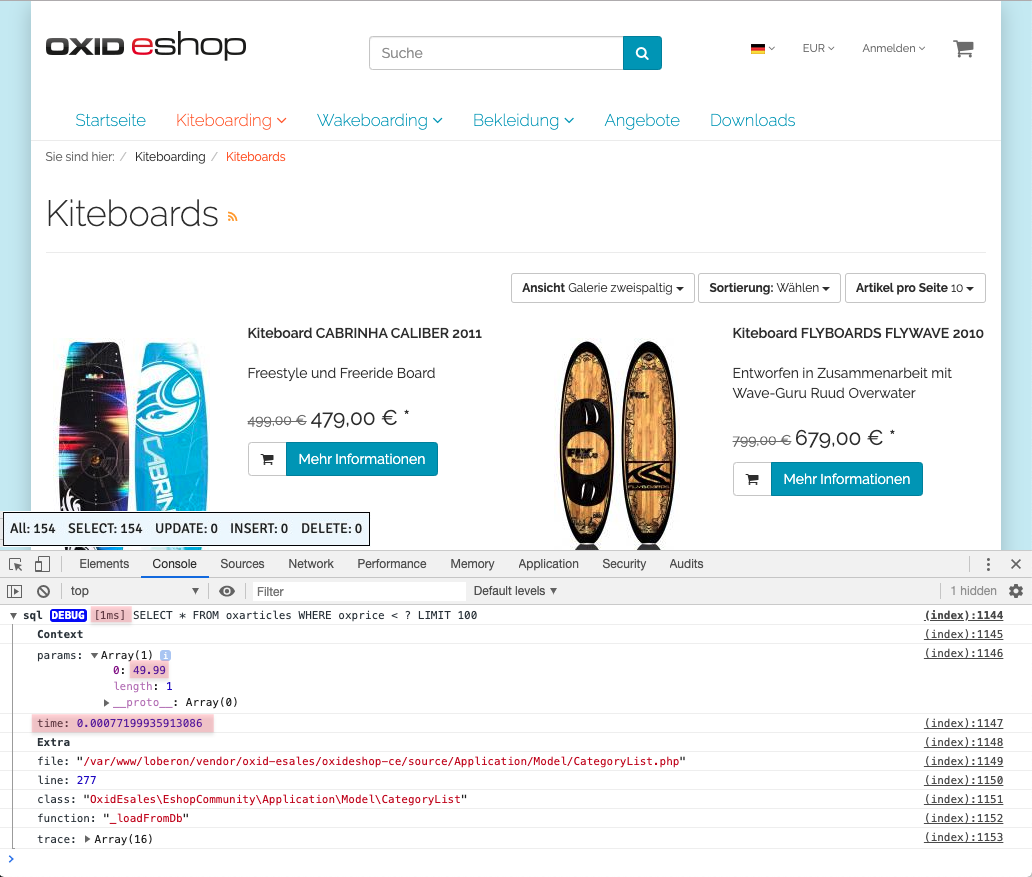
Returns all SQL queries into console of a Browser.
Install
composer require --dev tumtum/oxid-sql-logger
Usage
Just set the function StartSQLLog() somewhere and from that point on all SQLs will be logged.
\StartSQLLog();

$db = \OxidEsales\Eshop\Core\DatabaseProvider::getDb(\OxidEsales\Eshop\Core\DatabaseProvider::FETCH_MODE_ASSOC);
$list = $db->getAll('SELECT * FROM oxarticles WHERE oxprice < ? LIMIT 100', [49.99]);

\StopSQLLog();
Screenshots
Browser:
CLI:

SQL Query Status Monitor

See how many queries and which types of queries have been added to the database. To determine the amount.
Switch on
For this purpose, the parameter $this->blSQLStatusBox = true; must be stored in the file config.ing.php.
So you can turn it on and off temporarily.
Unique: Insert, at the end, the Smarty tag: [{tm_sql_status}] in the base.tpl file.
####### source/Application/views/flow/tpl/layout/base.tpl
        [{tm_sql_status}]
        </body>
    </html>
tumtum/oxid-sql-logger 适用场景与选型建议
tumtum/oxid-sql-logger 是一款 基于 PHP 开发的 Composer 扩展包,目前已累计 1.06k 次下载、GitHub Stars 达 1, 最近一次更新时间为 2019 年 08 月 20 日, 在 PHP 生态内属于活跃度较高的组件。
我们在过去多个企业项目中使用过 tumtum/oxid-sql-logger 或与其功能相近的方案,如果你在选型或落地过程中遇到问题,例如 版本兼容、二次改造、私有化封装、与内部系统对接、生产 BUG 排查,欢迎联系我们协助评估。
基于 tumtum/oxid-sql-logger 在你已有业务上做功能扩展、字段裁剪、UI 适配、与内部账号 / 权限 / 日志系统的深度对接。
线上偶发问题、内存泄漏、慢查询、并发异常等排查修复;针对高流量场景做缓存、队列、索引层面的调优。
承接完整的项目从需求 → 设计 → 开发 → 上线 → 长期运维;也可按月提供技术保姆服务。
统计信息
- 总下载量: 1.06k
- 月度下载量: 0
- 日度下载量: 0
- 收藏数: 1
- 点击次数: 9
- 依赖项目数: 0
- 推荐数: 0
其他信息
- 授权协议: GPL-3.0
- 更新时间: 2019-08-20