yidas/mtr-database
Composer 安装命令:
composer create-project yidas/mtr-database
包简介
MTR Batch processing storing in database with dashboard
README 文档
README
MTR (My traceroute) centralized monitoring dashboard with agent deployment
OUTLINE
DEMONSTRATION
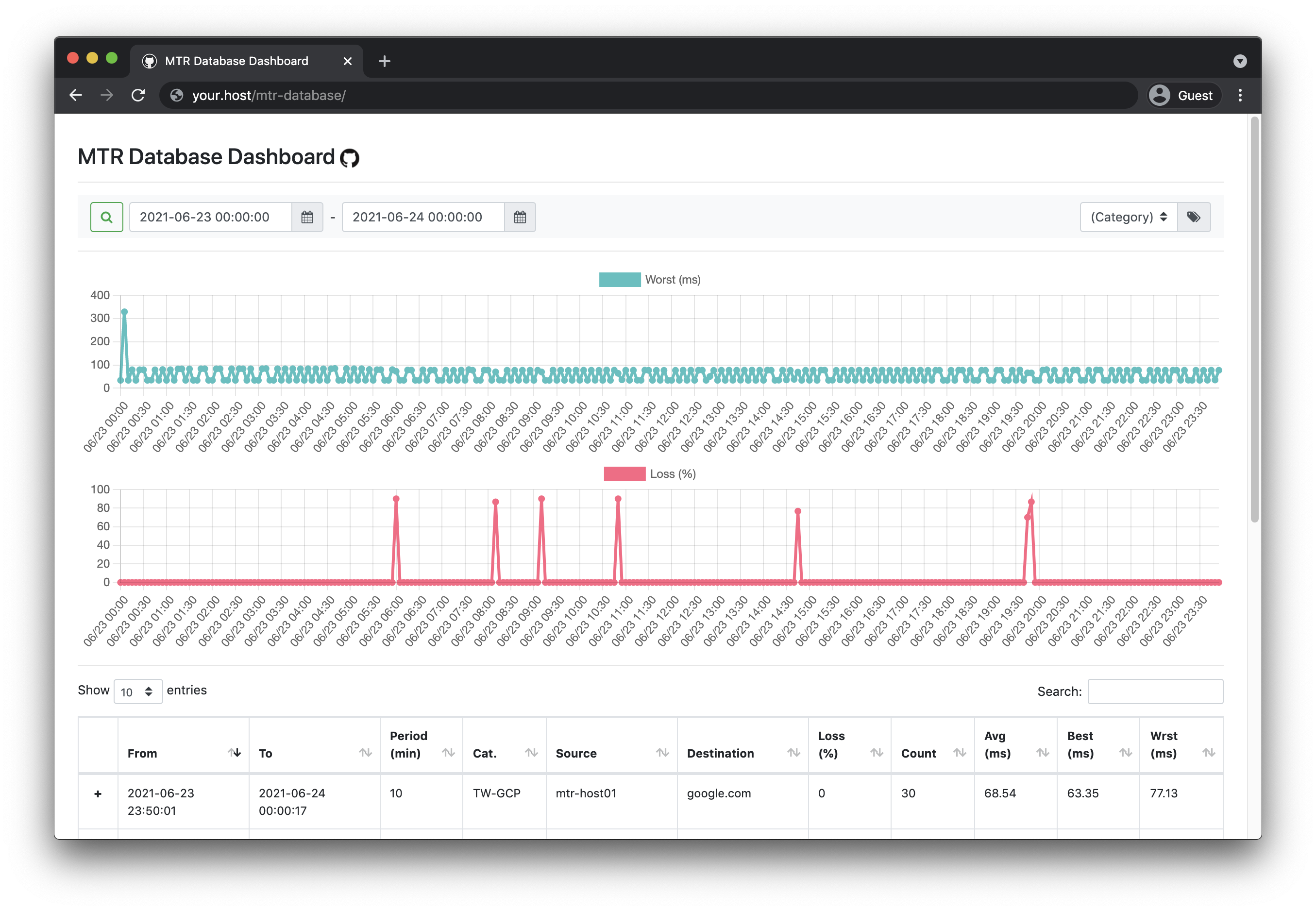
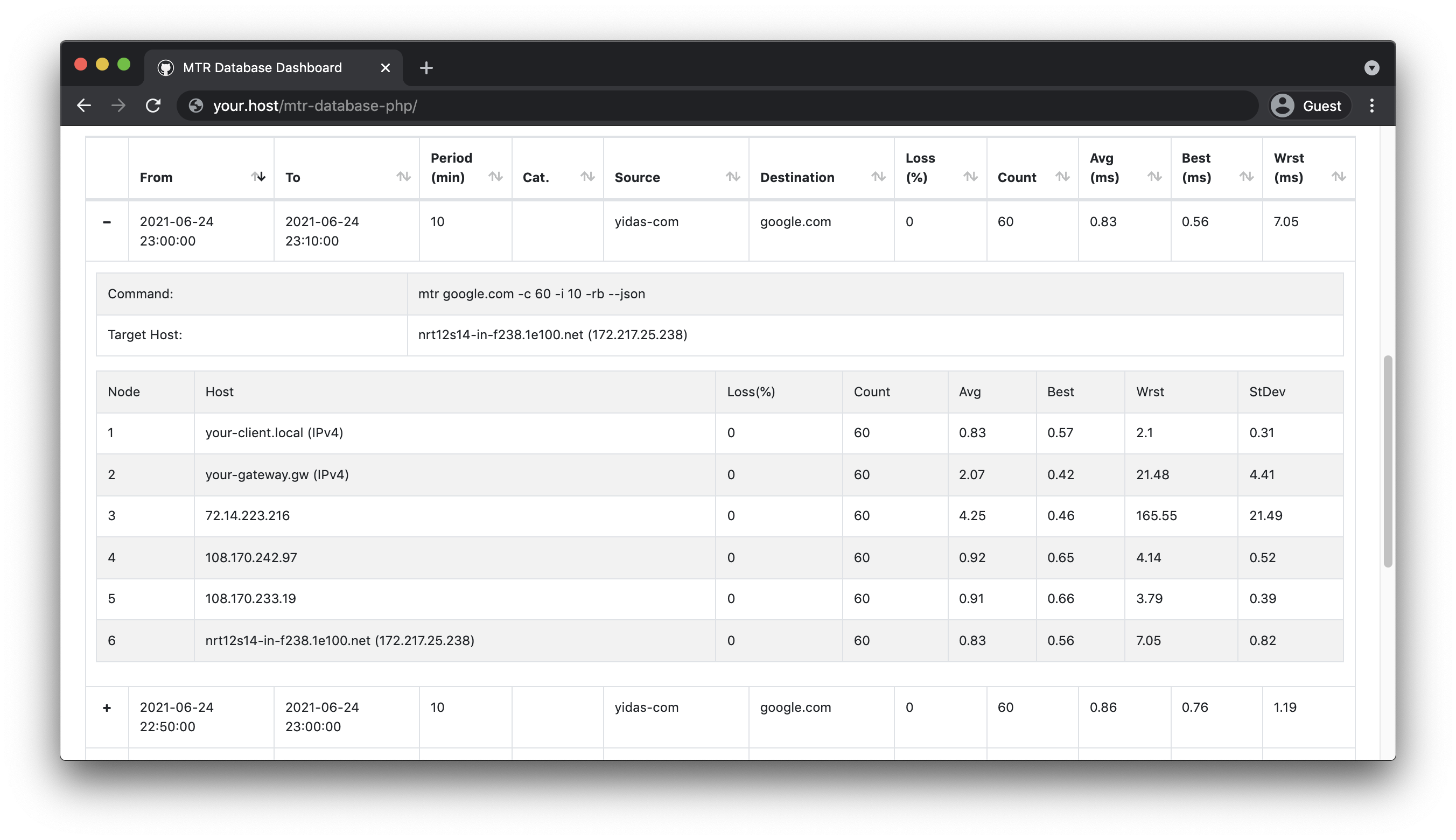
INTRODUCTION
Easy to deploy agents and collect MTR data into a database for monitoring via a web dashboard with charts.
REQUIREMENTS
This library requires the following:
- MTR library (CLI) 0.9+
- PHP 5.4.0+|7.0+
INSTALLATION
Download
Composer Installation
Using Composer to install is the easiest way with auto-installer:
composer create-project --prefer-dist yidas/mtr-database
Wget Installation
You could see Release for picking up the package with version, for example:
$ wget https://github.com/yidas/mtr-database-php/archive/master.tar.gz -O mtr-database-phpi.tar.gz
After download, uncompress the package:
$ tar -zxvf mtr-database-php.tar.gz
SETUP
Database Setup
After the download, you could start to set up the config.inc.php with your database connection:
...
    'database' => [
        'host' => '',
        'driver'    => 'mysql',
        'database'  => 'mtr_database',
        'username'  => '',
        'password'  => '',
        'table' => 'records',
        'charset'   => 'utf8',
        'collation' => 'utf8_unicode_ci',
    ],
...
Then run install.php which will help you to install the database & table:
$ php install.php
Installation completed
Agent Setup & Launch
The default setting of the agent can be configurated in config.inc.php:
...
    'general' => [
        'mtrCmd' => 'mtr',
        'timezone' => 'Asia/Taipei',
        'category' => 'agent-01',   // Category mark for distinguishing
    ],
    'mtr' => [
        'host' => 'your.host',
        'period' => 10,     // Minute
        'count' => 60,      // Report-cycles
        'tcp' => false,     // TCP mode
        'port' => 443,      // Port number for TCP mode
    ],
    'api' => [
        'key' => '',            // API key must be the same bewteen agent and collector
        'agent' => [
            'enabled' => false, // To send MTR data to collector via API Agent (deafult is database)
            'reportUrl' => '',  // Collector's API URL
        ],
        'collector' => [
            'enabled' => false, // To receive MTR data from agent via API
        ],
    ],
...
After the setting, enjoy to run or set launch.php with your prefered arguments in crontab:
$php launch.php
Process success
Set crontab into /etc/cron.d/mtr-database:
# Launch and record MTR every 10 miniutes by default ('period' => 10)
*/10 * * * * root php /var/www/html/mtr-database/launch.php >/dev/null 2>&1

# Purge data before 90 days by default (Optional)
00 00 * * * root php /var/www/html/mtr-database/purge.php >/dev/null 2>&1
The default batch period is configured to be 10 minutes, so we can set the batch to be executed every 10 minutes.
API for collector & agents
Regarding the introduction structure diagram, it's better to collect agents' MTR data via API (Default is database).
The endpoint path of collector (reportUrl) is /collect.php, you could place the project in the web path such as /var/www/html/mtr-database/index.php.
Configuration for collector, the database setting is required:
    'api' => [
        'key' => 'your-own-api-key',            // API key must be the same bewteen agent and collector
        'agent' => [
            'enabled' => false, // To send MTR data to collector via API Agent (deafult is database)
            'reportUrl' => '',  // Collector's API URL
        ],
        'collector' => [
            'enabled' => true,  // To receive MTR data from agent via API
        ],
    ],
    'database' => [
Configuration for agents:
    'api' => [
        'key' => 'your-own-api-key',            // API key must be the same bewteen agent and collector
        'agent' => [
            'enabled' => true, // To send MTR data to collector via API Agent (deafult is database)
            'reportUrl' => 'https://your.host/mtr-database/collect.php',  // Collector's API URL
        ],
        'collector' => [
            'enabled' => false, // To receive MTR data from agent via API
        ],
    ],
Dashboard
The endpoint path of MTR Dashboard is /index.php and it's disable by default, you could place the project in the web path such as /var/www/html/mtr-database/index.php.
Turn the enabled on and set the username and password for the authentication in config.ini.php, the database setting is required:
...
    'dashboard' => [
        'enabled' => true,
        'username' => '',
        'password' => '',
        'categories' => [''],   // Category list for selection
    ],
    'database' => [
...
categorieswill enable you to query specific data by category settings or query all data with default blank values.
ADVANCED USAGE
Agent Configuration
The configuration file config.inc.php allows you to set the default settings for MTR launching. However, you can also specify parameters immediately in the command to be run.
Host
Host parameter allows you to specify the target host to be tracked with -h --host parameter:
php launch.php --host="yourhost.local"
Period
Period argument allocate the number of minutes between crontab intervals with -p --period parameter:
# Launch and record MTR every 5 miniutes
*/5 * * * * root php /var/www/html/mtr-database/launch.php --period=5 >/dev/null 2>&1
In addition, Count argument will distribute the sending count between the interval according to the Period setting with -c --report-cycles parameter:
# Launch and record MTR every 1 miniutes, and each report will send 10 count (send every 6 seconds)
*/1 * * * * root php /var/www/html/mtr-database/launch.php --period=1 --report-cycles=10 >/dev/null 2>&1
TCP
TCP argument allows you to use MTR TCP mode with specified port, -T --tcp for enabling TCP mode and -P --port for setting port:
php launch.php --tcp -port=443
Category
Category allows to categorize each monitor command and supports filtering from the dashboard, which also can be achieved by using the --category parameter:
php launch.php --category="Monitor-A1"
Purge
Running purge.php will delete old records older than the given number of days. You can use the -d --days parameter to set with (default is 90 days):
00 00 * * * root php /var/www/html/mtr-database/purge.php --days=30 >/dev/null 2>&1
REFERENCES
yidas/mtr-database 适用场景与选型建议
yidas/mtr-database 是一款 基于 PHP 开发的 Composer 扩展包,目前已累计 50 次下载、GitHub Stars 达 15, 最近一次更新时间为 2021 年 05 月 25 日, 在 PHP 生态内属于活跃度较高的组件。
它主要适用于以下技术方向: 「monitoring」 「speed」 「latency」 「internet-connection」 「mtr」 等业务场景。在实际项目中,围绕这些方向常见需要落地的问题包括:接口对接、性能调优、并发安全、与既有框架(Laravel / ThinkPHP / Yii / Webman 等)的兼容适配,以及生产环境的日志埋点与稳定性保障。
我们在过去多个企业项目中使用过 yidas/mtr-database 或与其功能相近的方案,如果你在选型或落地过程中遇到问题,例如 版本兼容、二次改造、私有化封装、与内部系统对接、生产 BUG 排查,欢迎联系我们协助评估。
基于 yidas/mtr-database 在你已有业务上做功能扩展、字段裁剪、UI 适配、与内部账号 / 权限 / 日志系统的深度对接。
线上偶发问题、内存泄漏、慢查询、并发异常等排查修复;针对高流量场景做缓存、队列、索引层面的调优。
承接完整的项目从需求 → 设计 → 开发 → 上线 → 长期运维;也可按月提供技术保姆服务。
与 yidas/mtr-database 相关的其它包
同方向 / 同关键字的高下载量 PHP Composer 包推荐,方便对比选型:
A Symfony bundle for chameleon-system/sanitycheck
SoftWax Health Check Bundle for Symfony framework
1Pilot client for Symfony
Statsd (Object Oriented) client library for PHP
APM agent for laravel projects to monitor the application with elastic apm tools.
Production-ready Laravel Prometheus metrics package with built-in collectors for HTTP, database, cache, queue, events, errors, filesystem, and mail monitoring
统计信息
- 总下载量: 50
- 月度下载量: 0
- 日度下载量: 0
- 收藏数: 15
- 点击次数: 6
- 依赖项目数: 0
- 推荐数: 0
其他信息
- 授权协议: MIT
- 更新时间: 2021-05-25