ahmed-aliraqi/laravel-media-uploader
最新稳定版本:v8.1.0
Composer 安装命令:
composer require ahmed-aliraqi/laravel-media-uploader
包简介
This package used to upload files using laravel-media-library
README 文档
README

This package used to upload files using laravel-media-library before saving model.
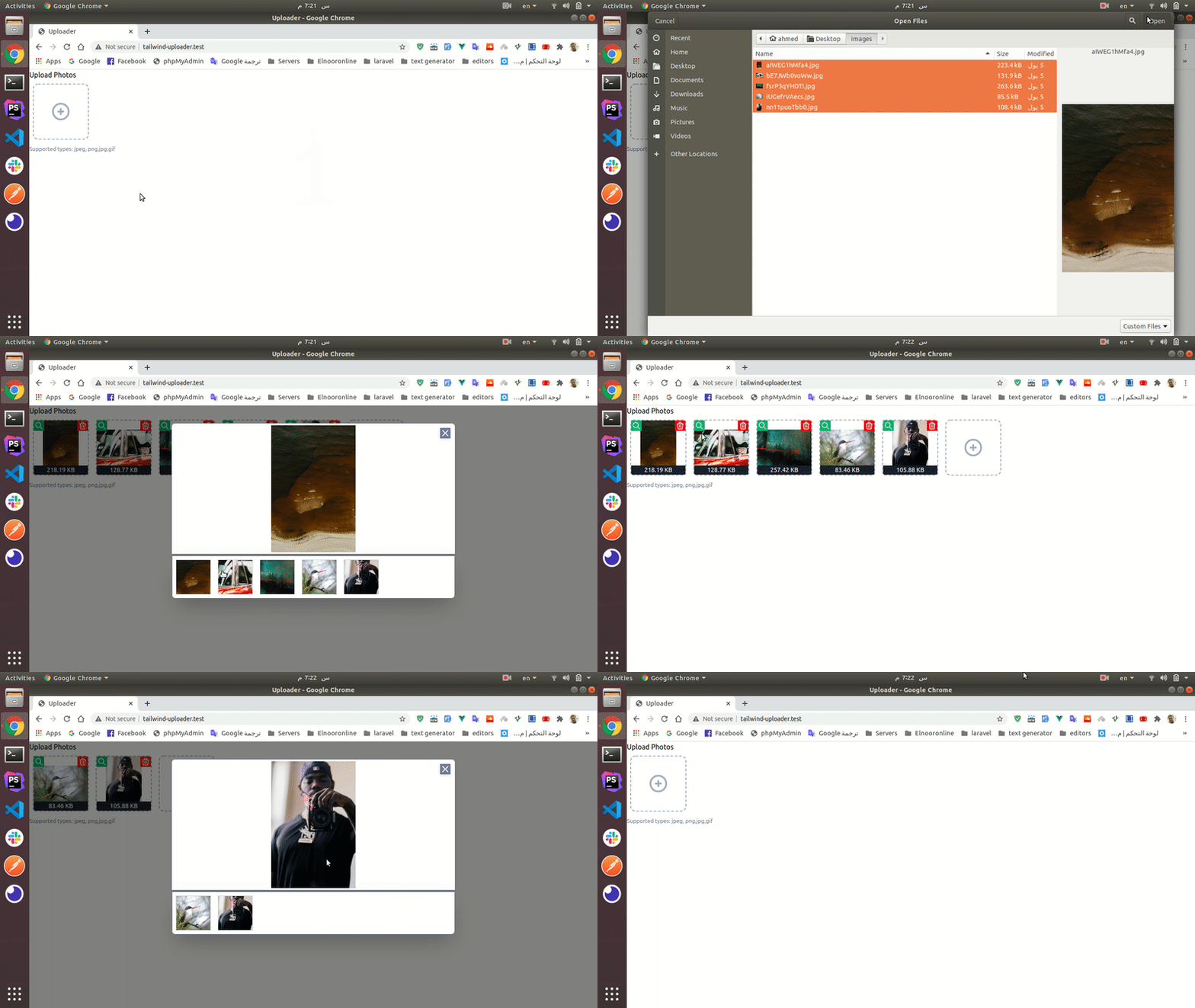
In this package all uploaded media will be processed.
- All videos will converted to
mp4. - All audios will converted to
mp3. - All images
width&height&ratiowill be saved as custom property. - All videos & audios
durationwill be saved as custom property.
Requirements
- PHP >= 7.4
- You should be ensured that the ffmpeg was installed on your server
Installation
composer require ahmed-aliraqi/laravel-media-uploader
The package will automatically register a service provider.
You need to publish and run the migration:
php artisan vendor:publish --provider="AhmedAliraqi\LaravelMediaUploader\Providers\UploaderServiceProvider" --tag="migrations"

php artisan migrate
Publish laravel-media-library migrations:
php artisan vendor:publish --provider="Spatie\MediaLibrary\MediaLibraryServiceProvider" --tag="migrations"
php artisan migrate
If you want to customize
attachmentsvalidation rules, you should publish the config file:
php artisan vendor:publish --provider="AhmedAliraqi\LaravelMediaUploader\Providers\UploaderServiceProvider" --tag="config"
If you want to customize validation translations, you should publish the
langfiles:
php artisan vendor:publish --provider="AhmedAliraqi\LaravelMediaUploader\Providers\UploaderServiceProvider" --tag="uploader:translations"
This is the default content of the config file:
<?php

return [
    /*
     * Regenerate uploaded media after assign to model
     */
    'regenerate-after-assigning' => true,

    'documents_mime_types' => [
        'application/msword',
        'application/vnd.openxmlformats-officedocument.wordprocessingml.document', // .doc & .docx
        'application/vnd.ms-powerpoint',
        'application/vnd.openxmlformats-officedocument.presentationml.presentation', // .ppt & .pptx
        'application/vnd.ms-excel',
        'application/vnd.openxmlformats-officedocument.spreadsheetml.sheet', // .xls & .xlsx
        'text/plain',
        'application/pdf',
        'application/zip',
        'application/x-rar',
        'application/x-rar-compressed',
        'application/octet-stream',
    ],
];
Use
HasUploadertrait in your model:
<?php

namespace App;


use Spatie\MediaLibrary\InteractsWithMedia;
use Spatie\MediaLibrary\MediaCollections\Models\Media;
use Spatie\MediaLibrary\HasMedia;
use AhmedAliraqi\LaravelMediaUploader\Entities\Concerns\HasUploader;

class Blog extends Model implements HasMedia
{
    use InteractsWithMedia, HasUploader;
    ...
}
In your controller use
addAllMediaFromTokens()method to assign the uploaded media to model using the generated tokens:
class BlogController extends Controller
{
        public function store(Request $request)
        {
            $blog = Blog::create($request->all());

            $blog->addAllMediaFromTokens();

            return back();
        }
}
If you do not add any arguments in
addAllMediaFromTokens()method will add all tokens inrequest('media')with any collection.If you want to save specific collection name add it to the second argument.
// specified collection name
$blog->addAllMediaFromTokens([], 'pictures');

// specified tokens
$blog->addAllMediaFromTokens($request->input('tokens', []), 'pictures');
Front End Basic Usage
<div id="app">
    <file-uploader
            :unlimited="true"
            collection="avatars"
            :tokens="{{ json_encode(old('media', [])) }}"
            label="Upload Avatar"
            notes="Supported types: jpeg, png,jpg,gif"
            accept="image/jpeg,image/png,image/jpg,image/gif"
    ></file-uploader>
</div>

<script src="https://cdn.jsdelivr.net/npm/vue/dist/vue.js"></script>
<script src="https://cdn.jsdelivr.net/npm/laravel-file-uploader"></script>
<script>
  new Vue({
    el: '#app'
  })
</script>
Or Install Component Via NPM
npm i laravel-file-uploader --save-dev
Now you should register the component in your
resources/js/app.js:
// app.js

import FileUploader from 'laravel-file-uploader';

Vue.use(FileUploader);
Usage
<file-uploader :media="{{ $user->getMediaResource('avatars') }}"
               :unlimited="true"
               collection="avatars"
               :tokens="{{ json_encode(old('media', [])) }}"
               label="Upload Avatar"
               notes="Supported types: jpeg, png,jpg,gif"
               accept="image/jpeg,image/png,image/jpg,image/gif"
></file-uploader>
Attributes
| Attribute | Rule | Type | Description |
|---|---|---|---|
| media | optional - default: [] |
array | used to display an existing files |
| unlimited | optional - default:false |
boolean | upload unlimited files - if let it false will not be multiple select |
| max | optional - default:12 |
int | the maximum uploaded files - if 1 will not me multiple select |
| accept | optional - default: * |
string | the accepted mime types |
| form | optional - default: false |
string | the form id of the uploaded media |
| notes | optional - default null |
string | the help-block that will be displayed under the files |
| label | optional - default null |
string | the label of the uploader |
| collection | optional - default default |
string | the media library collection that the file will store in |
| tokens | optional - default: [] |
array | the recently uploaded files tokens, used to display recently uploaded files in validation case |
| max-width | optional - default: 1200 |
string | The maximum width of uploaded image |
| max-height | optional - default: 1200 |
string | The maximum height of uploaded image |
API
- Upload Files
- endpoint: /api/uploader/media/upload
- method: POST
- body:
- files[]: multipart form data
- response:
- Display Recently Uploaded Files
- endpoint: /api/uploader/media
- method: GET
- params:
- tokens[]: temporary token
- response:
- Delete Files
- endpoint: /api/uploader/media/{id}
- method: DELETE
- response:
统计信息
- 总下载量: 23.59k
- 月度下载量: 0
- 日度下载量: 0
- 收藏数: 338
- 点击次数: 0
- 依赖项目数: 3
- 推荐数: 0
其他信息
- 授权协议: MIT
- 更新时间: 未知