digital-creative/batch-edit-toolbar
最新稳定版本:v0.0.4
Composer 安装命令:
composer require digital-creative/batch-edit-toolbar
包简介
Allows you to update a single column of a resource all at once.
README 文档
README
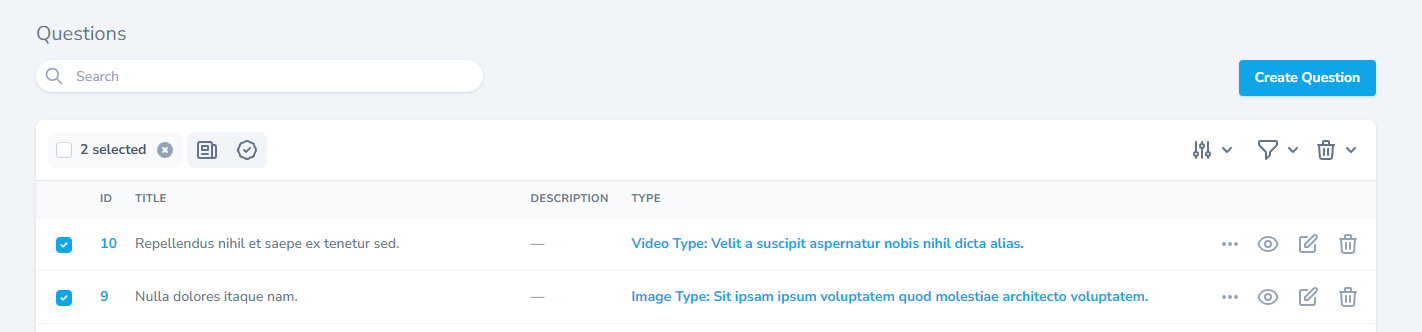
Allows you to update a single column of a resource all at once directly from the index page.
Installation
You can install the package via composer:
composer require digital-creative/batch-edit-toolbar
Basic Usage
To use the new functionality all you need to do is to add the batchEditable method to your field definition, this method should return an array containing the options as defined below.
class UserResource extends Resource
{
    public function fields(NovaRequest $request): array
    {
        return [
            Text::make('Title', 'title')
                ->rules('required')
                ->batchEditable(fn () => [
                    'icon' => 'annotation', // accepts any heroicon name supported by Nova: https://v1.heroicons.com

                    /**
                     * These are all optional, and the current values are the default ones
                     */
                    'tooltip' => 'Update {attribute}', // Appears when hovering the icon.
                    'title' => 'Update {attribute}', // Appears in the modal title.
                    'cancelButtonText' => 'Cancel', // Appears in the modal cancel button.
                    'confirmButtonText' => 'Update', // Appears in the modal confirm button.
                    'confirmText' => null, // Appears above the field in the modal.
                    'modalSize' => '2xl', // Can be "sm", "md", "lg", "xl", "2xl", "3xl", "4xl", "5xl", "6xl", "7xl".
                    'modalStyle' => 'window', // Can be either 'fullscreen' or 'window'.
                ]),

            /**
             * You can also use a custom SVG icon directly
             */
            Text::make('Description', 'description')
                ->rules('required')
                ->batchEditable(fn () => [
                    'icon' => <<<SVG
                        <svg>...</svg>
                    SVG,
                ]),
        ];
    }
}
⭐️ Show Your Support
Please give a ⭐️ if this project helped you!
Other Packages You Might Like
- Nova Dashboard - The missing dashboard for Laravel Nova!
- Nova Welcome Card - A configurable version of the
Help cardthat comes with Nova. - Icon Action Toolbar - Replaces the default boring action menu with an inline row of icon-based actions.
- Expandable Table Row - Provides an easy way to append extra data to each row of your resource tables.
- Collapsible Resource Manager - Provides an easy way to order and group your resources on the sidebar.
- Resource Navigation Tab - Organize your resource fields into tabs.
- Resource Navigation Link - Create links to internal or external resources.
- Nova Mega Filter - Display all your filters in a card instead of a tiny dropdown!
- Nova Pill Filter - A Laravel Nova filter that renders into clickable pills.
- Nova Slider Filter - A Laravel Nova filter for picking range between a min/max value.
- Nova Range Input Filter - A Laravel Nova range input filter.
- Nova FilePond - A Nova field for uploading File, Image and Video using Filepond.
- Custom Relationship Field - Emulate HasMany relationship without having a real relationship set between resources.
- Column Toggler - A Laravel Nova package that allows you to hide/show columns in the index view.
- Batch Edit Toolbar - Allows you to update a single column of a resource all at once directly from the index page.
License
The MIT License (MIT). Please see License File for more information.
统计信息
- 总下载量: 1.48k
- 月度下载量: 0
- 日度下载量: 0
- 收藏数: 9
- 点击次数: 0
- 依赖项目数: 0
- 推荐数: 0
其他信息
- 授权协议: MIT
- 更新时间: 2023-10-04