jofrysutanto/windsor
最新稳定版本:v1.0.2
Composer 安装命令:
composer require jofrysutanto/windsor
包简介
YAML-ised Configuration for ACF
README 文档
README
This package extends Advanced Custom Fields plugin for WordPress and enable developers to write their ACF fields blazingly fast in configuration file.
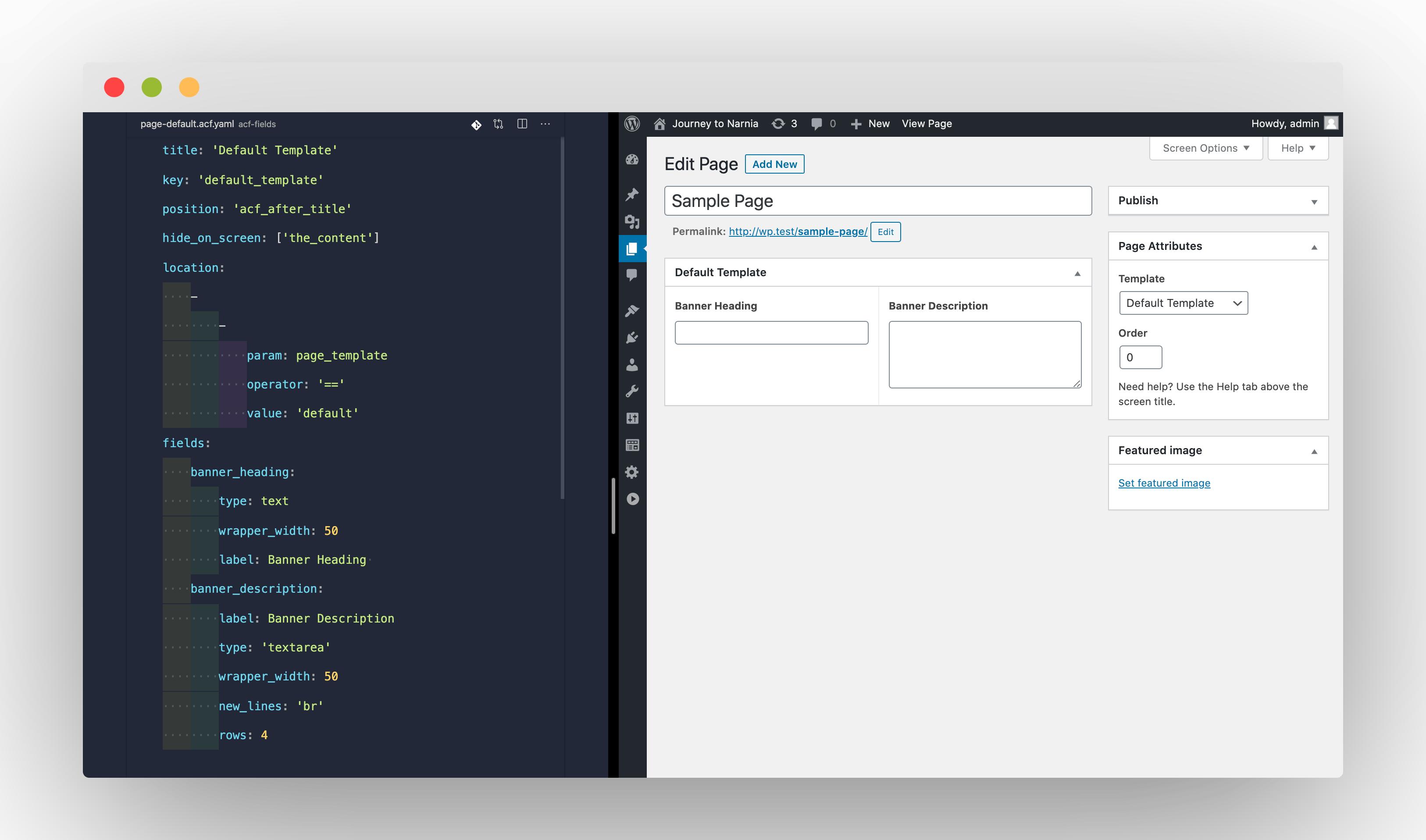
Features
- Permanently lock your custom fields in your version-controlled code, preventing accidental edits that quickly leads to out-of-sync configurations.
- Create your fields much faster, especially when complimented with the IDE integration.
- Composition is at the heart of it. Write your own rules to further supercharge your development productivity.
Getting Started
- The easiest way to install Windsor is to use composer:
composer require jofrysutanto/windsor
- If you are using VSCode, be sure to add the Schema file to your configuration.
- Ensure you have included composer auto-loader file. If you're not sure, add the following line into your
functions.phpfile:
require_once __DIR__ . '/vendor/autoload.php';
- Register Windsor on ACF initialization. You may also do this in
functions.phpfile:
function register_acf_windsor()
{
    \Windsor\Capsule\Manager::make()->register();
}
add_action('acf/init', 'register_acf_windsor');
- Create YAML entry file at
[your-active-theme]/acf-fields/index.yaml, where[your-active-theme]refers to your currently active WordPress theme directory. At minimum, your entry file should contain:
fields: []
pages: []
blocks: []
- Test your installation:
- Create your first custom field YAML, for example create a file
your-theme/acf-fields/page-default.acf.yaml:
title: 'Page Default'
key: 'page_default'
position: 'acf_after_title'
hide_on_screen: []
location:
  -
    -
      param: 'page_template'
      operator: '=='
      value: 'default'
fields:
  heading:
    type: text
    label: Heading
- Register this new ACF file in your index:
fields: []
pages:
  - page-default.acf.yaml
blocks: []
- You have successfully registered a new field group which will be made available when creating a new default page.
- Create your first custom field YAML, for example create a file
- Check out our full documentation below. Now go and create beautiful ACF fields!
Migrating Existing Fields
If you have existing field groups created through ACF interface, you can easily export them out to YAML by enabling the exporter through ui configuration when registering Windsor:
function register_acf_windsor()
{
    \Windsor\Capsule\Manager::make([
        'ui' => true
      ])
      ->register();
}
add_action('acf/init', 'register_acf_windsor');
Once enabled, you access the exporter within WordPress backend by clicking on Custom Fields > Export to YAML link in sidebar.
More information about this tool can be found in configurations section.
Learn More
Check out full documentations at https://windsor-docs.netlify.app/
IDE Integration
Only VSCode integration is available at the moment. To enable autocompletion and useful snippets, follow the installation steps below:
- If not already installed, download and enable YAML language server extension.
- Update your VSCode settings (i.e.
settings.json):
"yaml.schemas": {
    "https://windsor-docs.netlify.app/schema.json": "*.acf.yaml"
}
Credits
This package is written to be used with Advanced Custom Fields plugin by Elliot Condon, who deserves most of the credits for delivering and maintaining such an incredible plugin for WordPress developers.
If you have not already started using Advanced Custom Fields, be sure to check it out; it will definitely be worth your while.
统计信息
- 总下载量: 9.18k
- 月度下载量: 0
- 日度下载量: 0
- 收藏数: 54
- 点击次数: 0
- 依赖项目数: 0
- 推荐数: 0
其他信息
- 授权协议: Apache-2.0
- 更新时间: 2020-06-12