keizah7/custom-date-filter
最新稳定版本:v1.1.0
Composer 安装命令:
composer require keizah7/custom-date-filter
包简介
Laravel Nova FIlter Package. Custom date filter
README 文档
README
Data Filter
Laravel Nova Custom Date Filter
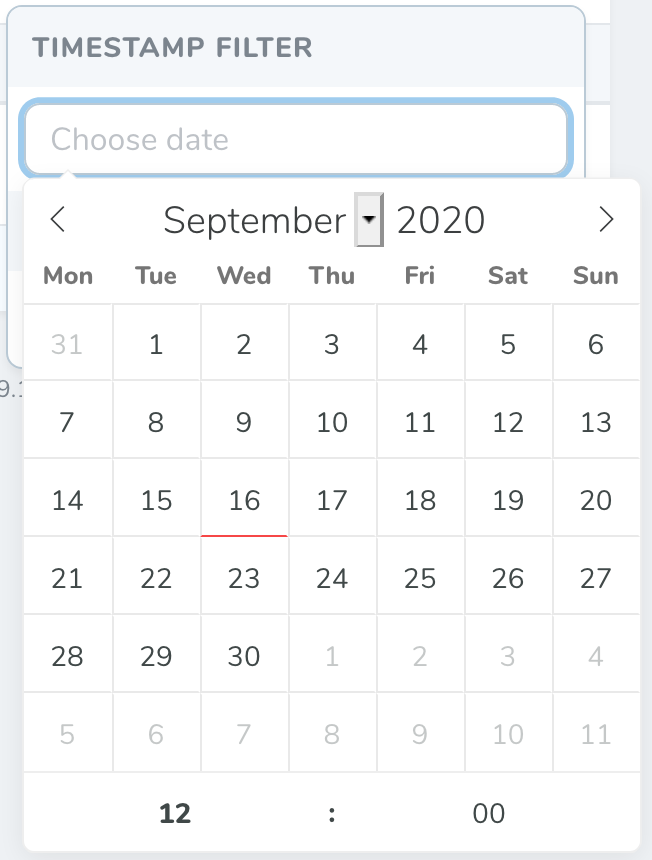
With this package you can set custom date filter format and other options, which newest Nova doesn't support.
Installation
Install your package in any Nova app
composer require keizah7/nova-date-filter
You may generate a filter using the nova:filter command.
By default, Nova will place newly generated filters in the app/Nova/Filters directory
php artisan nova:filter TimestampFilter
Extend your filter class with CustomDateFilter
use Keizah7\CustomDateFilter\CustomDateFilter;

class TimestampFilter extends CustomDateFilter
{
    //
}
Once you have defined a filter, you are ready to attach it to a resource. Each resource generated by Nova contains a filters method. To attach a filter to a resource, you should simply add it to the array of filters returned by this method:
/**
 * Get the filters available for the resource.
 *
 * @param  \Illuminate\Http\Request  $request
 * @return array
 */
public function filters(Request $request)
{
    return [
        new TimestampFilter(),
    ];
}
Remove TimestampFilter $component variable
/**
 * The filter's component.
 *
 * @var string
 */
public $component = 'select-filter'; // remove this line
After completing these steps you can see date filter in your nova resource.
Usage
The filter apply method is responsible for modifying the query to achieve the desired filter state, so you can modify it as you want or use prepared package methods:
byTimebyHourfromHourtoHourbyDayfromDaytoDay
/**
 * Apply the filter to the given query.
 *
 * @param  \Illuminate\Http\Request  $request
 * @param  \Illuminate\Database\Eloquent\Builder  $query
 * @param  mixed  $value
 * @return \Illuminate\Database\Eloquent\Builder
 */
public function apply(Request $request, $query, $value)
{
    return $this->byHour($query, 'created_at', $value);
}
Settings
Default filter setings is:
'altFormat' => 'Y-m-d H:i'
'dateFormat' => 'Y-m-d H:i'
'enableTime' => true
'enableSeconds' => false
'firstDayOfWeek' => 1
You can change them by modify your filter class options method:
/**
 * Get the filter's available options.
 *
 * @param  \Illuminate\Http\Request  $request
 * @return array
 */
public function options(Request $request)
{
    return [
        'altFormat' => 'Y-m-d H:i:S',
        'dateFormat' => 'Y-m-d H:i:S',
        'enableTime' => true,
        'enableSeconds' => true,
        'firstDayOfWeek' => 7,
    ];
}
License
The MIT License (MIT). Please see License File for more information.
统计信息
- 总下载量: 11.43k
- 月度下载量: 0
- 日度下载量: 0
- 收藏数: 3
- 点击次数: 0
- 依赖项目数: 0
- 推荐数: 0
其他信息
- 授权协议: MIT
- 更新时间: 2020-09-16