mgrechanik/gridviewfilterfix
最新稳定版本:1.0.1
Composer 安装命令:
composer require mgrechanik/gridviewfilterfix
包简介
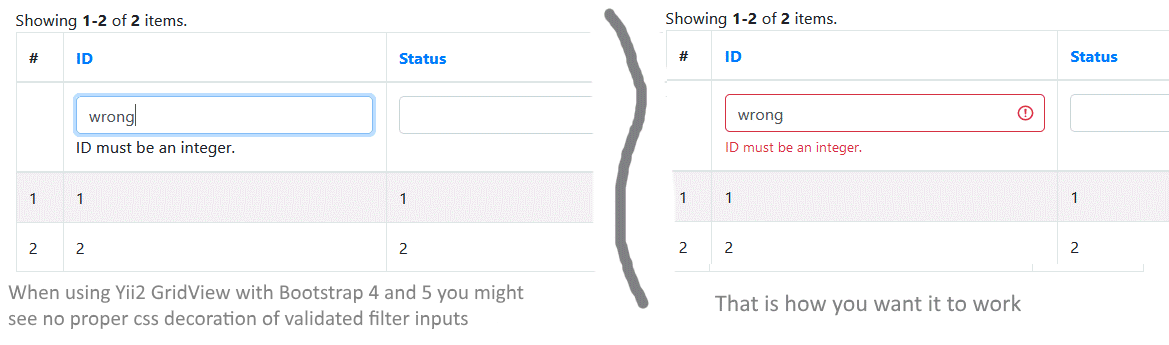
Fix for Yii2 GridView DataColumn for filter validation errors to be properly shown with bootstrap 4 and 5
README 文档
README
What is it about?
When you are using Yii2 default GridView you might meet a problem that validation errors for filter model are not displayed properly, like this:
Installing
Installing through composer::
The preferred way to install this library is through composer.
Either run
composer require --prefer-dist mgrechanik/gridviewfilterfix
or add
"mgrechanik/gridviewfilterfix" : "~1.0.0"
to the require section of your composer.json.
How to use
Add the following lines of code to your main configuration file:
- For Bootstrap 4
    'container' => [
        'definitions' => [
            \yii\grid\GridView::class => [
                'dataColumnClass' => \mgrechanik\gridviewfilterfix\Bs4DataColumn::class
            ]
        ]
    ],
- For Bootstrap 5
    'container' => [
        'definitions' => [
            \yii\grid\GridView::class => [
                'dataColumnClass' => \mgrechanik\gridviewfilterfix\Bs5DataColumn::class
            ]
        ]
    ],
Similar problems with Forms or GridView and Bootstrap 4 / 5
Paginator does not look good
Solution:
    'container' => [
        'definitions' => [
            \yii\widgets\LinkPager::class => \yii\bootstrap5\LinkPager::class,
        ],
    ],
Error block under field is now shown, after failed validation, since this block is not at the same level with input.is-invalid
There is a library to solve this problem
统计信息
- 总下载量: 952
- 月度下载量: 0
- 日度下载量: 0
- 收藏数: 0
- 点击次数: 1
- 依赖项目数: 0
- 推荐数: 0
其他信息
- 授权协议: BSD-3-Clause
- 更新时间: 2024-12-09