unikka/neos-slick
Composer 安装命令:
composer require unikka/neos-slick
包简介
Plugin for the Neos CMS that provides a slick slider content element
README 文档
README
Slick Content Element for Neos CMS
This is a ready-to-use implementation of the JavaScript package slick.
Installation
Most of the time you have to make small adjustments to a package (e.g., the configuration in Settings.yaml). Because of that, it is important to add the corresponding package to the composer manifest in your theme package. Mostly this is the site package located under Packages/Sites/. To install it correctly, go to your theme package (e.g. Packages/Sites/Foo.Bar) and run following command:
composer require unikka/neos-slick --no-update
The --no-update command prevents the automatic update of the dependencies. After the package was added to your theme composer.json, go back to the root of the Neos installation and run composer update. Your desired package is now installed correctly.
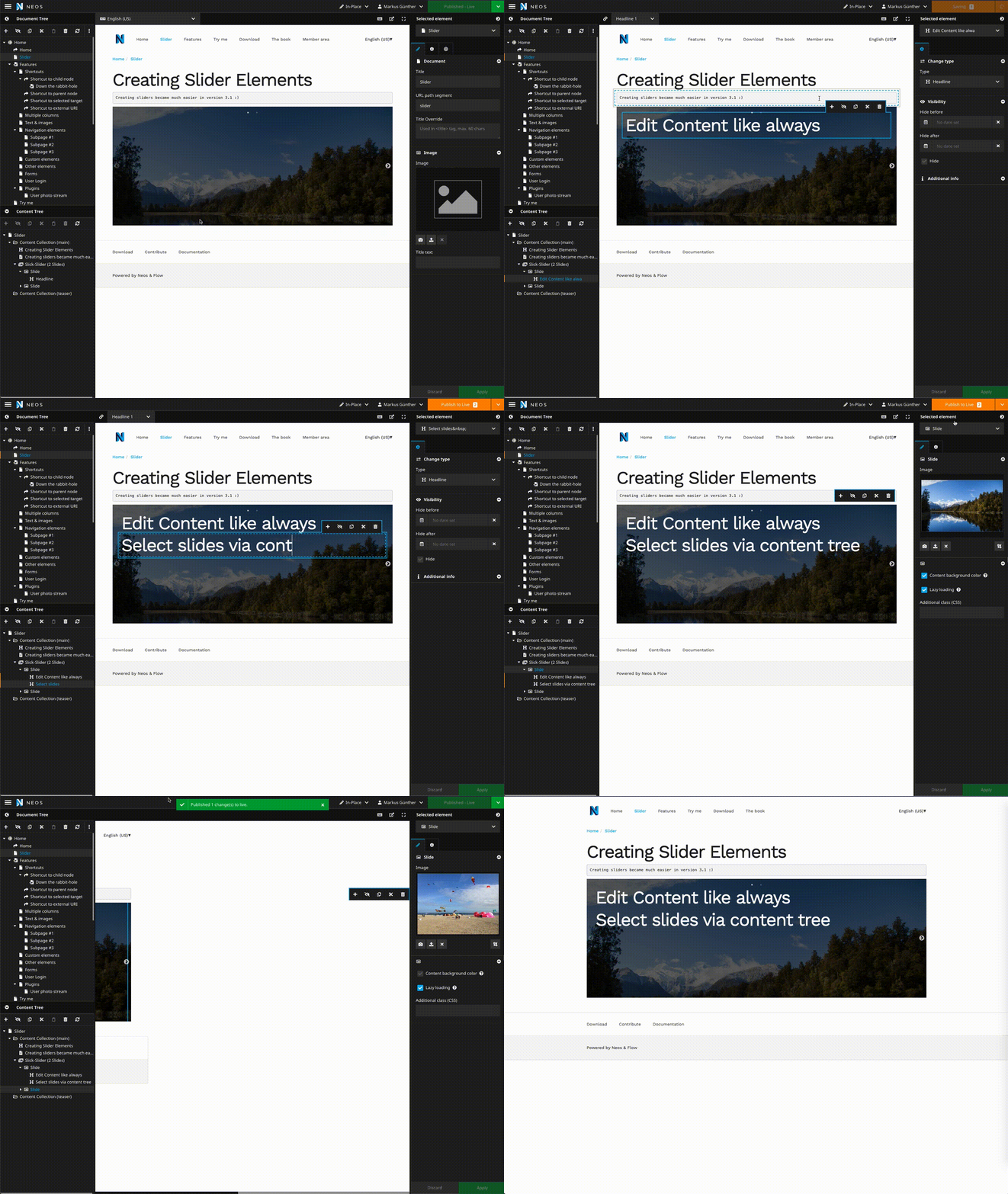
Usage
This package uses background images as slides. If you want to use a fixed height for the slider you can use the following CSS to override the defaults:
.slick-slide {
    min-height: <your-slide-height>;
}
Disabling / enabling features
The Slide and the Slider element have a few mixins, which you can use to enable/disable and to add/remove a feature.
Example
If you want to disable the autoplay option in the backend, you can do this:
'Unikka.Slick:Content.Slider':
  superTypes:
    'Unikka.Slick:Mixin.Autoplay': false
Unikka.Slick:Content.Slider Mixins
| Mixin | Default value | Description |
|---|---|---|
| Unikka.Slick:Mixin.Autoplay | true | Autoplay option |
| Unikka.Slick:Mixin.SlidesToScroll | true | How many slides scroll |
| Unikka.Slick:Mixin.Infinite | false | Infinite scrolling |
| Unikka.Slick:Mixin.Draggable | true | Draggable |
| Unikka.Slick:Mixin.PauseOnHover | true | Pause on hover |
| Unikka.Slick:Mixin.AnimationSpeed | true | Animation speed |
| Unikka.Slick:Mixin.Fade | false | Fade |
| Unikka.Slick:Mixin.Arrows | true | Arrows shown |
| Unikka.Slick:Mixin.Dots | false | Dots shown |
| Unikka.Slick:Mixin.SlidesToShow | true | Number of slides shown at once |
| Unikka.Slick:Mixin.AdditionalClass | true | Additional CSS-Class |
| Unikka.Slick:Mixin.Repsonsive.Sm | true | Responsive group mobile |
| Unikka.Slick:Mixin.Repsonsive.Md | true | Responsive group tablet |
| Unikka.Slick:Mixin.Repsonsive.Lg | true | Responsive group laptop |
| Unikka.Slick:Mixin.Repsonsive.Xl | true | Responsive group desktop |
Unikka.Slick:Content.Slide Mixins
| Mixin | Default value | Description |
|---|---|---|
| Unikka.Slick:Mixin.BackgroundImage | true | Background image for Slide |
| Unikka.Slick:Mixin.AdditionalClass | true | Additional CSS-Class |
| Unikka.Slick:Mixin.LazyLoading | true | Enables layz loading |
| Unikka.Slick:Mixin.ContentBackground | true | Enables dark translucend background |
Fade option
The fade options is disabled by default, because if you enable fade, the "slides to show" option isn't working. But you can simply enable it like this:
'Unikka.Slick:Content.Slider':
  superTypes:
    'Unikka.Slick:Mixin.Fade': true
    'Unikka.Slick:Mixin.SlidesToShow': false
Configuration
Unikka:
  Slick:
    # include the theme css file from slick
    theme: true
    backend:
      # disables autoplay in backend
      disableAutoplay: true
    # breakpoints for the responsive tab
    responsive:
      sm: 576px
      md: 768px
      lg: 992px
      xl: 1200px
Contribution
We'd love you to contribute to neos-slick. We try to make it as easy as possible. We are using semantic versioning to have more time to concentrate on important stuff instead of struggling in the dependency or release hell.
Therefore the first rule is to follow the eslint commit message guideline.
It is really easy if you always commit via yarn commit. Commitizen will guide you.
All PRs will be merged into the master branch. Travis and semantic release will check the commit messages and start building a new release when the analysis of the latest commits will trigger that.
If you have questions just ping us on Twitter or Github.
About
The package is based on the Noerdisch/Slick package. We thank the Noerdisch team for
all the efforts. Part of the development has been sponsored by the Danske Folkekirken, we are proud that the Folkekirken is using the slider package and supports open source software.
License
The MIT License (MIT). Please see License File for more information.
unikka/neos-slick 适用场景与选型建议
unikka/neos-slick 是一款 基于 JavaScript 开发的 Composer 扩展包,目前已累计 8.02k 次下载、GitHub Stars 达 9, 最近一次更新时间为 2019 年 01 月 02 日, 在 PHP 生态内属于活跃度较高的组件。
我们在过去多个企业项目中使用过 unikka/neos-slick 或与其功能相近的方案,如果你在选型或落地过程中遇到问题,例如 版本兼容、二次改造、私有化封装、与内部系统对接、生产 BUG 排查,欢迎联系我们协助评估。
基于 unikka/neos-slick 在你已有业务上做功能扩展、字段裁剪、UI 适配、与内部账号 / 权限 / 日志系统的深度对接。
线上偶发问题、内存泄漏、慢查询、并发异常等排查修复;针对高流量场景做缓存、队列、索引层面的调优。
承接完整的项目从需求 → 设计 → 开发 → 上线 → 长期运维;也可按月提供技术保姆服务。
统计信息
- 总下载量: 8.02k
- 月度下载量: 0
- 日度下载量: 0
- 收藏数: 9
- 点击次数: 0
- 依赖项目数: 0
- 推荐数: 0
其他信息
- 授权协议: MIT
- 更新时间: 2019-01-02