wp-graphql/wp-graphql-jwt-authentication
最新稳定版本:v0.7.0
Composer 安装命令:
composer require wp-graphql/wp-graphql-jwt-authentication
包简介
JWT Authentication for WPGraphQL
README 文档
README
WPGraphQL JWT Authentication
This plugin extends the WPGraphQL plugin to provide authentication using JWT (JSON Web Tokens)
JSON Web Tokens are an open, industry standard RFC 7519 method for representing claims securely between two parties.
This plugin was initially based off the wp-api-jwt-auth plugin by Enrique Chavez (https://github.com/Tmeister), but modified (almost completely) for use with the WPGraphQL plugin.
Install, Activate & Setup
You can install and activate the plugin like any WordPress plugin. Download the .zip from Github and add to your plugins directory, then activate.
JWT uses a Secret defined on the server to validate the signing of tokens.
It's recommended that you use something like the WordPress Salt generator (https://api.wordpress.org/secret-key/1.1/salt/) to generate a Secret.
You can define a Secret like so:
define( 'GRAPHQL_JWT_AUTH_SECRET_KEY', 'your-secret-token' ); Or you can use the filter graphql_jwt_auth_secret_key to set a Secret like so:
add_filter( 'graphql_jwt_auth_secret_key', function() { return 'your-secret-token'; }); This secret is used in the encoding and decoding of the JWT token. If the Secret were ever changed on the server, ALL tokens that were generated with the previous Secret would become invalid. So, if you wanted to invalidate all user tokens, you can change the Secret on the server and all previously issued tokens would become invalid and require users to re-authenticate.
- Learn more about JWT: https://jwt.io/introduction/
HTTP_AUTHORIZATION
In order to use this plugin, your WordPress environment must support the HTTP_AUTHORIZATION header. In some cases, this header is not passed to WordPress because of some server configurations.
Depending on your particular environment, you may have to research how to enable these headers, but in Apache, you can do the following in your .htaccess:
SetEnvIf Authorization "(.*)" HTTP_AUTHORIZATION=$1 For NGINX, this may work: https://serverfault.com/questions/511206/nginx-forward-http-auth-user#answer-511612
How the plugin Works
Login User
This plugin adds a new login mutation to the WPGraphQL Schema.
This can be used like so:
Input-Type: LoginUserInput!
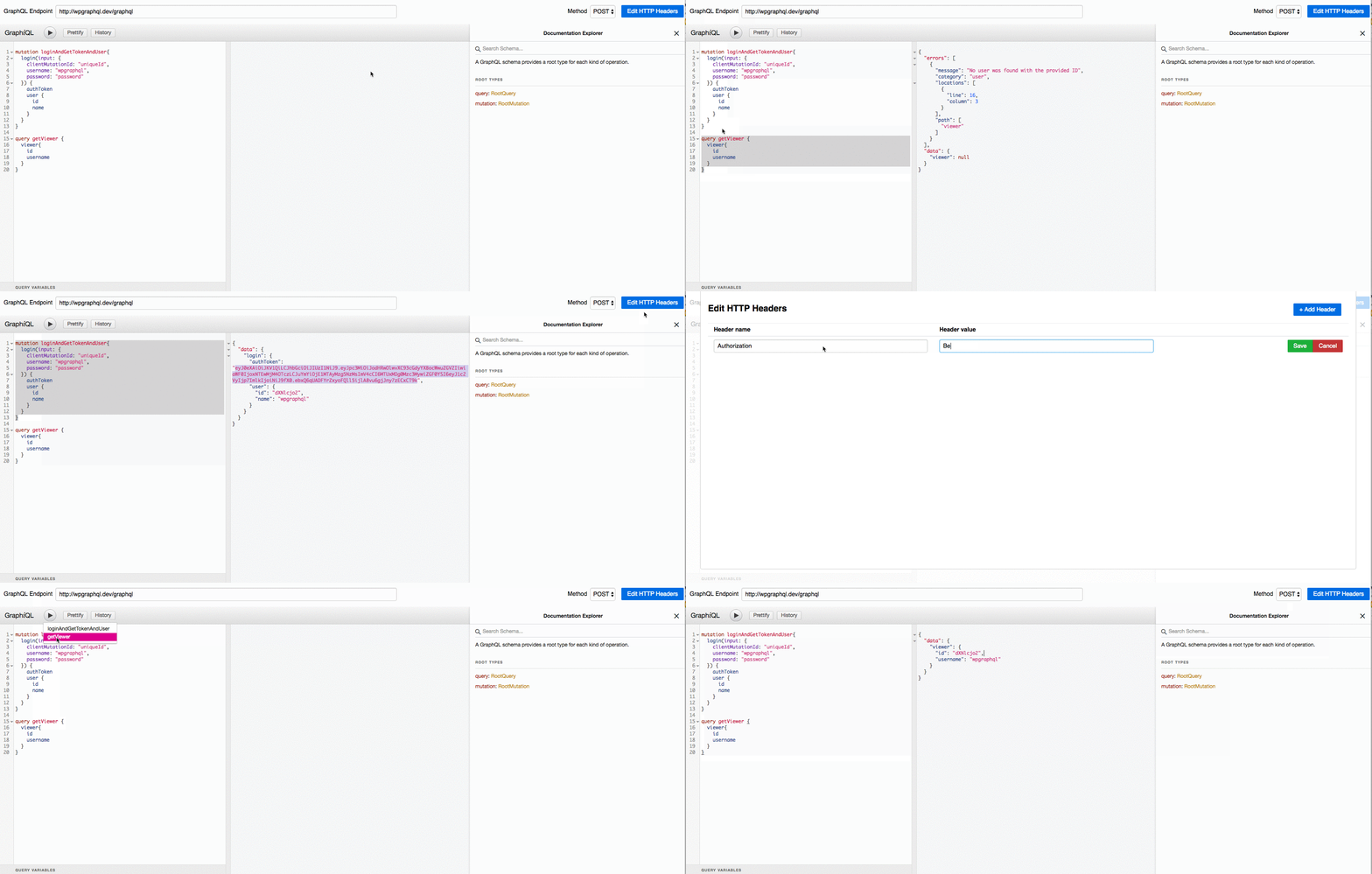
mutation LoginUser { login( input: { clientMutationId: "uniqueId", username: "your_login", password: "your password" } ) { authToken user { id name } } }
The authToken that is received in response to the login mutation can then be stored in local storage (or similar) and used in subsequent requests as an HTTP Authorization header to Authenticate the user prior to execution of the GraphQL request.
- Set authorization header in Apollo Client: https://www.apollographql.com/docs/react/networking/authentication/#header
- Set authorization header in Relay Modern: https://relay.dev/docs/en/network-layer.html
- Set authorization header in Axios: https://github.com/axios/axios#axioscreateconfig
Register User
Input-Type: RegisterUserInput!
mutation RegisterUser { registerUser( input: { clientMutationId: "uniqueId", username: "your_username", password: "your_password", email: "your_email" }) { user { jwtAuthToken jwtRefreshToken } } }
Refresh Auth Token
Input-Type: RefreshJwtAuthTokenInput!
mutation RefreshAuthToken { refreshJwtAuthToken( input: { clientMutationId: "uniqueId" jwtRefreshToken: "your_refresh_token", }) { authToken } }
Filters
The plugin offers some filters to hook into.
Change Auth Token expiration
Note: For security, we highly recommend, that the Auth Token is short lived. So do not set this higher than 300 seconds unless you know what you are doing.
function custom_jwt_expiration( $expiration ) { return 60; } add_filter('graphql_jwt_auth_expire', 'custom_jwt_expiration', 10);
- Argument: Expiration in seconds
- Default: 300
Example using GraphiQL
统计信息
- 总下载量: 113.35k
- 月度下载量: 0
- 日度下载量: 0
- 收藏数: 360
- 点击次数: 0
- 依赖项目数: 1
- 推荐数: 0
其他信息
- 授权协议: GPL-3.0
- 更新时间: 2026-01-04