armezit/lunarphp-purchase-limit
Composer 安装命令:
composer require armezit/lunarphp-purchase-limit
包简介
Lunar E-Commerce Purchase Limit Addon
README 文档
README
The Purchase Limit addon for Lunar allows you to define complex purchase limitation scenarios in your Lunar store.
Features
You can define a criteria for each rule. Currently, you are able to define purchase limits for:
- a specific Product
- a specific Product Variant
- a Customer or Customer Group
- a specific Product for a specific Customer or Customer Group
- a specific Product Variant for a specific Customer or Customer Group
Each purchase limit rule allows you to restrict either quantity, amount (total sum), or both of them.
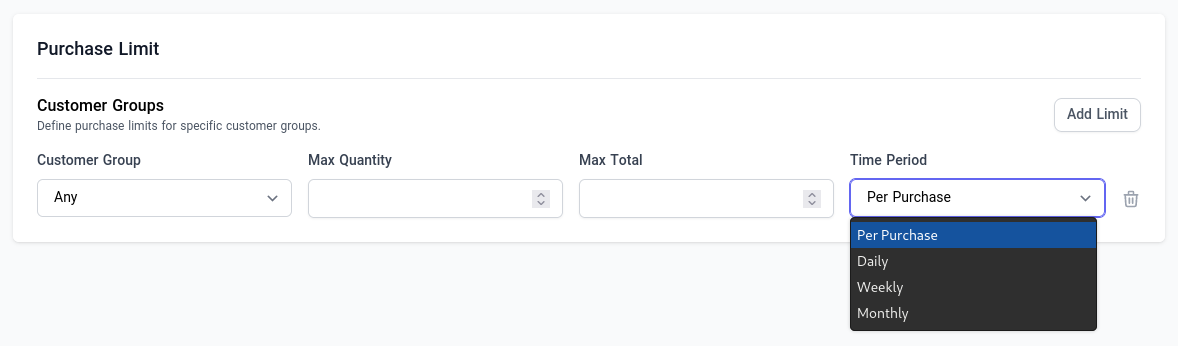
Quick Setup
Install the Lunar Purchase Limit via composer:
composer require armezit/lunarphp-purchase-limit
Run the migrations with:
php artisan migrate
Usage
By default, after quick setup, you can start to define purchase limits on products and customers. There is also a detailed installation guide, in case you need more customization.
Detect Violation of Defined Limitations
The package throws a child type of Lunar\Exceptions\Carts\CartException exception,
each time a violation of defined limits detected.
Typically, you want to catch these exceptions during create order process:
use Lunar\Facades\CartSession;
use Lunar\Exceptions\Carts\CartException;
use Armezit\Lunar\PurchaseLimit\Exceptions\PurchaseLimitException;
use Armezit\Lunar\PurchaseLimit\Exceptions\CustomerQuantityLimitException;

try {
    $order = CartSession::current()
                ->getManager()
                ->createOrder();

// catch any CartException
} catch (CartException $e) {
    ...

// catch any kind of purchase limit violation
} catch (PurchaseLimitException $e) {
    ...

// catch specific kind of purchase limit violation
} catch (CustomerQuantityLimitException $e) {
    // customer quantity limit exceeded
}
Product Purchase Limit (Slot)
The Product Purchase Limit slot will let you define limitations for a specific product.
In the following example, we have defined limitation rules for product A:
Anycustomer is allowed to purchase at most10units of the product in eachWeek.- Customers of
Retailgroup are allowed to purchase at most2000total sum of the product inEach Purchase. So, for example, if price of product is $500, they can only purchase up to 4 unit of productAin each order.
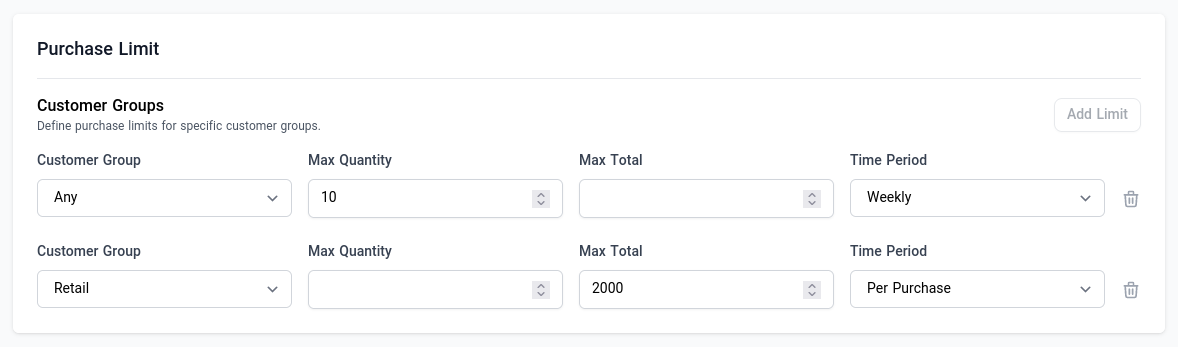
BY default, you will find this slot in bottom of the product edit page. However, you can change this default position in config file.
Customer Purchase Limit (Slot)
The Customer Purchase Limit slot will let you define limitations for a specific customer or customer group.
TODO: Not Yet Implemented !
Advanced Usage
Architecture
The primary component is Rule classes, which check defined limitations (stored in database)
and throw exception if a violation of rule detected.
There are two kinds of rules which implement either CartRuleInterface or CartLineRuleInterface contracts.
Each rule perform only a unique type of checks.
For example, CustomerProductLimit rule only checks purchase limits of a specific customer on a specific product.
While CustomerLimit rule only checks purchase limits of a specific customer on any product, and
ProductLimit rules only checks purchase limits of any customer on a specific product; And so on.
These rules are injected into the Cart/CartLine modifiers pipelines.
So, everytime you try to call CreateOrder action, these rules execute one by one
and throw exception if detect violation of defined limitations.
Complex Rules
Although there is Hub slots for defining typical limitations, nothing prevents you to compose more complex rules by saving purchase limits directly in database.
Take a look at the PurchaseLimit Model.
Extend
In addition, you can extend/modify business logic by implementing CartRuleInterface and/or CartLineRuleInterface
contracts and inject them into the modifier pipelines.
After implementing a new CheckVeryComplexLimit rule, add it to the corresponding pipeline in config file:
'cart_rules' => [
    ...
    CheckVeryComplexLimit::class,
],
or
'cart_line_rules' => [
    ...
    CheckVeryComplexLimit::class,
],
Installation
Quick Setup covers the essential installation steps. This section, however, is a detailed installation procedure, containing all optional parts.
You can install the package via composer:
composer require armezit/lunarphp-purchase-limit
Migrations
Optionally, publish the migrations:
php artisan vendor:publish --tag="lunarphp-purchase-limit-migrations"
Run the migrations with:
php artisan migrate
::: tip Table names are configurable. See the config file. :::
Config
You can publish the config file with:
php artisan vendor:publish --tag="lunarphp-purchase-limit-config"
This is the contents of the published config file:
return [
    /*
     * List of rules to check during CartModifier::calculated() hook
     */
    'cart_rules' => [
        ProductLimit::class,
        CustomerLimit::class,
        CustomerProductLimit::class,
    ],

    /*
     * List of rules to check during CartLineModifier::calculated() hook
     */
    'cart_line_rules' => [
        ProductVariantLimit::class,
        CustomerProductVariantLimit::class,
    ],

    /*
     * Automatically register purchase-limit`s cart/cart-line modifiers during PurchaseLimitServiceProvider boot
     * Set it to false, if you want to manually register cart/cart-line modifiers
     */
    'register_cart_modifiers' => true,

    /*
     * Automatically register purchase-limit admin hub slots
     * Set it to false, if you want to manually register them
     */
    'register_hub_slots' => true,

    /*
     * The name (handle) of hub slot which you want to display product purchase limit component
     */
    'product_purchase_limit_slot' => 'product.all',

    'database' => [
        'purchase_limits_table' => 'purchase_limits',
    ],
];
Translations & Views
Optionally, you can publish the translations and views using
php artisan vendor:publish --tag="lunarphp-purchase-limit-translations"
php artisan vendor:publish --tag="lunarphp-purchase-limit-views"
Service provider
By default, this package automatically register it`s service providers when it is installed.
If for any reason you prefer to register them manually, you should add the package service providers
into your laravel application's config/app.php file.
// ...
'providers' => [
    // ...
    Armezit\Lunar\PurchaseLimit\PurchaseLimitServiceProvider::class,
    Armezit\Lunar\PurchaseLimit\PurchaseLimitHubServiceProvider::class,
],
The PurchaseLimitServiceProvider bootstrap primary package features,
while the PurchaseLimitHubServiceProvider is used to register some
Slots to be used in Lunar Admin Hub.
Testing
composer test
Changelog
Please see CHANGELOG for more information on what has changed recently.
Contributing
Please see CONTRIBUTING for details.
Security Vulnerabilities
Please review our security policy on how to report security vulnerabilities.
Credits
License
The MIT License (MIT). Please see License File for more information.
armezit/lunarphp-purchase-limit 适用场景与选型建议
armezit/lunarphp-purchase-limit 是一款 基于 PHP 开发的 Composer 扩展包,目前已累计 201 次下载、GitHub Stars 达 7, 最近一次更新时间为 2022 年 10 月 07 日, 在 PHP 生态内属于活跃度较高的组件。
它主要适用于以下技术方向: 「ecommerce」 「laravel」 「e-commerce」 「lunar」 「purchase-limit」 等业务场景。在实际项目中,围绕这些方向常见需要落地的问题包括:接口对接、性能调优、并发安全、与既有框架(Laravel / ThinkPHP / Yii / Webman 等)的兼容适配,以及生产环境的日志埋点与稳定性保障。
我们在过去多个企业项目中使用过 armezit/lunarphp-purchase-limit 或与其功能相近的方案,如果你在选型或落地过程中遇到问题,例如 版本兼容、二次改造、私有化封装、与内部系统对接、生产 BUG 排查,欢迎联系我们协助评估。
基于 armezit/lunarphp-purchase-limit 在你已有业务上做功能扩展、字段裁剪、UI 适配、与内部账号 / 权限 / 日志系统的深度对接。
线上偶发问题、内存泄漏、慢查询、并发异常等排查修复;针对高流量场景做缓存、队列、索引层面的调优。
承接完整的项目从需求 → 设计 → 开发 → 上线 → 长期运维;也可按月提供技术保姆服务。
与 armezit/lunarphp-purchase-limit 相关的其它包
同方向 / 同关键字的高下载量 PHP Composer 包推荐,方便对比选型:
Implementation of the Omnibus Directive for Sylius application.
Nevogate Payment Gateway SDK
Livewire starter kit for Lunar e-commerce.
Admin Hub for GetCandy. A modern headless e-commerce solution for Laravel PHP framework.
Dealing with payments through the Egyptian payment gateway PayMob
Automatically translate and review your content via Lokalise.
统计信息
- 总下载量: 201
- 月度下载量: 0
- 日度下载量: 0
- 收藏数: 7
- 点击次数: 12
- 依赖项目数: 0
- 推荐数: 0
其他信息
- 授权协议: MIT
- 更新时间: 2022-10-07